How Do I Turn On Adaptive High Beam Assist on My Vehicle
Adaptive High Beam Assist is a smart headlight feature that automatically switches between high and low beams to improve night visibility without blinding other drivers. This guide shows you exactly how to activate the system in your car, regardless of the make or model. You will learn the dashboard controls, steering wheel buttons, and infotainment menus needed to get it working. We also cover common issues and tips for getting the best performance from your adaptive lighting system.
Driving at night can be stressful. You flip your high beams, and suddenly the car coming toward you flashes their lights at you. You drop to low beam, and now you cannot see the road ahead very well. This back-and-forth is annoying and dangerous. That is exactly the problem Adaptive High Beam Assist was designed to solve.
Adaptive High Beam Assist is an advanced lighting system found in many modern vehicles. It uses sensors and cameras to detect other cars on the road. The system then automatically switches between high and low beams. This gives you the best visibility without blinding other drivers. If you have never used this feature, you are missing out on a much safer and more comfortable night driving experience.
In this article, we will walk you through everything you need to know. We will cover how the system works, where to find the controls, and how to activate it in different car brands. We will also share tips for getting the most out of your adaptive lighting system. By the end, you will feel confident turning on and using this helpful driver assistance feature.
Key Takeaways
- Easy Activation: Most vehicles let you turn on Adaptive High Beam Assist through a dashboard button, steering wheel control, or infotainment menu.
- Widely Available: The feature is found in BMW, Mercedes-Benz, Audi, Toyota, Ford, and many other brands.
- Smart Sensor Technology: The system uses cameras and sensors to detect oncoming traffic and adjust your headlights automatically.
- Improved Night Driving: You get better road visibility without worrying about blinding other drivers with your high beams.
- Common Issues Are Fixable: Dirt on sensors, blown fuses, or software updates can usually resolve problems with the system not working.
- Works Best on Highways: The feature shines on open roads with minimal traffic, but it also helps in city driving.
- Consult Your Manual: Every vehicle is different, so always check your owner’s manual for exact instructions.
📑 Table of Contents
- What Is Adaptive High Beam Assist?
- Why You Should Use Adaptive High Beam Assist
- How to Turn on Adaptive High Beam Assist
- How to Turn on Adaptive High Beam Assist by Brand
- Common Issues and How to Fix Them
- Tips for Getting the Best Performance
- Adaptive High Beam Assist vs. Standard High Beams
- Key Takeaways
- Conclusion
What Is Adaptive High Beam Assist?
Before you learn how to turn it on, it helps to understand what Adaptive High Beam Assist actually does. Many drivers use their high beams on dark roads. But high beams can blind oncoming drivers. They can also reflect off rearview mirrors and distract the drivers ahead of you. The auto high beam system solves this problem by managing the switch for you.
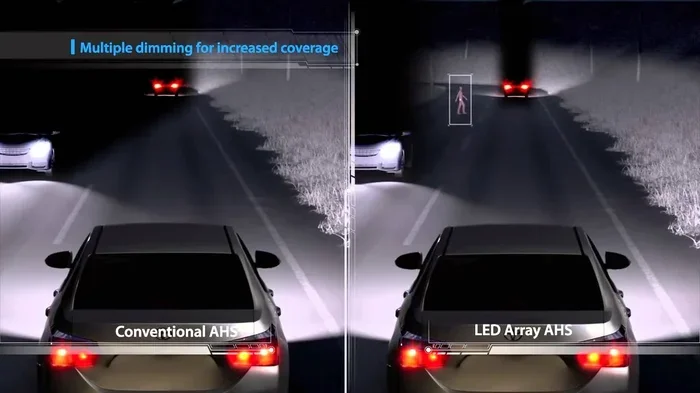
The system relies on a camera mounted near your rearview mirror. This camera scans the road ahead. It looks for headlights and taillights from other vehicles. When it detects a car approaching or one ahead of you, it dims your lights to low beam. When the road is clear, it switches back to high beam. This all happens automatically. You do not need to touch anything once the system is activated.
The result is better road visibility at night. You can see further down the road without causing glare for others. This makes night driving safer and much less tiring. The feature is especially useful on highways and rural roads where lighting is poor.
How the Sensors Work
The adaptive driving beam system uses a combination of technology. A forward-facing camera is the main component. It captures images of the road and identifies light sources from other vehicles. Some systems also use radar sensors to detect objects. Together, these components create a real-time map of your surroundings.
The processing happens fast. The system can switch between high and low beams in a fraction of a second. This means you rarely notice the changes. The transition is smooth and seamless. Most drivers say they forget the system is even working after a few minutes of use.
Why You Should Use Adaptive High Beam Assist
There are many reasons to turn on this feature every time you drive at night. The benefits go beyond just convenience. Let us look at why Adaptive High Beam Assist is worth using regularly.
Better Visibility: High beams let you see much farther down the road. The adaptive lighting system gives you this advantage without the downside of blinding others. You can spot obstacles, animals, and road hazards earlier.
Safer Driving: Studies show that better lighting reduces nighttime accident risk. When you can see more clearly, you have more time to react. The automatic beam switching also prevents you from accidentally leaving your high beams on and blinding someone.
Less Eye Strain: Driving at night with poor lighting is hard on your eyes. The smart headlights reduce the need to constantly switch between high and low beams. This means less fatigue on long night drives.
Better Visibility comes from having the road well lit ahead of you. The adaptive lighting system gives you this advantage without the downside of blinding others. You can spot obstacles, animals, and road hazards earlier.
Safer Driving is supported by studies that show better lighting reduces nighttime accident risk. When you can see more clearly, you have more time to react. The automatic beam switching also prevents you from accidentally leaving your high beams on and blinding someone.
Less Eye Strain on long night drives comes from not having to constantly switch between high and low beams manually. The smart headlights handle everything for you, making your drive more comfortable.
How to Turn on Adaptive High Beam Assist
Now let us get to the main question: how do you actually turn on Adaptive High Beam Assist? The process varies by vehicle brand and model. But the general steps are similar across most cars. We will cover the most common methods below.
Method 1: Steering Wheel Controls
Many vehicles have a dedicated button on the left side of the steering wheel. Look for a symbol that looks like a headlight with curved lines. This is the auto high beam control. Push the lever or press the button to activate the system.
In some cars, you need to first turn on your headlights. Then you push the lever forward or pull it back to engage the adaptive mode. The dashboard will light up with a blue headlight icon. This confirms the system is active.
Quick Tip: If you are not sure which symbol represents the adaptive beam on your car, check the owner’s manual. The symbol is usually a headlight with a letter “A” or curved lines next to it.
Method 2: Dashboard Button
Some vehicles place the control on the dashboard or center console. You will find a button near the light switch cluster on the left side of the instrument panel. Press the button to toggle the adaptive high beam system on or off.
In certain models, you need to access a menu on the dashboard display. Navigate to the vehicle settings or lighting section. Look for the adaptive beam option and select it. The system will activate, and you will see a confirmation icon on your gauge cluster.
Quick Tip: If you cannot find the button, try using the infotainment screen. Most modern cars let you control lighting settings through the touchscreen or command interface.
Method 3: Infotainment System Menu
Newer vehicles often include lighting controls within the infotainment system. Turn on your vehicle and access the main menu. Look for a section labeled “Vehicle Settings,” “Lighting,” or “Driver Assistance.” Within that menu, you should find the option to enable Adaptive High Beam Assist.
In BMW vehicles, you can find this under the “Vehicle” menu on the iDrive system. Mercedes-Benz users can look in the “Settings” menu on the MBUX screen. Audi drivers can access it through the MMI system. The exact path may vary, but the option is always there.
Quick Tip: Some vehicles require you to be parked or moving below a certain speed to access the lighting menu. If the option is grayed out, try activating it while the car is stationary.
How to Turn on Adaptive High Beam Assist by Brand
Every car brand has its own way of activating the adaptive beam system. Let us break down the steps for the most popular brands. This will help you find the right method for your specific vehicle.
BMW
BMW vehicles with Adaptive High Beam Assist are easy to activate. Start by turning on your headlights using the light stalk. Then push the stalk forward once. This activates the auto high beam mode. The blue headlight icon will appear on your dashboard.
You can also access the setting through the iDrive infotainment system. Go to “Vehicle Settings” and then “Lighting.” Toggle the adaptive high beam option to on. BMW also offers a “Flash High Beam” function by pulling the stalk toward you briefly.
Mercedes-Benz
In Mercedes-Benz cars, the Adaptive High Beam Assist is controlled through the steering wheel. Look for a button with a headlight icon on the left side of the steering column. Press it to turn the system on.
The blue icon on your instrument cluster will confirm activation. You can also find the setting through the touchscreen. Go to “Settings,” then “Vehicle,” and then “Lighting.” From there, you can enable the auto high beam feature and adjust its sensitivity.
Audi
Audi uses the term “Adaptive Light System” in many of its models. To turn it on, press the button on the light stalk located on the left side of the steering column. The stalk controls both the light switch and the adaptive beam function.
Through the MMI infotainment system, you can go to “Car Setup,” then “Exterior Lighting.” Select the adaptive high beam option. Audi also offers a dynamic turning light feature that works alongside the adaptive beam for even better visibility on curves.
Toyota
Toyota calls its system “Automatic High Beam.” To activate it, look for the headlight control on the left side of the dashboard. Push the lever to the “Auto High Beam” position. The indicator light on the instrument cluster will turn blue when the system is active.
Toyota vehicles also allow you to adjust the sensitivity of the system. A more sensitive setting will dim the lights sooner when it detects other vehicles. A less sensitive setting keeps the high beams on longer. This is useful on very dark roads with little traffic.
Ford
Ford vehicles with Adaptive High Beam Assist use a button on the left side of the steering wheel. The button has a headlight symbol with “A” inside it. Press it to toggle the system on or off.
The system works automatically once activated. You do not need to adjust anything else. Ford also includes a feature that allows you to flash the high beams briefly by pulling the turn signal stalk toward you. This is useful when you want to alert another driver.
Common Issues and How to Fix Them
Sometimes the adaptive beam system may not work as expected. This can be frustrating, but most issues are easy to fix. Here are the most common problems and their solutions.
System Not Turning On
If you cannot activate Adaptive High Beam Assist, start by checking the basics. Make sure your headlights are turned on. The adaptive system usually requires the main headlights to be active first. Also check that you are not in a parking or fog light mode.
Next, look at the dashboard. If you see a warning light, it may indicate a sensor issue. The camera near the rearview mirror needs a clear view of the road. Dirt, snow, or ice on the camera lens can prevent the system from working. Clean the camera gently with a soft cloth.
Quick Tip: After a car wash or in heavy snow, always check that the camera lens is clear. This is one of the most common reasons the system stops working temporarily.
System Not Switching Beams Properly
If the system stays on high beam even when other cars are nearby, the sensitivity may need adjustment. Go to the lighting settings in your infotainment system and look for a sensitivity option. Lower the sensitivity so the system reacts sooner to oncoming traffic.
Another cause could be a dirty camera or sensor. Road grime and bugs can build up on the camera lens over time. Clean it regularly to maintain proper function. If cleaning does not help, a professional diagnostic may be needed.
Warning Lights on the Dashboard
A warning light on your dashboard usually means something is wrong with the adaptive lighting system. The most common cause is a blocked camera sensor. Check for dirt, ice, or aftermarket accessories that might be blocking the camera view.
Sometimes the issue is a software update. Many car manufacturers release updates that improve the performance of driver assistance features. Visit your dealer or check your car’s app for available updates. If the light persists after trying these steps, have a certified technician inspect the system.
Tips for Getting the Best Performance
To get the most out of your Adaptive High Beam Assist, follow these simple tips. They will help you enjoy better visibility and longer system life.
- Keep the Camera Clean: The sensor camera needs a clear view to work properly. Wipe it gently during regular car washes.
- Use the Right Bulbs: Make sure your headlights are in good working condition. Replace dim or burnt-out bulbs promptly.
- Adjust Sensitivity: Customize the sensitivity setting based on where you drive. Use higher sensitivity in cities and lower sensitivity on dark rural roads.
- Keep Software Updated: Manufacturers often release updates that improve the adaptive lighting system. Check for updates regularly.
- Do Not Modify the Headlights: Aftermarket headlight modifications can interfere with the system’s sensors. Keep the headlights stock for best performance.
- Use on Appropriate Roads: The system works best on roads with moderate traffic. In very dense city traffic, it may stay on low beam most of the time.
Expert Insight: According to automotive lighting engineers, keeping the camera lens clean is the single most important maintenance task for the adaptive beam system. A dirty lens can reduce the system’s accuracy by up to 50 percent. A quick wipe takes seconds but makes a big difference.
Adaptive High Beam Assist vs. Standard High Beams
You might wonder if Adaptive High Beam Assist is really worth it compared to just using standard high beams manually. The answer is yes, for several important reasons.
With standard high beams, you have to remember to switch to low beam when you see other cars. Many drivers forget or ignore this. This can cause dangerous glare for oncoming traffic. The auto high beam system takes this responsibility away from you.
The table below shows a quick comparison of the two systems.
| Feature | Standard High Beams | Adaptive High Beam Assist |
|---|---|---|
| Automatic Switching | No | Yes |
| Driver Effort | High | Low |
| Risk of Glaring Others | High | Very Low |
| Visibility on Dark Roads | Good | Excellent |
| Works in All Conditions | Yes | Mostly (depends on sensors) |
| Availability | All Vehicles | Many Modern Vehicles |
The adaptive lighting system clearly offers advantages. It provides better visibility with less effort and greater safety. If your vehicle supports it, there is no reason not to use it every time you drive at night.
Key Takeaways
- Easy Activation: Most vehicles let you turn on Adaptive High Beam Assist through a dashboard button, steering wheel control, or infotainment menu.
- Widely Available: The feature is found in BMW, Mercedes-Benz, Audi, Toyota, Ford, and many other brands.
- Smart Sensor Technology: The system uses cameras and sensors to detect oncoming traffic and adjust your headlights automatically.
- Improved Night Driving: You get better road visibility at night without worrying about blinding other drivers with your high beams.
- Common Issues Are Fixable: Dirt on sensors, blown fuses, or software updates can usually resolve problems with the system not working.
- Works Best on Highways: The feature shines on open roads with minimal traffic, but it also helps in city driving.
- Consult Your Manual: Every vehicle is different, so always check your owner’s manual for exact instructions.
Conclusion
Adaptive High Beam Assist is one of the most useful driver assistance features available today. It makes night driving safer, easier, and more comfortable. Once you activate it, you will wonder how you ever drove without it. The automatic beam switching takes a small task off your plate and lets the technology do the work for you.
Turning on the system is simple once you know where to look. Whether you use a steering wheel control, a dashboard button, or the infotainment menu, the process is straightforward. We covered the steps for BMW, Mercedes-Benz, Audi, Toyota, and Ford. If you drive a different brand, the method will likely be similar. Check your owner’s manual for specific guidance.
Remember to keep the camera sensor clean and adjust the sensitivity to match your driving conditions. These small habits will keep your adaptive beam system working at its best. Night driving does not have to be stressful. With Adaptive High Beam Assist, you can enjoy the road ahead with confidence and clarity.
Take a few minutes today to find the control in your vehicle. Once you turn it on, you will see the difference immediately. Safe travels and bright roads ahead.
Frequently Asked Questions
Can I turn on Adaptive High Beam Assist while driving?
Yes, you can activate Adaptive High Beam Assist while driving. Most vehicles allow you to toggle the system on or off at any speed. However, it is always safest to make any dashboard adjustments when road conditions are clear and you are not in heavy traffic.
Does Adaptive High Beam Assist work in all weather conditions?
The system works well in most conditions, but heavy rain, fog, or snow can reduce its effectiveness. The camera sensor may have difficulty detecting other vehicles in poor weather. In these situations, the system may keep your lights on low beam more often than usual. This is normal and still helps improve safety.
Will using Adaptive High Beam Assist drain my battery?
No, the system uses very little power. The sensors and camera draw minimal energy from your vehicle. The LED headlights or halogen bulbs used in the system are designed for regular use. You can leave the feature on every night without worrying about battery drain.
Can I manually override the system if I want to keep high beams on?
Yes, most vehicles allow you to override the adaptive system. You can switch to manual high beam mode if needed. This is useful in situations like driving on a deserted road where you want maximum visibility. Simply toggle the regular high beam control, and the adaptive system will pause until you switch back.
Why is the Adaptive High Beam Assist light yellow instead of blue?
A yellow or amber warning light usually indicates a problem with the system. It could mean the camera sensor is blocked, the system needs a software update, or there is a malfunction. Check the camera lens first, as dirt or snow is the most common cause. If cleaning does not fix it, consult your dealer for a diagnostic check.
Is Adaptive High Beam Assist available on all vehicle models?
No, the feature is typically found on mid-range and higher trim levels. Many newer vehicles now include it as standard or optional equipment. If your vehicle does not have it, you can check with your dealer about aftermarket lighting upgrades. However, factory-installed systems work best and integrate seamlessly with your vehicle’s other driver assistance features.