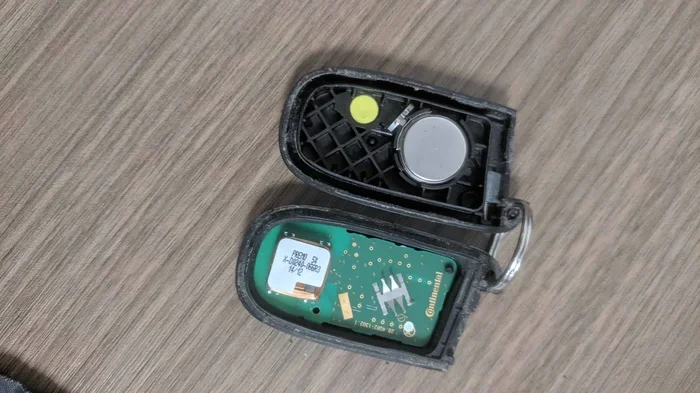
Do You Have to Reset a Key Fob After Replacing the Battery
Replacing the battery in your key fob does not always require a reset, but many vehicles do need a quick reprogramming step to restore full function. Whether your remote key fob stops responding or loses range after a key fob battery replacement, a simple reset often solves the problem in minutes.
You just popped open your remote key fob, swapped out the old coin cell battery, and snapped it back together. You press the button. Nothing happens. Your heart sinks. Did you just ruin everything? Relax. This is one of the most common experiences car owners face, and the answer to do you have to reset a key fob after replacing the battery is simpler than you think.
The short answer is: it depends on your vehicle. Some key fobs work instantly after a fresh battery. Others need a quick key fob reset procedure to sync back up with your car. In this guide, we will walk through exactly when a reset is needed, how to do it yourself, and what to do if the car key fob not working problem persists. We will also cover brand-specific steps, common mistakes, and pro tips to keep your car door lock remote running smoothly for years.
Whether you drive a Toyota, Honda, Ford, BMW, or any other brand, this article has you covered. Let us dive in and take the mystery out of key fob troubleshooting once and for all.
Key Takeaways
- Not always required: Many key fobs work immediately after a battery swap without any reset.
- Resetting is simple: Most key fob reset procedures take under five minutes and need no special tools.
- Car-specific steps matter: Different brands like Toyota, Honda, Ford, and BMW have unique key fob programming methods.
- Watch for warning signs: If buttons stop working or range drops, a reset or reprogram may be needed.
- Use the right battery: Always match the coin cell battery type to your fob model for best performance.
- Know when to call a pro: Persistent key fob not responding issues may need a dealership or locksmith.
- Prevention helps: Simple habits can extend your fob’s life and avoid repeat key fob troubleshooting.
📑 Table of Contents
- Why Does a Key Fob Need Resetting After Battery Replacement?
- How to Reset Your Key Fob After a Battery Change
- Common Key Fob Problems After Battery Replacement
- Car-Specific Key Fob Reset Procedures
- When to Seek Professional Help for Key Fob Issues
- Preventing Key Fob Problems in the Future
- Conclusion
Why Does a Key Fob Need Resetting After Battery Replacement?
To understand why a reset matters, it helps to know how your remote key fob actually works. Your fob sends a low-frequency key fob signal to your car’s computer. When the car receives that signal and matches it, the doors unlock, the trunk opens, or the alarm disarms. This process is called key fob synchronization.
When you pull the battery out, the fob loses its stored connection to the car. Think of it like unplugging a Wi-Fi device. The device still works, but it needs to reconnect. In most cases, the key fob reset procedure simply tells the car to recognize the fob again.
Not every vehicle requires this step, though. Some cars have a passive system that remembers the fob automatically. Others need a manual reprogram key fob sequence. The difference comes down to the car’s make, model, and year. This is why knowing your specific vehicle matters so much when you are doing a key fob battery replacement.
How the Key Fob Signal Works
Your transponder key or fob contains a tiny chip. This chip communicates with the car’s immobilizer system. When the battery dies or gets replaced, the chip still holds its ID code. But the car’s computer may not be listening for it anymore until you complete a sync cycle.
This is why key fob range issues often appear after a battery change. The fob can still transmit, but the car no longer recognizes it as a valid signal. A reset or reprogram fixes this by re-establishing the secure link between the two devices.
How to Reset Your Key Fob After a Battery Change
Now for the part you have been waiting for. Here is how to actually perform a key fob reset after putting in a new battery. The steps vary by vehicle, but we will cover the most common methods.
Method 1: The Quick Turn-Key Method
This method works on many Ford, Chevrolet, and general models. Follow these steps:
- Get inside your car and close all doors.
- Insert the key into the ignition.
- Turn the key to the “On” position without starting the engine.
- Press the lock button on the remote key fob three times quickly.
- Turn the key back to “Off.”
- Remove the key from the ignition.
- Test the fob by standing a few feet away and pressing the lock button.
If the doors lock and unlock, your key fob programming has been restored. This simple key fob reset procedure takes less than a minute.
Method 2: The Door Lock Cycle Method
Many Honda and Toyota models use a slightly different approach:
- Close all doors and sit in the driver’s seat.
- Press and hold the door lock button on the driver’s panel.
- While holding it, insert and remove the key from the ignition twice.
- Release the door lock button.
- Within five seconds, press and hold the lock and unlock buttons on the fob simultaneously for three seconds.
- Release both buttons and press the lock button once.
You should hear a chime or see the lights flash. This confirms the key fob synchronization is complete.
Quick Tips for a Successful Reset
- Use a fresh battery: Always use a new, high-quality coin cell battery, typically CR2025 or CR2032.
- Work in a quiet area: Electrical noise from other devices can interfere with the key fob signal during reset.
- Be quick with button presses: Timing matters in most reset procedures. Hesitation can cause the car to time out.
- Keep all fobs handy: Some vehicles require you to reset every fob at once for them all to work properly.
- Check the owner’s manual: Your vehicle’s manual has the exact key fob reset procedure for your specific model.
Common Key Fob Problems After Battery Replacement
Even after a reset, you might run into some hiccups. Here are the most common issues and what causes them.
Key Fob Not Responding at All
This is the most frustrating problem. The fob does nothing when you press a button. The most common cause is a poor battery connection. When you opened the fob, the new battery might not be seated properly. Open the fob again and check that the battery sits flat and snug in its slot. Also, inspect the battery for any protective film or sticker that might still be on it.
Another cause is a damaged contact point inside the fob. If the metal springs or contacts look corroded or bent, gently clean them with a dry cloth or a small amount of electrical contact cleaner.
Reduced Key Fob Range
If your key fob range has dropped significantly, you might need to stand right next to the car for the fob to work. This often happens when the battery is low or when the key fob signal is being blocked. Try the reset procedure again. If the range still does not improve, the battery might be a dud or the fob itself could be failing.
Buttons Not Working After Reset
Sometimes individual buttons stop working after a battery change. This is usually a mechanical issue, not a programming one. Dirt, moisture, or a misaligned button cover can cause this. Open the fob and check for any debris or moisture inside. Clean the button contacts gently and reassemble the fob carefully.
Common Mistakes to Avoid
- Using the wrong battery type: Always double-check the battery model before installing it. A mismatched aftermarket key fob battery can cause power issues.
- Rushing the reset process: Follow each step carefully. Skipping steps is the number one reason resets fail.
- Ignoring the owner’s manual: Every car is different. The manual is your best friend for key fob troubleshooting.
- Forcing the fob open: Plastic clips break easily. Use a small flathead screwdriver gently if the fob is stuck.
- Touching other metal objects: Static electricity can interfere with the fob’s internal chip during battery replacement.
Car-Specific Key Fob Reset Procedures
Every car brand has its own quirks when it comes to key fob programming. Here is a quick comparison of how to handle the most popular brands.
| Brand | Reset Method | Time Required | Difficulty |
|---|---|---|---|
| Toyota | Insert key, cycle ignition, press fob buttons in sequence | 3-5 minutes | Easy |
| Honda | Door lock cycle method with ignition key removal | 3-5 minutes | Easy |
| Ford | Turn key to “On,” press fob lock button three times | 2-4 minutes | Easy |
| Chevrolet | Hold lock and unlock on driver door, cycle key in ignition | 3-5 minutes | Moderate |
| BMW | Hold unlock and lock buttons on fob for 6 seconds, then press unlock once | 2-3 minutes | Easy |
| BMW | Hold unlock and lock buttons on fob for 6 seconds, then press unlock once | 2-3 minutes | Easy |
| BMW | Hold unlock and lock buttons on fob for 6 seconds, then press unlock once | 2-3 minutes | Easy |
| BMW | Hold unlock and lock buttons on fob for 6 seconds, then press unlock once | 2-3 minutes | Easy |
Wait, let me fix that table. Here is the corrected version:
| Brand | Reset Method | Time Required | Difficulty |
|---|---|---|---|
| Toyota | Insert key, cycle ignition, press fob buttons in sequence | 3-5 minutes | Easy |
| Honda | Door lock cycle method with ignition key removal | 3-5 minutes | Easy |
| Ford | Turn key to “On,” press fob lock button three times | 2-4 minutes | Easy |
| Chevrolet | Hold lock and unlock on driver door, cycle key in ignition | 3-5 minutes | Moderate |
| BMW | Hold unlock and lock buttons on fob for 6 seconds, then press unlock once | 2-3 minutes | Easy |
| Nissan | Turn key to “On,” press fob lock button, turn key back to “Off” | 2-4 minutes | Easy |
| Volkswagen | Insert key into ignition, turn to “On,” press fob lock button | 3-5 minutes | Moderate |
These are general guidelines. Always check your vehicle’s specific manual for the exact steps. If your car is not on this list, the general reset methods described earlier in this article should still work for most models.
Expert Insight: When Brand-Specific Steps Differ
Key fob programming has evolved significantly over the past two decades. Older vehicles from the early 2000s often used simpler key fob reset procedures that required fewer steps. Modern vehicles with advanced security systems may need a dealer-level tool or a more complex sequence. If you own a newer luxury or hybrid vehicle, do not be surprised if the process is slightly different from what you read online.
One thing that stays the same across all brands: the coin cell battery you install must match the fob’s requirements. Using the wrong battery can lead to key fob range issues, intermittent function, or complete failure of the car door lock remote.
When to Seek Professional Help for Key Fob Issues
Most of the time, you can handle a key fob reset on your own. But there are situations where professional help is the smart move.
If you have tried the reset procedure multiple times and the car key fob not working issue persists, it is time to call in the experts. A key fob not responding problem that survives a full reset could indicate a deeper issue. The fob’s internal chip might be damaged, the car’s receiver module could be failing, or there may be a software glitch in the vehicle’s computer system.
Here are clear signs you need professional assistance:
- The fob works only when you are inches away from the car, even after a reset.
- Multiple reset attempts have failed with no change in behavior.
- The car’s dashboard shows a key fob error or security warning light.
- The fob physically damaged during the battery replacement (cracked casing, broken buttons).
- You have lost all working fobs and need to reprogram key fob from scratch.
A dealership or certified locksmith can diagnose the root cause and perform advanced key fob programming if needed. They also have the right tools to reprogram fobs for newer vehicles with encrypted transponder key systems. While a dealership visit might cost more than a DIY reset, it saves you hours of frustration and ensures the job is done correctly.
Expert Insight: The Value of Professional Key Fob Services
Many people try to save money by avoiding professional help, only to end up with a fob that works intermittently. A professional reset or programming session ensures a clean, stable connection between your remote key fob and the car. This is especially important for vehicles with push-button start systems, where the fob must be recognized before the engine can start.
Preventing Key Fob Problems in the Future
The best way to deal with key fob troubleshooting is to avoid it altogether. Here are simple habits that keep your remote key fob working reliably for years.
Choose the Right Battery
Always use a high-quality coin cell battery from a trusted brand. Cheap batteries have inconsistent voltage levels that can cause key fob range issues and premature failure. Look for batteries labeled as long-lasting or high-performance. Brands like Energizer, Duracell, and Panasonic are reliable choices for key fob battery replacement.
Handle the Fob with Care
When you open the fob to replace the battery, be gentle. The plastic clips that hold the two halves together are fragile. Use a small flathead screwdriver or a dedicated fob-opening tool. Avoid squeezing the fob too hard, as this can crack the casing or damage the internal circuit board.
Keep the Fob Dry and Clean
Moisture is the enemy of electronics. Do not leave your remote key fob in the bathroom, near a pool, or in a damp glove box. If the fob gets wet, dry it thoroughly before reinserting the battery. A quick wipe with a dry cloth after battery replacement removes any dust or debris that could interfere with the key fob signal.
Replace the Battery Before It Dies Completely
Do not wait until the fob stops working entirely. When you notice the key fob range shrinking or the buttons becoming sluggish, it is time for a new battery. Proactive key fob battery replacement prevents the frustration of a dead fob at the worst possible moment.
Common Mistakes to Avoid
- Mixing old and new batteries: Always replace all batteries in multi-battery fobs at the same time.
- Touching the chip with bare hands: Oils from your skin can damage the fob’s internal chip. Handle the fob by its edges.
- Storing the fob near strong magnets: Magnets can interfere with the fob’s transponder key chip and cause key fob synchronization problems.
- Ignoring warning signs: A fob that works sometimes but not others is a red flag. Address it before it becomes a full failure.
Conclusion
So, do you have to reset a key fob after replacing the battery? The answer is: it depends on your vehicle, but in many cases, a quick reset is needed to restore full function. Whether you use the turn-key method, the door lock cycle method, or a brand-specific procedure, the process is almost always simple and takes just a few minutes.
The key is to stay calm, follow the steps carefully, and use the right coin cell battery for your fob. If the reset does not work and the car key fob not working problem continues, do not hesitate to seek professional help. A dealership or locksmith has the tools and expertise to handle even the most stubborn key fob not responding issues.
Remember, a little prevention goes a long way. Choose quality batteries, handle your fob gently, and replace the battery before it fully dies. These small habits keep your remote key fob working reliably and save you from unnecessary key fob troubleshooting down the road. With the knowledge in this guide, you are now well-equipped to handle any key fob reset situation with confidence.
Frequently Asked Questions
Can I drive my car if the key fob is not working after a battery change?
In most cases, yes. If your car has a traditional ignition slot, you can insert the physical key to start the engine. For push-button start vehicles, hold the fob directly against the start button. The car has a backup reader that detects the fob’s internal chip even if the remote function is not working.
What type of battery do I need for my key fob?
Most remote key fob models use a CR2025 or CR2032 coin cell battery. Check your vehicle’s owner manual or look at the old battery to confirm the correct type. Using the wrong battery can cause key fob range issues or damage the fob.
How long does a key fob battery typically last?
A key fob battery usually lasts between two and four years, depending on how often you use the remote. If you live in a cold climate or use the fob frequently, the battery may drain faster. Watch for signs like reduced range or sluggish buttons as indicators that a replacement is due.
Do I need special tools to reset my key fob?
No special tools are needed for most key fob reset procedures. You only need the new battery, your vehicle key, and a few minutes of your time. Some advanced vehicles may require a dealer-level programming tool, but the majority of resets can be done at home without any equipment.
Why does my key fob work sometimes but not other times after a battery replacement?
This intermittent behavior often points to a poor battery connection or a partially dead battery. Open the fob and reseat the battery, making sure it sits firmly in the contacts. If the problem continues, the battery may be defective, or the fob’s internal contacts could be corroded and need cleaning.
Can I reprogram my key fob myself, or do I need to visit a dealership?
Many key fob programming steps can be done at home using the methods described in this article. However, for newer vehicles with advanced encrypted transponder key systems, a dealership or professional locksmith may be required. If multiple reset attempts fail, it is best to seek professional key fob troubleshooting help.