What to Do If Your Key Fob Dies and How to Fix It Fast
When your key fob dies, it can leave you stranded and frustrated. This guide walks you through exactly what to do if your key fob dies with simple, step-by-step solutions you can do at home. You will learn how to replace the battery, start your car in an emergency, and prevent future key fob not working problems.
There is nothing worse than standing by your car, pressing the button on your key fob, and hearing nothing. Your car door lock not working is bad enough, but when your push button start system also fails to respond, it can turn a simple morning into a real headache. If you have ever been in this situation, you are not alone. Key fob failures happen to everyone at some point, and they almost always catch you at the worst possible moment.
The good news is that most key fob not working situations are easy to fix. You do not need to be a mechanic or spend hundreds of dollars. In this guide, we will walk you through exactly what to do if your key fob dies. From key fob battery replacement to emergency car start methods, you will find practical steps that work right away. Whether your remote key fob has a weak key fob signal or has completely stopped communicating with your vehicle, this article has you covered.
We will also share key fob troubleshooting tips that help you figure out the real problem fast. You will learn how to replace the battery yourself, how to start your car without a working fob, and how to avoid this problem in the future. By the end, you will feel confident handling a dead key fob like a pro. Let us get started.
Key Takeaways
- Battery replacement is the most common fix: A simple CR2032 or CR2025 battery swap solves most key fob not working issues in under five minutes.
- You can still start your car with a dead fob: Push button start vehicles have hidden slots or backup methods that let you start the car even when the fob is completely dead.
- Know the early warning signs: Reduced key fob range and weak signal are clear indicators that your battery needs replacement soon.
- Avoid common mistakes: Using the wrong battery type or skipping the reprogramming step can cause repeated key fob problems.
- Prevention saves time and money: Simple daily habits like keeping your fob away from electronics can double its lifespan.
- When in doubt, seek professional help: Some key fob repair and programming tasks are best left to certified dealers or locksmiths.
📑 Table of Contents
Why Key Fobs Die and How to Spot the Warning Signs
Understanding why your key fob dies is the first step toward fixing it. Most modern remote key fob devices use a small coin-cell battery that sends a signal to your car. When that battery weakens, the key fob signal becomes unreliable. Eventually, it stops working altogether.
Common Reasons Your Key Fob Stops Working
Several factors can cause your car key not working situation. Here are the most common culprits:
- Battery depletion: The single most common reason. Most key fob battery type units last between two and four years depending on usage.
- Water damage: Dropping your fob in water or exposing it to heavy rain can corrode the internal circuits.
- Signal interference: Standing near tall buildings, power lines, or even other electronic devices can weaken your key fob range.
- Wear and tear: Constant pressing, dropping, and general use can damage the internal buttons and circuit board.
- Programming loss: Sometimes the fob loses its pairing with the car, especially after a battery change if you do not reset it properly.
Early Warning Signs Your Key Fob Battery Is Dying
Your key fob not working does not usually happen overnight. There are clear warning signs you should watch for:
- Increased distance: You need to be closer to your car for the lock and unlock buttons to work. If you used to stand across the parking lot and now you must be right next to the car, the battery is dying.
- Intermittent response: The fob works sometimes but not others. This inconsistent key fob signal is a classic sign of a low battery.
- Delayed action: Pressing the button takes longer for the car to respond. This lag is often overlooked but very telling.
- Dashboard warning: Some newer vehicles display a key fob battery warning message on the dashboard cluster.
Quick Tips
- Replace your key fob battery as soon as you notice any of these warning signs. Do not wait until it completely dies.
- Keep a spare battery in your glove box. It costs less than a dollar and saves you from being stranded.
- Test your key fob range every few months by standing farther away and pressing the button.
How to Replace Your Key Fob Battery in Minutes
The most common fix for a dead key fob is a key fob battery replacement. This is a simple task that almost anyone can do at home. You do not need special tools or technical skills. In most cases, it takes less than five minutes.
Step-by-Step Battery Replacement Guide
Follow these steps to replace the battery in your remote key fob:
- Identify the fob type: Look at your key fob and determine how it opens. Some have a small release button on the side. Others have a sliding panel or a screw on the back.
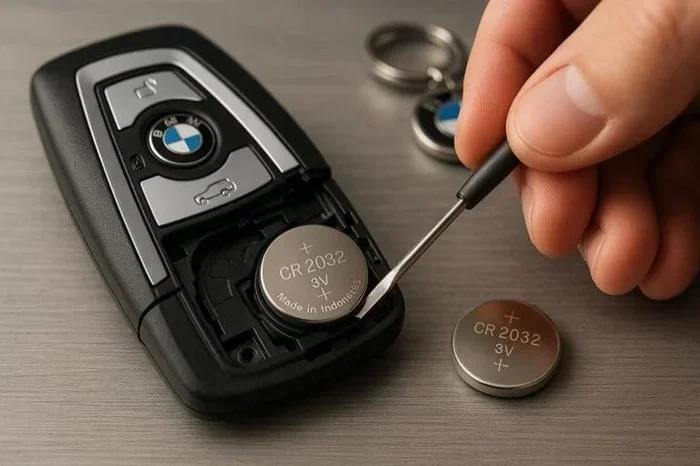
- Open the fob carefully: Use a flat-head screwdriver or a coin to gently pry open the casing. Start at the seam and work your way around. Be gentle to avoid cracking the plastic.
- Note the battery orientation: Before removing the old battery, take a photo or remember which side faces up. This makes installation easier.
- Remove the old battery: Use a small flat tool or your fingernail to pop the old battery out. Dispose of it properly at a recycling center.
- Insert the new battery: Place the new battery in the same orientation as the old one. Make sure it sits flat and secure.
- Snap the fob back together: Press both halves of the fob until they click into place.
- Test the fob: Stand near your car and press the lock and unlock buttons. If it works, you are done!
Which Battery Does Your Key Fob Use?
Not all key fob battery type units use the same battery. Here is a quick comparison of the most common batteries found in key fob battery replacement scenarios:
| Battery Type | Common Uses | Voltage | Lifespan |
|---|---|---|---|
| CR2032 | Most Toyota, Honda, Ford, and Chevrolet fobs | 3V | 2-4 years |
| CR2025 | Some BMW, Mercedes, and luxury models | 3V | 2-3 years |
| CR2016 | Thinner fob designs, older models | 3V | 1-2 years |
| CR1632 | Some Chrysler and older Subaru fobs | 3V | 1-2 years |
Check your vehicle owner’s manual or look at the old battery to confirm the correct key fob battery type. Using the wrong size can damage the fob or prevent it from working.
Common Mistakes to Avoid
- Using a rechargeable battery: Standard key fob battery replacement requires a disposable lithium battery. Rechargeable batteries do not provide the correct voltage.
- Forcing the fob open: If it does not open easily, check for a hidden screw or latch. Forcing it can break the plastic casing.
- Touching the battery with wet hands: Moisture can damage the circuit board. Make sure your hands are dry before handling the battery.
How to Start Your Car When Your Key Fob Is Dead
Even after your key fob dies, you can still get behind the wheel and drive. Modern vehicles with push button start systems have built-in backup methods. Knowing these tricks ahead of time can save you from a stressful morning.
Push Button Start Workarounds
Most vehicles with push button start have a backup way to start the engine when the fob battery is dead. Here is what to do:
- Check the fob pocket: Many cars have a designated spot on the steering column or center console where you can place the dead fob. The car reads the fob through its internal antenna even without a working battery. Look for a small symbol that looks like a key fob on your dashboard or console.
- Hold the fob against the start button: On many models, placing the dead fob directly against the push button start allows the car to read the transponder chip and start the engine.
- Use the mechanical key: Most remote key fob units hide a small metal key blade inside. Use this key to open the driver’s door, then place the fob near the start button.
Using the Mechanical Key Inside Your Fob
Every key fob not working situation is different, but the mechanical key is your best friend. Here is how to use it:
- Locate the key release: Look for a small button or slider on the side of your fob. Press it to release the metal key blade.
- Unlock the door: Use the mechanical key to unlock the driver’s door. This works even when the fob is completely dead.
- Start the car: Once inside, place the dead fob as close to the start button as possible. Press the brake pedal and push the push button start. The car should recognize the transponder and start.
If your vehicle does not have push button start and uses a traditional ignition, simply insert the mechanical key into the ignition slot and turn it. This bypasses the fob entirely and gets your engine running.
Expert Insights
Automotive technicians recommend keeping a backup key at home and in your office. If your primary key fob dies and you do not have the mechanical key accessible, a spare fob can save you from calling a locksmith or towing service. Many dealerships also offer key fob programming services for a reasonable fee if you lose or damage your fob entirely.
When You Need a Whole New Key Fob
Sometimes key fob repair is not enough. If the fob has physical damage, water exposure, or internal circuit failure, you may need a complete replacement. Knowing when to replace versus when to fix can save you time and money.
Signs Your Key Fob Needs Full Replacement
Watch for these signs that indicate a key fob repair will not solve the problem:
- Cracked or broken casing: If the plastic is damaged and the internal components are exposed, replacement is usually the safest option.
- Water damage: If your fob has been submerged or heavily exposed to moisture, the circuit board may be corroded beyond repair.
- Buttons that do not respond at all: If cleaning the contacts and replacing the battery does not restore function, the internal electronics may be faulty.
- Car does not recognize the fob: If your vehicle consistently fails to detect the fob even with a new battery, the transponder chip may be damaged.
- Fob is very old: Fobs that are more than five years old may use outdated technology that is no longer compatible with newer vehicle security systems.
Key Fob Programming and Pairing Basics
Once you get a new key fob, you will need to program it to your vehicle. This process, also called key fob programming or pairing, varies by manufacturer. Here are some general guidelines:
- Check your owner’s manual: Most manuals include step-by-step key fob programming instructions specific to your vehicle model.
- Use two working fobs if possible: Some vehicles require at least one working fob to program a new one.
- Visit a dealer for complex systems: Luxury brands and newer models often require dealer-level equipment for key fob programming.
- Consider a locksmith: Many automotive locksmiths offer key fob programming services at a lower cost than dealerships.
Quick Tips
- Always program your new fob immediately after purchase to avoid being stranded.
- Keep your old fob as a backup even after programming the new one.
- Some key fob repair shops can reprogram used or salvaged fobs at a fraction of the cost of a new one.
Simple Habits to Prevent Key Fob Problems
The best way to deal with a dead key fob is to prevent it from happening in the first place. A few simple daily habits can extend the life of your remote key fob and reduce the chance of a car key not working situation.
Daily Habits That Extend Key Fob Life
- Keep your fob away from other electronics: Phones, tablets, and laptops emit signals that can interfere with your key fob signal and drain the battery faster.
- Store it in a safe spot: Use a designated pocket or compartment in your bag. Avoid tossing it loosely into a bag where it can get damaged.
- Avoid extreme temperatures: Leaving your fob in a hot car or in freezing weather can damage the battery and internal components.
- Replace the battery proactively: Do not wait for the fob to stop working. Replace the battery every two to three years as a preventive measure.
- Clean the contacts: Occasionally wipe the battery contacts inside the fob with a dry cloth to ensure good electrical connection.
Quick Tips for Key Fob Owners
Here are some extra habits that make a big difference in the long run:
- Carry a backup mechanical key: Always have a spare key hidden somewhere safe. This is your ultimate backup if both fobs fail at the same time.
- Test your range regularly: Stand at the far end of your parking lot and test the lock and unlock functions. If the range feels shorter than usual, replace the battery soon.
- Know your vehicle’s manual: Spend 15 minutes reading the section on key fob troubleshooting in your owner’s manual. It can save you a lot of stress later.
- Keep a spare fob at home: If you have a second fob, keep it at home with a fresh battery. This gives you a reliable backup for emergency car start situations.
Common Mistakes That Shorten Key Fob Life
- Storing the fob next to your phone: The electromagnetic signals from your phone can interfere with the fob’s radio frequency and drain the battery.
- Dropping the fob frequently: Even small drops can damage the internal circuit board over time. Use a protective fob cover.
- Using the fob as a bottle opener or tool: This is a common habit that causes physical damage to the casing and buttons.
- Ignoring warning signs: If your key fob range starts shrinking, do not ignore it. Replace the battery immediately.
Expert Insights on Key Fob Maintenance
Automotive professionals have seen every type of key fob problem imaginable. Here is what the experts want you to know about maintaining your remote key fob and handling dead key fob situations.
Regular maintenance goes a long way. Most technicians agree that a simple battery replacement every two to three years is all it takes to prevent most key fob not working scenarios. They also recommend keeping your fob clean and dry at all times.
Do not ignore the transponder chip. Even if your key fob battery replacement fixes the remote functions, the transponder chip inside the fob is what actually allows your car to start. If this chip is damaged, no amount of battery replacement will help. This is why physical damage to the fob should always be taken seriously.
Know when to call a professional. If you have tried all the troubleshooting steps and your car door lock not working issue persists, it may be time to see a specialist. A certified locksmith or dealership technician can diagnose deeper issues with the key fob signal or the vehicle’s receiver system.
Stay updated on technology. Modern vehicles are increasingly moving toward digital key systems that use smartphones instead of physical fobs. Understanding these systems can help you stay ahead of potential problems and know your options for emergency car start methods.
In summary, knowing what to do if your key fob dies gives you confidence and saves you from unnecessary stress. Whether it is a quick key fob battery replacement, using the mechanical key for an emergency car start, or knowing when to seek professional key fob repair, you now have all the tools you need. Keep these tips in mind, maintain your fob regularly, and you will rarely have to worry about a dead key fob again.
Frequently Asked Questions
Can I drive my car if the key fob dies completely?
Yes, in most cases. Vehicles with push button start systems allow you to place the dead fob against the start button to read the transponder chip. You can also use the hidden mechanical key inside the fob to unlock the door and start the car. Check your vehicle manual for the specific backup method.
How much does a key fob battery replacement cost?
A key fob battery replacement costs between $1 and $5 for the battery itself. You do not need to pay for labor since it is a simple DIY task. If you visit a dealership or locksmith, they may charge a service fee, but the battery cost remains very low.
How do I know which battery my key fob uses?
Check your vehicle owner’s manual for the exact key fob battery type. You can also open the fob and look at the old battery printed on its surface. The most common types are CR2032, CR2025, and CR2016. Match the number exactly when purchasing a replacement.
What should I do if my key fob gets wet?
Remove the battery immediately and let the fob dry completely for at least 24 hours. Clean the contacts with a dry cloth before reinserting the battery. If the fob still does not work after drying, the internal circuit board may be damaged, and you will need key fob repair or a full replacement.
Can a dead key fob drain my car battery?
No, a dead remote key fob cannot drain your car battery. The fob only uses power when you press a button to send a signal. A completely dead fob sends no signal and draws no power from the vehicle. However, if the fob is constantly trying to transmit with a weak battery, it may drain slightly faster.
How long does key fob programming take?
Most key fob programming tasks take between five and fifteen minutes. Simple battery replacements usually do not require reprogramming. However, if you replace the entire fob or the vehicle has lost connection with the fob, programming may be needed. Some vehicles allow self-programming through the dashboard, while others require a dealer or locksmith.
=== CONCLUSION ===
Dealing with a dead key fob does not have to be a nightmare. Now that you know what to do if your key fob dies, you can handle the situation calmly and quickly. Remember to always carry a spare battery, keep your mechanical key accessible, and watch for early warning signs like reduced key fob range. A little preventive maintenance goes a long way in keeping your remote key fob working reliably for years to come. Share this guide with friends and family so they are prepared too. Stay safe and drive confidently!