How to Reset BMW Vehicle Check Light Quickly at Home
Resetting your BMW vehicle check light is easier than most owners think. You can handle this at home with basic tools and a little patience. This guide walks you through every method, from using an OBD2 scanner to simple battery resets. You will learn what triggers the light, how to clear fault codes, and when to seek professional help.
That little yellow or orange light on your BMW dashboard can send anyone into a panic. You are driving along, minding your own business, and suddenly the BMW check engine light pops on. Your first thought might be the worst. But here is the good news. In many cases, you can fix this yourself without ever visiting a dealership or mechanic.
Whether you own a BMW 3 Series, an X5, or any other model, the process to reset your BMW vehicle check light is surprisingly straightforward. You do not need expensive tools or years of mechanical experience. With the right guidance, you can handle this in your garage or driveway in under thirty minutes.
This guide covers everything you need to know. We will walk you through the reasons the light comes on, the tools required, and multiple reset methods you can try at home. By the end, you will feel confident tackling this common BMW maintenance task on your own.
Key Takeaways
- Multiple Reset Methods: You can reset a BMW vehicle check light using an OBD2 scanner, battery disconnect, or iDrive system settings at home.
- Identify the Root Cause First: Always diagnose why the light came on before resetting it to avoid missing serious issues.
- Common Triggers Include: Loose gas caps, sensor faults, overdue service intervals, and minor electrical glitches.
- Tools You Need: An OBD2 scanner, a basic wrench set, and your BMW ignition key are all you need for most resets.
- When to See a Mechanic: If the light returns after reset or flashes instead of staying solid, get professional diagnostics right away.
- Prevention Matters: Regular BMW maintenance and timely service intervals keep warning lights from appearing unnecessarily.
📑 Table of Contents
- What Does the BMW Vehicle Check Light Mean?
- Tools You Need to Reset the BMW Check Light
- Method 1: Reset Using an OBD2 Scanner
- Method 2: Battery Disconnect Reset
- Method 3: Reset Through the iDrive System
- When Should You NOT Reset the Check Light?
- Preventing the BMW Check Light from Returning
- Common Mistakes People Make When Resetting the Check Light
- Final Thoughts on Resetting Your BMW Check Light
What Does the BMW Vehicle Check Light Mean?
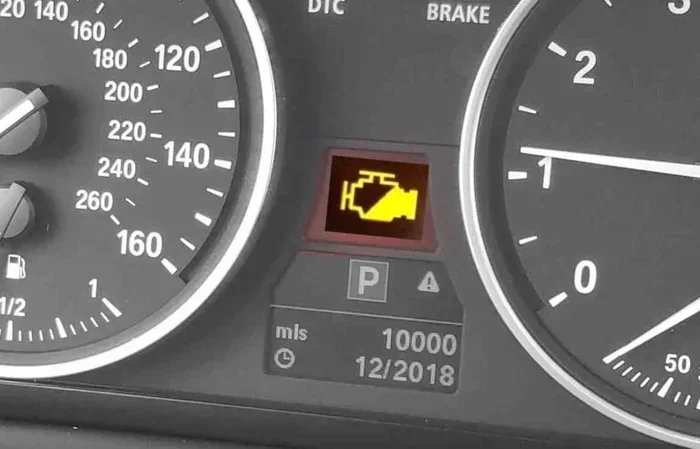
The BMW dashboard warning lights use a system of symbols to communicate problems. The check engine light specifically alerts you to an issue detected by the engine management system. It is part of your BMW’s onboard diagnostics, commonly known as OBD-II.
The light can appear in two forms. A solid yellow light usually indicates a non-emergency issue. A flashing red light means something is seriously wrong and you should stop driving immediately. Understanding the difference helps you decide whether to reset the light or seek urgent BMW repair.
Common Reasons the Check Light Comes On
Many BMW owners assume the worst when the check light appears. But the causes are often minor and easy to fix. Here are the most common triggers:
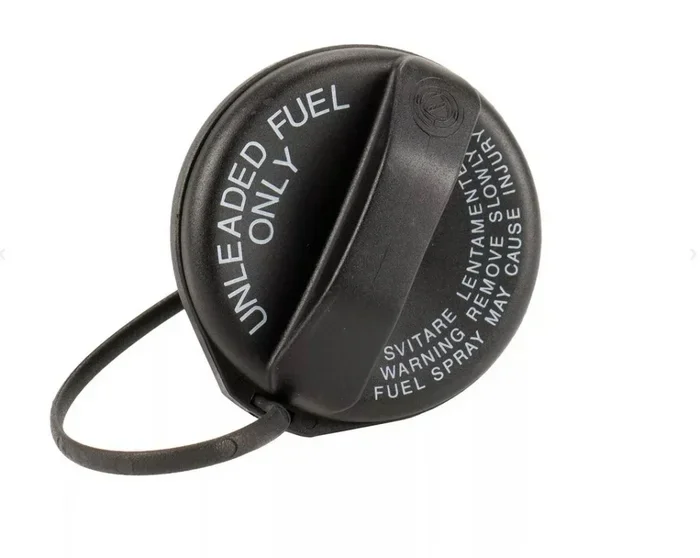
- Loose or Faulty Gas Cap: A loose fuel cap is the number one cause. It lets fuel vapors escape and triggers the emissions system warning.
- Sensor Malfunctions: BMW vehicles have many sensors. Oxygen sensors, mass airflow sensors, and wheel speed sensors can all fail over time.
- Overdue Service Intervals: BMW tracks maintenance schedules. If you miss an oil change or inspection, the light may appear.
- Catalytic Converter Issues: A failing catalytic converter affects emissions and triggers the check light. You can read more about catalytic converter problems in our article on can a bad catalytic converter cause a car to overheat.
- Electrical Glitches: Sometimes a temporary voltage drop or loose wire causes a false alert. These often clear on their own.
- Spark Plug or Ignition Coil Problems: Worn spark plugs or faulty coils cause misfires that activate the warning light.
Tools You Need to Reset the BMW Check Light
Before you start, gather the right tools. You do not need a professional-grade setup. A few affordable items will get the job done.
Essential Tools
- OBD2 Scanner: This is the most important tool. A basic Bluetooth or WiFi OBD2 scanner connects to your BMW’s diagnostic port. You can read and clear fault codes directly from your phone.
- Basic Wrench Set: A 10mm and 13mm wrench will help with battery terminal work.
- Battery Terminal Cleaner: Corrosion on terminals can cause electrical issues and false warnings.
- Your BMW Key: You need access to the ignition for several reset methods.
- Owner’s Manual: Your specific BMW model may have unique steps. The manual is your best reference.
Recommended OBD2 Scanners for BMW
Not all OBD2 scanners work equally well with BMWs. Some brands offer better BMW-specific features. Look for scanners that support BMW-specific fault codes and live data streams. Popular options include the Ancel BD310, the FIXD sensor, and the Autel MaxiCOM series. These devices plug into the OBD-II port under your steering column and communicate with your BMW’s computer system.
Method 1: Reset Using an OBD2 Scanner
This is the most reliable and recommended method. An OBD2 scanner lets you read the actual fault codes stored in your BMW’s computer before clearing them. This approach ensures you know exactly what triggered the light.
Step-by-Step Instructions
- Locate the OBD-II Port: In most BMWs, the port sits under the steering column on the driver’s side. You may need to remove a small plastic cover to access it.
- Connect the Scanner: Plug your OBD2 scanner into the port. Turn the ignition to the “ON” position without starting the engine.
- Read the Fault Codes: Open the scanner app on your phone or the scanner’s built-in screen. Write down every code displayed. Each code tells you what system or component has a problem.
- Research the Codes: Look up each code online or in your BMW manual. This tells you whether the issue is minor or serious.
- Clear the Codes: Once you understand the codes, use the scanner’s menu to erase them. The check light should turn off within a few seconds.
- Test Drive: Take a short drive around the block. If the light does not return, the reset was successful.
One advantage of using a scanner is that you can also monitor live data. This helps you verify that the problem has truly been resolved. If you want to learn more about diagnostic tools, check out our guide on running diagnostics without a check engine light.
Method 2: Battery Disconnect Reset
The battery disconnect method is the oldest trick in the book. It works by draining the residual power from your BMW’s electrical system. When you reconnect the battery, the car’s computer resets and clears temporary fault codes.
How to Do It Safely
- Park on a Flat Surface: Make sure your BMW is parked safely and the engine is off.
- Open the Hood: Locate the battery. In most BMWs, the battery sits in the trunk on the driver’s side or in the engine bay depending on the model.
- Disconnect the Negative Terminal First: Use a 10mm wrench to loosen the negative cable. Always disconnect the negative terminal first to prevent short circuits.
- Wait 15 to 30 Minutes: This allows the capacitor to fully drain and the computer memory to reset.
- Reconnect the Terminal: Attach the negative cable back and tighten it securely.
- Start the Engine: Turn the key and let the BMW idle for a few minutes. The dashboard lights will cycle on and off as the system boots up.
Important Warning: Disconnecting the battery can reset other settings in your BMW. Your radio presets, window auto-up/down calibration, and clock may need to be reconfigured. Some BMW models also require a battery registration after a disconnect. If you are unsure, consult your owner’s manual or a BMW specialist.
Also, if you want to check whether your battery health is causing electrical warnings, you might want to read our article on car not starting but battery is fine what to check for additional troubleshooting tips.
Method 3: Reset Through the iDrive System
Newer BMW models with the iDrive infotainment system offer a built-in way to reset certain warnings. This method works best for service-related check lights and non-serious alerts.
Steps for iDrive Reset
- Turn the Ignition On: Press the start button without pressing the brake pedal. The dashboard lights will illuminate.
- Navigate to Vehicle Info: Use the iDrive controller to go to the main menu, then select “Vehicle Info.”
- Access Vehicle Status: Look for “Vehicle Status” or “System Check” in the menu.
- Find the Warning Light Menu: Some BMW models list active warnings here. Select the check engine or vehicle check entry.
- Select Reset: Follow the on-screen prompts to reset the warning. Confirm when prompted.
- Turn the Ignition Off and Back On: This completes the reset process.
Keep in mind that the iDrive method only clears certain types of warnings. If a deeper mechanical issue exists, the light may return shortly after. This method works best after you have already addressed the underlying cause.
When Should You NOT Reset the Check Light?
Resetting the light is not always the right move. There are situations where you should skip the reset and head straight to a mechanic.
Red Flags That Mean Professional Help Is Needed
- The Light Is Flashing: A flashing check engine light indicates a severe engine misfire. Continuing to drive can cause catalytic converter damage.
- The Light Returns Immediately: If the light comes back right after you reset it, the underlying problem has not been fixed.
- You Notice Performance Issues: Rough idling, loss of power, strange noises, or reduced fuel economy alongside the check light signal real problems.
- Multiple Warning Lights Are On: If the check light appears with other warnings like the ABS light or oil pressure light, do not reset. Get the vehicle inspected immediately.
- You Smell Fuel or Burning: These are clear signs of serious issues that need professional attention.
If you are unsure about what your warning lights mean, you can visit a local auto parts store for a free diagnostic scan. Many stores, including AutoZone, offer free check engine light diagnostics. Learn more in our article can AutoZone check engine light.
Preventing the BMW Check Light from Returning
Once you have successfully reset the light, you want to keep it off. Prevention is always better than cure. Here are proven strategies to avoid future BMW dashboard warning lights.
Regular Maintenance Habits
- Stick to BMW Service Intervals: Follow the maintenance schedule in your owner’s manual. Timely oil changes, spark plug replacements, and filter changes keep your engine running smoothly.
- Check the Gas Cap After Every Fill-Up: Make sure it clicks tightly into place. A worn gas cap gasket is an easy and cheap fix.
- Monitor Fluid Levels: Keep an eye on oil, coolant, and brake fluid. Low levels trigger warnings in many BMW models.
- Address Minor Issues Early: Do not ignore small warning signs. A slight vibration or unusual sound today can become a major repair tomorrow.
- Use Quality Fuel and Parts: BMW engines are precision machines. Using recommended fuel grades and OEM parts reduces the chance of triggering warning lights.
Quick Tips for BMW Owners
Here are some bonus tips that experienced BMW owners swear by:
- Keep an OBD2 Scanner in Your Trunk: Having one handy lets you check codes anytime, anywhere. You do not need to wait for a mechanic appointment.
- Reset Your BMW Service Interval After DIY Work: If you perform your own maintenance, the service reminder may need a manual reset through the iDrive system.
- Learn Your Dashboard Symbols: Familiarize yourself with common BMW warning symbols. This helps you react appropriately instead of panicking.
- Record Fault Codes: Even after a successful reset, save the codes in a note app. This history helps mechanics diagnose recurring issues faster.
Common Mistakes People Make When Resetting the Check Light
Even well-meaning BMW owners make avoidable mistakes. Here are the most common ones and how to prevent them.
- Resetting Without Diagnosing First: This is the biggest mistake. Clearing the light without knowing what caused it means you could be driving with a serious unresolved problem.
- Using a Cheap Scanner That Does Not Support BMW: Not all OBD2 scanners read BMW-specific codes properly. Invest in a scanner that explicitly supports BMW models.
- Ignoring the Light After Reset: If the light returns, do not just reset it again. The problem is still there and will get worse over time.
- Disconnecting the Battery While the Engine Is Running: This can damage the BMW’s electrical system and computer modules. Always turn the engine off first.
- Skipping the Test Drive: After a reset, a test drive confirms whether the issue is truly resolved. Skipping this step means you might miss a recurring problem.
Resetting your BMW vehicle check light at home is a skill every BMW owner should have. It saves time, money, and the hassle of scheduling a service appointment for what might be a simple fix. With the right tools and a cautious approach, you can handle most check light situations confidently.
Final Thoughts on Resetting Your BMW Check Light
The BMW vehicle check light does not have to be scary. Most of the time, it signals a minor issue that you can fix yourself. Whether you use an OBD2 scanner, disconnect the battery, or navigate the iDrive menu, the process is well within reach of any car owner.
Remember to always diagnose the root cause first. Resetting the light is only half the battle. Finding and fixing the underlying problem keeps your BMW running at its best and prevents the light from coming back.
Stay proactive with your BMW maintenance schedule. Keep your tools handy and your diagnostic knowledge growing. Your BMW is a precision machine, and treating it with care pays off in reliability and performance for years to come.
Now that you know how to reset the check light, you are better equipped than most BMW owners. The next time that yellow light appears, you will know exactly what to do.
Frequently Asked Questions
Can I drive my BMW with the check engine light on?
If the light is solid and yellow, you can usually drive a short distance carefully. However, you should get the vehicle diagnosed soon. If the light is flashing, stop driving immediately and have the vehicle towed. A flashing light indicates a serious issue like an engine misfire that can cause expensive damage.
How much does it cost to reset a BMW check engine light?
If you do it yourself with an OBD2 scanner, the cost is zero beyond the scanner purchase, which ranges from $20 to $100. If you visit a mechanic or dealership, expect to pay between $100 and $200 for diagnostics and a reset. Many auto parts stores also offer free check light scans.
Why did my BMW check light come back after I reset it?
The light returns when the underlying problem has not been fixed. The BMW computer continuously monitors emissions and engine systems. If the same fault is detected again after a reset, the light will reappear. You need to address the root cause to prevent this.
What is the difference between a BMW check engine light and a service light?
The check engine light (shaped like an engine) indicates an emissions or mechanical problem detected by the onboard diagnostics system. The service light (often a wrench icon) simply reminds you that maintenance is due. They require different reset methods and address different issues.
Do I need a special scanner to reset a BMW check light?
A standard OBD2 scanner works for most reset functions. However, for full BMW-specific diagnostics including ABS, airbag, and transmission codes, a scanner that supports BMW proprietary protocols is better. Brands like Autel, Ancel, and Launch offer scanners with BMW compatibility.
How long does it take to reset a BMW check engine light?
The actual reset process takes only 5 to 10 minutes with an OBD2 scanner. The battery disconnect method takes about 30 minutes including the waiting period. If you need to diagnose and fix the underlying issue first, the total time varies depending on the problem.