How Long Does a Toyota Software Update Take to Finish
A Toyota software update typically takes between 30 minutes and 2 hours depending on the type of update, your vehicle model, and where you have it done. The process involves downloading new software, installing it, and verifying that everything works correctly. Knowing what to expect can save you time and help you plan your visit to the service center.
This is a comprehensive guide about How Long Does a Toyota Software Update Take?.
Key Takeaways
- Typical update time: Most Toyota software updates take 30 minutes to 2 hours at a dealership.
- Over-the-air updates: Some newer Toyota models support OTA updates that take 15 to 45 minutes.
- Factors that affect duration: Update type, internet speed, model year, and dealership workload all play a role.
- Prep matters: Charging your battery and backing up data can prevent delays and issues.
- Don’t skip updates: Regular updates improve safety, fix bugs, and keep your Toyota running smoothly.
[FEATURED_IMAGE_PLACEHOLDER]
A Toyota software update is one of those things every owner should understand. Whether you just bought a new Toyota or have been driving one for years, staying on top of software keeps your vehicle safe and efficient. Many people wonder how long this process actually takes, and the answer depends on several factors. This guide breaks everything down in simple terms so you know exactly what to expect.
Toyota software updates are not like updating your phone. They involve your car’s computer systems, safety features, and infotainment units. A typical Toyota software update can range from a quick 15-minute patch to a more involved 2-hour installation. The variation depends on the update scope, your specific model, and where you go to have it done.
Understanding the timeline helps you plan better. You will not be stuck at the dealership all day wondering what is happening under the hood. Let us walk through every detail you need to know about how long a Toyota software update takes to finish.
What Happens During a Toyota Software Update
Before we talk about timing, it helps to understand what actually happens during a Toyota software update. The process is more involved than most people think. It is not just a simple download and go.
First, the technician connects your vehicle to their diagnostic system. This system communicates with your car’s onboard computer. The computer checks for available updates from Toyota’s servers. Once an update is found, the download begins. This can happen at the dealership or, for newer models, through a wireless connection.
After the download completes, the installation phase starts. The new software replaces or updates existing code in your car’s various control modules. These modules manage everything from your engine performance to your safety systems. Once installation finishes, the system runs a verification check. This ensures all updates installed correctly and nothing got corrupted.
The Role of Your Toyota’s Computer System
Modern Toyotas have multiple computers, often called electronic control units or ECUs. Each one handles a specific job. Your engine control module manages fuel and ignition. Your infotainment unit handles music, navigation, and connectivity. Your safety module controls things like automatic emergency braking.
During a software update, each relevant ECU gets updated one at a time. This is why the process takes time. The technician cannot just push one button and walk away. Each module needs individual attention to ensure a clean install.
How Long Does a Toyota Software Update Take
The big question everyone wants answered: how long does a Toyota software update take? The honest answer is it varies. But here are the general timeframes you can expect for different types of updates.
| Update Type | Typical Duration | Where It Happens |
|---|---|---|
| Over-the-air (OTA) minor patch | 15 to 45 minutes | At home or parked |
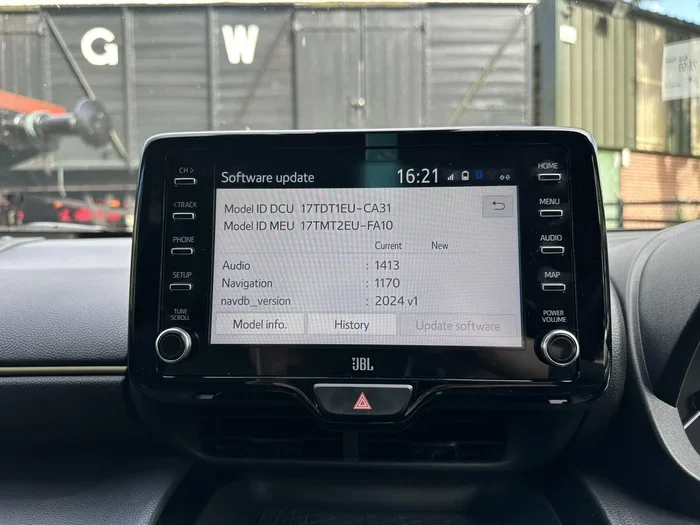
| Infotainment system update | 30 to 60 minutes | Dealership or home (OTA) |
| Full software suite update | 1 to 2 hours | Dealership only |
| Recall-related update | 1 to 2 hours | Dealership only |
| TSS (Toyota Safety Sense) update | 45 minutes to 1.5 hours | Dealership only |
As you can see, the range is wide. A simple infotainment update might only take half an hour. But a full Toyota software update covering multiple systems could take closer to two hours. Always ask your service advisor for a time estimate before you drop your car off.
Dealership vs. Over-the-Air Updates
Where you get your update matters a lot. Dealership visits usually take longer because of wait times, check-in processes, and the complexity of some updates. An over-the-air update is faster and more convenient since you do not need to leave home.
However, not all Toyota models support OTA updates. Newer models from 2022 onward are more likely to have this feature. If your car does not support OTA, you will need to visit a Toyota dealership or authorized service center. You might also want to check if you can take your Toyota to any dealership for warranty work, as this could save you a trip if your nearest dealer is busy.
Factors That Affect Update Duration
Several things can make your Toyota software update take longer or shorter than average. Understanding these factors helps you set realistic expectations.
1. The Type of Update
A minor bug fix takes far less time than a major safety recall update. The scope of the update is the single biggest factor in how long the process takes. Small patches touch one or two modules. Major updates can touch a dozen or more.
2. Your Vehicle Model and Year
Newer Toyota models have more advanced software. This means more modules to update. A 2024 Toyota Camry might take longer for a full update than a 2018 model simply because it has more technology. Similarly, models with advanced driver assistance systems need extra time for those specific modules.
3. Dealership Workload
If you visit a busy dealership, you might wait before the update even starts. Some service centers schedule updates in batches. Others handle them on a first-come, first-served basis. Calling ahead to book a service slot can save you hours of waiting.
4. Internet Connection Speed
For OTA updates, your Wi-Fi or cellular connection matters. A slow connection means a longer download time. For dealership updates, this is less of a concern since they use direct wired connections. But if you are doing an OTA update at home, make sure you have a strong and stable connection.
5. Battery Level
Your Toyota needs sufficient battery charge before an update. Many vehicles will not start the process if the battery is below a certain threshold. If your battery is low, you might need to charge it first, which adds time to the overall process.
How to Prepare for a Toyota Software Update
Preparation is the key to a smooth and fast Toyota software update. A few simple steps before your appointment or update session can save you a lot of headaches.
- Charge your battery fully. Aim for at least 70% charge before you start. This prevents the update from pausing or failing if the battery dips too low.
- Back up your infotainment data. Some updates reset your radio presets, Bluetooth pairings, and navigation favorites. Backing up these settings takes just a few minutes and saves you from frustration later.
- Check for recalls first. Visit the Toyota website or call your dealer to see if any recalls or technical service bulletins apply to your vehicle. These often require priority updates.
- Clear your schedule. Even though most updates finish within a couple of hours, it is smart to block out a few hours of your day. You do not want to feel rushed.
- Bring your keys and registration. You will need both for the dealership visit. Forgetting either can delay the process.
Quick Tips to Speed Up the Process
Here are some practical tips that experienced Toyota owners use to minimize update time:
- Book your service appointment during off-peak hours. Early mornings or late afternoons are usually less busy.
- Ask the service advisor if they can run the update while you wait. Some dealerships have dedicated update bays that work faster.
- Make sure your vehicle is within range of a strong Wi-Fi signal if you are doing an OTA update.
- Turn off any unnecessary accessories before the update starts. This includes dashcams, phone chargers, and aftermarket devices.
- Keep your Toyota app updated on your phone. Some updates can be triggered through the app, which saves a dealership visit.
Common Problems During Toyota Software Updates
Even with preparation, things can go wrong. Here are the most common issues and how to handle them.
1. Update Stuck or Frozen
Sometimes the installation screen freezes mid-way. This usually happens if the battery voltage drops too low. The best fix is to let the dealership technician know immediately. They can often restart the process without damaging anything. Never try to disconnect the battery yourself during an update.
2. Slow Download Speeds
For OTA updates, slow internet is the number one culprit. If your download is crawling, try moving closer to your router or switching to a different network. Dealership technicians can also use their high-speed wired connection to speed things up.
3. Incomplete Installation
In rare cases, an update does not finish installing. This can leave your vehicle in an inconsistent state. If this happens, you will likely need to return to the dealership for a complete reinstall. This is why it is so important to keep your battery charged throughout the entire process.
4. Post-Update Glitches
After an update, some owners report minor glitches like a blank screen or unresponsive buttons. These usually resolve on their own after a reboot. If the problem persists, contact your dealership. They can run a diagnostic check to make sure everything is working as it should.
Why Keeping Your Toyota Software Updated Matters
Some Toyota owners skip software updates. They think it is not worth the time or hassle. But staying current with your Toyota software offers real benefits that go beyond just fixing bugs.
Safety improvements are the biggest reason to keep your software up to date. Toyota regularly releases updates that improve automatic emergency braking, lane departure warnings, and adaptive cruise control. These are features that can save lives. An updated system responds faster and more accurately than an outdated one.
Performance gains also come with updates. Toyota engineers constantly refine engine mapping, transmission logic, and hybrid battery management through software patches. These refinements can improve your fuel economy and make your driving smoother.
Infotainment enhancements keep your entertainment system running well. Updates fix Bluetooth connectivity issues, improve navigation accuracy, and add new features. If you love using your phone through Apple CarPlay or Android Auto, regular updates make sure those connections stay reliable.
Warranty protection is another important factor. In some cases, failing to install a required software update could void a warranty claim. This is especially true for recall-related updates. Keeping your software current protects both your safety and your investment.
Toyota also uses software updates to add connected services features. These include remote start, vehicle tracking, and emergency assistance. Some of these features depend on having the latest software version installed.
If you are curious about how Toyota uses technology for vehicle features, you might wonder can Toyota track a stolen car. The answer is yes, newer models with connected services include GPS tracking capabilities that work through the same software ecosystem.
How Often Should You Update Your Toyota Software
There is no single rule for how often you should update your Toyota software. But here are some general guidelines to follow.
- Check for updates every 3 to 6 months. This is a good habit for any Toyota owner. You can check through the Toyota app or by visiting your dealership.
- Install updates immediately if they are safety-related. Recall updates and safety patches should never be delayed. These address critical issues that could affect your driving.
- Update before long trips. A software update before a road trip ensures all your systems are running at their best. You do not want a navigation glitch or infotainment freeze when you are far from home.
- Follow your dealership’s recommendation. Your service advisor knows your specific model and can tell you when an update is due based on your vehicle history.
Some owners ask if they can skip updates if their car seems fine. The short answer is no. Software updates often fix issues that you cannot see or feel yet. They patch vulnerabilities, improve stability, and prepare your vehicle for future features. Skipping updates is like skipping oil changes. Your car might run fine today, but problems can develop over time.
Final Thoughts
A Toyota software update is a straightforward process that keeps your vehicle safe, performant, and up to date. Most updates take between 30 minutes and 2 hours, depending on the type and scope. Over-the-air updates are faster, while dealership visits for full suite updates take a bit longer.
The key is to plan ahead, prepare your vehicle, and choose a good time for your update. Avoid rushing the process and always let the technician know if anything seems unusual during the installation. With the right approach, your Toyota software update will be quick, smooth, and well worth the time invested.
Stay proactive about your vehicle’s software health. Set a reminder every few months to check for updates. Your Toyota will thank you with better performance, improved safety, and a smoother driving experience every time you hit the road.
Frequently Asked Questions
Can I drive my Toyota while a software update is installing?
No. You should never drive your vehicle while a software update is in progress. The car needs to be completely stationary and in park. Driving during an update can corrupt the software and cause serious damage to your vehicle’s systems. Always wait until the update fully completes and the system confirms it is finished.
Do I need an appointment for a Toyota software update at the dealership?
It is highly recommended to book an appointment. Walk-ins are sometimes accommodated, but software updates can take one to two hours. Without an appointment, you might wait several hours before your vehicle is even started. Calling ahead saves you time and ensures the dealership has the correct update files ready for your model.
Are Toyota software updates free of charge?
Most standard software updates are free, especially those related to recalls or safety improvements. However, some major feature updates or infotainment upgrades might carry a cost depending on your vehicle’s warranty status and the nature of the update. Always ask your service advisor for a clear cost breakdown before approving any update.
What happens if my Toyota software update fails?
If an update fails, do not panic. The technician will run diagnostics to identify the issue. In most cases, the update can be reattempted after a simple reboot or battery recharge. Rarely, a failed update might require a full software reinstall at the dealership. This is why keeping your battery charged and following preparation steps is so important.
Can I cancel a Toyota software update once it starts?
You should never interrupt a software update once it has started. Cancelling mid-process can leave your vehicle’s computer systems in an unstable state. If you need to stop for any reason, inform the technician immediately so they can handle it safely. Interruptions can lead to costly repairs and extended time at the service center.
How do I know if my Toyota needs a software update?
You can check for updates through the Toyota app on your phone, your vehicle’s infotainment screen, or by contacting your dealership directly. Your vehicle may also display a notification on the dashboard when an update is available. Staying on top of these notifications ensures you never miss an important safety or performance patch.