How Do I Update the GPS in My Toyota Highlander Guide
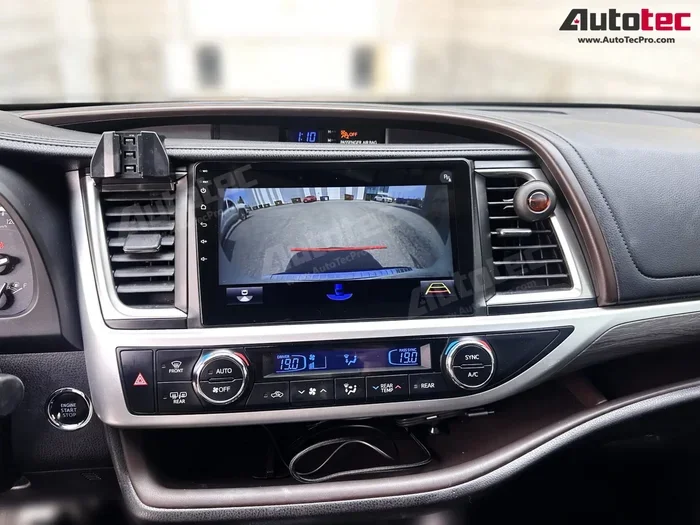
Keeping your Toyota Highlander GPS updated is essential for accurate navigation and safe driving. Whether you use a map disc, USB drive, or the Toyota Entune system, this guide walks you through every method step by step. You will learn how to update the GPS in my Toyota Highlander quickly, avoid common mistakes, and decide when to visit a dealer for professional help.
Driving a Toyota Highlander is a great experience. The vehicle offers comfort, reliability, and advanced features that make every trip smoother. One of those features is the Toyota navigation system built into the dashboard. But like any technology, the maps and software need regular updates. Outdated GPS data can lead to wrong turns, missed exits, and frustrating detours. If you have ever wondered how to keep your navigation system running at its best, you are in the right place.
In this guide, we will walk you through everything you need to know about performing a GPS map update on your Toyota Highlander. We will cover every method available, from using a map disc to downloading updates through Toyota Entune. You will also learn when it makes sense to visit a dealer and what common mistakes to avoid. By the end, you will feel confident handling the update yourself or knowing exactly what to expect from professional service.
The process is simpler than most people think. With the right tools and a little patience, you can have fresh map data on your vehicle in under an hour. Let us dive into the details so you can get back to enjoying your drives with confidence in your navigation.
Key Takeaways
- Multiple Update Methods: You can update your GPS using a map disc, USB drive, SD card, or the Toyota Entune app depending on your model year.
- Regular Updates Matter: Keeping your map data current ensures accurate GPS tracking, better route planning, and access to the latest traffic information.
- DIY Is Possible: Most GPS updates can be done at home with a computer and a USB drive, saving you time and money.
- Dealer Service Is an Option: If you prefer hands-off help, a Toyota dealer can handle the update for you, often as part of routine maintenance.
- Avoid Common Mistakes: Never interrupt an update process, always use official map data, and back up your system before making changes.
- Annual Updates Recommended: Toyota recommends updating your maps at least once a year for the best GPS accuracy.
📑 Table of Contents
Why Keeping Your GPS Updated Matters
Many Toyota Highlander owners overlook GPS updates until something goes wrong. A navigation system that has not been updated in a few years can cause real problems. Roads change, new businesses open, and traffic patterns shift. Your GPS needs current data to guide you accurately.
The Importance of Current Map Data
GPS accuracy depends entirely on the map data stored in your system. When this data becomes outdated, your navigation screen may direct you down roads that no longer exist or miss new highways and shortcuts. This is especially true in fast-growing areas where construction and new developments happen frequently.
Updated map data also improves GPS tracking precision. The system relies on exact GPS coordinates to place your location on the map. Old data can cause the blue dot to appear in the wrong spot, leading to confusion while driving. Fresh maps ensure your navigation screen reflects reality as closely as possible.
Beyond directions, updated maps also improve route planning. New road classifications, speed limits, and one-way streets are all factored into the routing algorithm. When this information is current, the system can suggest faster and safer routes for your daily commute or road trips. Access to real-time traffic information also improves when your map data is up to date.
How Often Should You Update Your GPS?
Toyota recommends updating your GPS maps at least once a year. However, if you frequently travel to new areas or live in a rapidly growing region, you may benefit from more frequent updates. Some owners update every six months to stay ahead of road changes.
You can usually tell it is time for an update when you notice any of these signs:
- Your navigation system cannot find addresses you know exist
- Roads or highways shown on the map do not match reality
- The system gives you routes that feel unnecessarily long
- You receive frequent “map data out of date” warnings on the navigation screen
- Points of interest like restaurants and gas stations are missing or incorrect
If you experience any of these issues, it is time to update your maps. The good news is that the process is straightforward and does not require advanced technical skills.
How Do I Update the GPS in My Toyota Highlander: Complete Methods
There are several ways to perform a Toyota Highlander navigation update. The method you choose depends on your model year, the tools you have available, and your comfort level with technology. Below, we cover each method in detail so you can pick the best one for your situation.
Method 1: Using a Map Disc
The traditional method for updating GPS in a Toyota Highlander involves a map disc. This is a DVD that contains the latest map data for your region. Toyota has provided these discs through dealerships and online purchases for many years. If your Highlander was manufactured before the widespread adoption of USB-based updates, this is likely the method your vehicle uses.
What You Need Before Starting:
- A compatible DVD disc with the correct map data for your region
- A DVD drive in your vehicle or a portable DVD player compatible with the system
- Your vehicle identification number (VIN) to ensure you purchase the correct disc
- A few hours of uninterrupted time
You can purchase official Toyota map discs through your local dealer or online retailers. Make sure to select the disc that matches your specific Highlander model year and region. Using the wrong disc can cause errors or fail to install correctly.
Step-by-Step Map Disc Installation:
- Park your vehicle in a safe, stationary location and turn off the engine
- Insert the map disc into the DVD drive, usually located in the center console
- The system should automatically detect the disc and prompt you to begin the update
- Follow the on-screen instructions to start the installation
- Wait for the installation to complete. This process can take 30 minutes to over an hour depending on the size of the update
- Do not turn off the vehicle or remove the disc during installation
- Once complete, remove the disc and restart the navigation system
- Verify the new map data by searching for a recent address or road
Quick Tip: If your system does not recognize the disc, try cleaning it with a soft cloth. Dust or smudges can prevent the DVD drive from reading the data correctly. Also, make sure the disc is the correct region version for your vehicle.
Using a map disc is a reliable method, but it does require you to have the physical disc on hand. For owners who prefer a digital approach, there are alternative methods available.
Method 2: Updating Through USB or SD Card
Many newer Toyota Highlander models support GPS updates through a USB drive or SD card. This method is more convenient because you can download the map data directly from Toyota’s website and transfer it to your vehicle without needing a physical disc. This is also the preferred method for a map data update on recent model years.
Downloading Map Updates Online:
- Visit the official Toyota map update page
- Enter your vehicle information, including the model year and VIN
- Select your region and the specific map package you need
- Purchase the update if required (some updates are free for newer models)
- Download the update file to your computer
The downloaded file is typically a large compressed folder. Make sure you have enough storage space on your computer before downloading. The file size can range from a few gigabytes to over ten gigabytes depending on the coverage area.
Transferring Files to Your Vehicle:
- Format a USB drive to FAT32 file system
- Extract the downloaded map files and copy them to the root directory of the USB drive
- Insert the USB drive into the USB port in your vehicle, usually located in the center console or glove box
- Navigate to the settings menu on the touch screen navigation display
- Select the map update option and choose the USB source
- Follow the on-screen prompts to begin the installation
- Wait for the process to complete without interrupting the power
- Remove the USB drive and restart the navigation system
Quick Tip: Always use a USB drive with at least 16GB of storage and no other files on it. The update process requires the drive to be clean and properly formatted. Using a slow or incompatible USB drive can cause the installation to fail.
This method is faster and more flexible than using a map disc. You can also update multiple regions if you frequently travel to different areas. Just download the additional map packages and install them one at a time.
Method 3: Using Toyota Entune for GPS Updates
Toyota Entune is the brand’s connected car platform that offers a range of services including navigation updates. If your Highlander is equipped with Entune, you may have access to wireless or app-based GPS updates that simplify the process even further.
Setting Up Entune on Your Device:
- Download the Toyota Entune app on your smartphone
- Create an account and pair your phone with the vehicle through Bluetooth
- Navigate to the map update section within the app
- Check for available updates for your vehicle’s navigation system
Entune also allows you to access real-time traffic information, weather updates, and fuel pricing through the navigation screen. These features work best when your map data is current, making regular updates even more important.
Wireless vs Wired Updates:
Entune supports both wireless and wired update methods. Wireless updates download directly to your vehicle through a cellular connection if your Entune plan includes data. Wired updates use a USB connection to transfer files from your phone or computer.
Wireless updates are the most convenient option. They eliminate the need for a computer or USB drive. However, they may require an active Entune subscription and a strong cellular signal. Wired updates are more reliable in areas with poor connectivity and give you more control over the process.
If you are having trouble with your Entune system or the navigation features are not working as expected, you might consider updating my Lexus navigation system through a similar process, as both Toyota and Lexus share the same underlying technology platform.
You can also check if your vehicle supports starting my Toyota Highlander with a key to troubleshoot any system issues that might be affecting the navigation functionality. Sometimes a simple system reset can resolve GPS glitches before you need a full update.
When to Visit a Toyota Dealer for GPS Updates
While many owners prefer the DIY approach, there are times when visiting a Toyota dealer is the best option. Professional service ensures the update is done correctly and gives you access to expert support if anything goes wrong.
What to Expect at the Dealer
A Toyota dealer will typically handle your GPS update as part of a routine service visit. Here is what the process looks like:
- You schedule a service appointment, either online or by phone
- The technician connects your vehicle to their diagnostic computer
- They check your current navigation software version and available updates
- The update is downloaded and installed directly to your vehicle’s system
- The technician verifies the new maps are working correctly
- You are informed of the completion and any additional recommendations
The entire process usually takes one to two hours, depending on the size of the update and the dealership’s schedule. Some dealers offer complimentary map updates for vehicles still under warranty or within a certain timeframe of purchase, so it is worth checking your service plan details.
If you also need help with other vehicle features, such as driving my Toyota Highlander without a key fob, the dealer can address multiple concerns in a single visit. This saves time and ensures all your vehicle systems are functioning properly.
Cost of Professional GPS Updates
The cost of a dealer GPS update varies. Some dealers offer free updates for vehicles still under warranty or within a certain timeframe of purchase. For out-of-warranty vehicles, the cost typically ranges from $100 to $300 depending on the map package and your location.
Compared to the cost of getting lost on a trip or missing a critical turn because of outdated maps, this investment is well worth it. Accurate navigation saves time, fuel, and stress on every journey you take.
Common GPS Update Mistakes to Avoid
Even with clear instructions, GPS updates can go wrong if you are not careful. Here are the most common mistakes Highlander owners make and how to avoid them.
Interrupting the Update Process
The most critical mistake is turning off the vehicle or removing a USB drive while the update is in progress. This can corrupt the vehicle software and leave your navigation system inoperable. Always ensure your vehicle has enough fuel or is plugged in if it is a hybrid model, and wait patiently for the process to finish completely.
Using Unofficial or Outdated Map Data
Some owners try to save money by downloading free map files from unofficial websites. These files can contain errors, outdated information, or even malware. Always use official Toyota map data from the Toyota website or authorized dealers. This ensures accuracy and protects your vehicle’s system from potential harm.
Forgetting to Back Up Your System
Before performing any update, it is wise to back up your current navigation settings and saved locations. If something goes wrong during the update, you can restore your previous data rather than starting from scratch. Some navigation systems allow you to export your saved addresses and favorites before the update begins.
Ignoring System Requirements
Not all Highlander models support the same update methods. Older models may only accept map discs, while newer models support USB and wireless updates. Check your owner’s manual or contact a Toyota dealer to confirm which methods your specific model supports before attempting an update.
Another important consideration is the condition of your vehicle’s battery and electrical system. If your car battery is weak, the GPS update process could be interrupted by a power loss. Consider having your battery tested before performing a major update to ensure everything goes smoothly.
Tips for Maintaining Accurate GPS Navigation
Updating your GPS is just one part of keeping your navigation system in top shape. Here are some additional tips to maintain accuracy and performance over time.
- Keep your system software current: Map updates are important, but software updates also improve system performance and fix bugs
- Clean your GPS antenna: The antenna is usually located on the roof or near the windshield. Keep it free from dirt and debris for the best signal reception
- Update maps for all regions you visit: If you travel frequently, download maps for multiple regions to ensure coverage everywhere
- Restart the system regularly: A simple restart can clear temporary glitches and improve the responsiveness of your touch screen navigation
- Use the latest version of the Toyota app: If you use Entune or the Toyota app, keep it updated on your phone for the best integration with your vehicle
- Check for seasonal map updates: Some regions receive seasonal updates that include construction zones and temporary road closures
Following these simple maintenance habits will keep your Toyota Highlander infotainment system running smoothly for years to come. You will always have confidence in your directions, whether you are navigating your daily commute or exploring a new city.
Conclusion
Updating the GPS in your Toyota Highlander does not have to be complicated. Whether you choose to use a map disc, a USB drive, or the Toyota Entune platform, the process is designed to be user-friendly and straightforward. The key is to stay proactive and update your maps at least once a year to maintain the best GPS accuracy and navigation screen performance.
Remember that you have options. DIY updates save money and give you control over the process. Dealer updates provide peace of mind and professional support. Choose the method that fits your comfort level and schedule.
By keeping your navigation system current, you invest in safer, more efficient driving. You will spend less time worrying about directions and more time enjoying the journey. How Do I Update the GPS in My Toyota Highlander becomes a simple question with a clear answer once you know the steps. Take the time today to check your map data and update if needed. Your future self will thank you the next time you are on an unfamiliar road and your navigation guides you perfectly to your destination.
Frequently Asked Questions
How much does it cost to update the GPS on a Toyota Highlander?
The cost varies depending on whether you do it yourself or visit a dealer. DIY updates using a USB drive typically cost between $50 and $150 for the map disc or download. Dealer updates range from $100 to $300. Some dealers offer free updates for vehicles still under warranty or within a certain timeframe of purchase.
Can I update my Toyota Highlander GPS without going to a dealer?
Yes, most Toyota Highlander models allow you to update the GPS yourself at home. You can use a map disc, a USB drive, or the Toyota Entune app depending on your model year. The DIY methods are straightforward and do not require advanced technical skills.
How long does a GPS update take on a Toyota Highlander?
A GPS update typically takes between 30 minutes and two hours. The time depends on the method you use, the size of the map package, and your vehicle model. Map disc installations tend to take longer than USB updates. Always make sure your vehicle is running during the process.
How often should I update the GPS maps on my Toyota Highlander?
Toyota recommends updating your GPS maps at least once a year. If you frequently travel to new areas or live in a rapidly growing region, updating every six months can be beneficial. Watch for “map data out of date” warnings on your navigation screen as a signal that an update is needed.
What happens if I interrupt a GPS update on my Toyota Highlander?
Interrupting a GPS update can corrupt the navigation software and leave your system inoperable. The vehicle may need to be taken to a dealer for professional repair if this happens. Always ensure your vehicle has enough power and wait patiently for the update to complete fully before turning anything off.
Is there a difference between GPS updates for different Toyota Highlander model years?
Yes, different model years support different update methods. Older models typically use map discs, while newer models support USB drives, SD cards, and wireless updates through Toyota Entune. Check your owner’s manual or contact a dealer to confirm which update methods are compatible with your specific Highlander.