Do You Have to Reprogram a Toyota Key Fob After Battery
The short answer is usually no, but there are exceptions. Do You Have to Reprogram a Toyota Key Fob After Battery replacement depends on your model and whether the fob lost full power. This guide covers when reprogramming is needed, how to do it yourself, and tips to avoid common issues.
Do You Have to Reprogram a Toyota Key Fob After Battery replacement? The short answer is usually no, but there are exceptions. Most Toyota key fobs reconnect automatically once you insert a fresh battery. However, if the fob was completely dead for a long time or if you replaced the battery in a specific way, the car’s computer might have forgotten the fob’s signal. This guide will walk you through everything you need to know, from understanding how your key fob works to fixing issues if the fob doesn’t respond after a battery change.
Whether you drive a Camry, RAV4, or Highlander, the key fob is your daily companion. It locks the doors, starts the engine, and sometimes even opens the trunk with a single press. When the battery dies, it can feel like you’ve lost a part of your car. Before you panic, let’s break down exactly what happens when you change that tiny battery and when you might need to reprogram the fob.
The Toyota key fob battery replacement process is simple, but the aftermath isn’t always the same. Some fobs reconnect automatically, while others need a manual sync. Knowing the difference can save you a trip to the dealer. I’ll walk you through the signs that your fob needs reprogramming, the steps to do it yourself, and a few preventive tips to keep everything running smoothly.
Key Takeaways
- Most Toyota key fobs do not need reprogramming after a simple battery swap.
- If the fob was completely dead for a long time, you may need to reprogram it.
- The CR2032 battery is the most common, but always check your owner’s manual.
- You can often reprogram the fob yourself in under five minutes with the right steps.
- Ignoring a fob that won’t sync can lead to lockout or alarm issues.
- Some Toyota models require a dealer or locksmith for advanced key fob programming.
- Keeping a spare battery in your glovebox prevents future headaches.
📑 Table of Contents
Do You Have to Reprogram a Toyota Key Fob After Battery?
In most cases, you do not need to reprogram your Toyota key fob after changing the battery. The fob stores its programming in the car’s memory, and a simple battery swap does not erase that information. However, there are a few situations where reprogramming becomes necessary. If the fob battery was completely dead for an extended period, the car’s receiver might have dropped the fob from its memory. Also, if you accidentally short-circuited the fob while changing the battery, the internal computer might have reset. In those cases, a quick reprogram will restore full function.
How Toyota Key Fobs Work and Why the Battery Matters
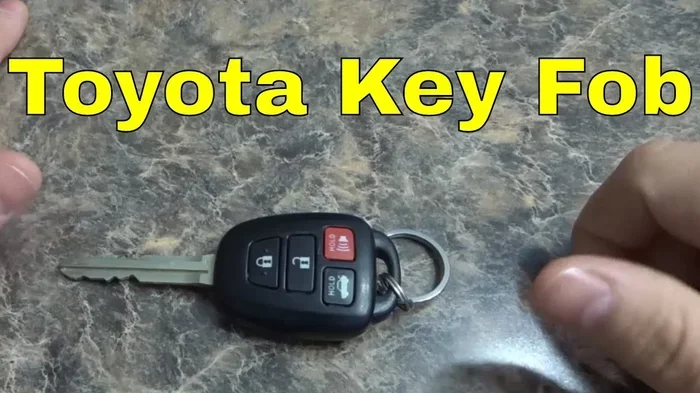
Toyota key fobs use a small coin-cell battery to send a radio signal to your car. The most common battery type is the CR2032, a 3-volt lithium coin cell. This tiny battery powers the fob’s transmitter, which communicates with the car’s antenna around the door frames and ignition. When you press a button, the fob sends a unique coded signal. The car verifies the code and then locks, unlocks, or starts the engine. If the battery voltage drops too low, the signal weakens, and the fob may not reach the car’s receiver.
Most Toyota key fobs run on a common CR2032 battery, which is easy to find at any drugstore or auto parts store. The battery typically lasts two to three years, depending on how often you use the fob. When the battery dies, the fob stops sending signals, but the programming inside the fob itself remains intact. That’s why a simple battery swap usually does not require reprogramming.
There is one important exception. If the fob battery was dead for a very long time and you left the fob near the car, the car’s system might have eventually removed the fob from its trusted list. This can happen after several days of no communication. In that case, you will need to reprogram the fob so the car recognizes it again.
When a Battery Change Triggers a Reprogramming Need
You might need to reprogram your Toyota key fob after a battery change if you notice any of the following signs:
- The fob does not lock or unlock the car from more than a few feet away.
- The push-button start does not recognize the fob when you sit in the driver’s seat.
- The car’s dashboard displays a key fob warning light or message.
- The fob works intermittently, even with a brand-new battery.
- The remote trunk release or window controls stop working.
If you experience any of these symptoms after a battery swap, don’t worry. Reprogramming is usually a straightforward process that you can do yourself at home. The exact steps depend on your Toyota model and year, but the basic principle is the same: you put the car into a learning mode and then tell the fob to send its signal again.
Step-by-Step: Reprogramming Your Toyota Key Fob (If Needed)
What You’ll Need Before You Begin
Before you start reprogramming, gather a few items to make the process smooth:
- A fresh CR2032 battery (or the battery type specified for your fob).
- Your Toyota owner’s manual (for model-specific instructions).
- A calm, quiet environment with minimal radio interference.
- About five to ten minutes of uninterrupted time.
Make sure the new battery is inserted correctly with the positive side facing up. A weak or incorrectly placed battery can cause the reprogramming to fail. If you’re unsure about the battery orientation, check the CR2032 battery guide for detailed instructions.
The Reprogramming Process for Popular Toyota Models
While the exact steps vary, here is a general reprogramming sequence that works for many Toyota models from the 2010s and 2020s:
- Sit in the driver’s seat and close all doors.
- Turn the ignition to the “ON” position (just press the start button without pressing the brake, or turn the key to the “ON” spot without starting the engine).
- Within five seconds, press and hold the lock and unlock buttons on the key fob simultaneously for about three seconds.
- Release the buttons. The hazard lights should flash twice, indicating the car is in programming mode.
- Within 30 seconds, press any button on the key fob. The hazard lights should flash again to confirm the fob has been learned.
- Turn the ignition off and test the fob from outside the car.
If this sequence does not work for your specific model, consult your owner’s manual or search for a model-specific guide. Some older Toyotas require you to cycle the ignition between “OFF” and “ON” three times within five seconds to enter programming mode.
A Quick Comparison: Toyota Models and Reprogramming Methods
| Toyota Model | Reprogramming Needed After Battery Swap? | DIY Reprogramming Possible? | Approximate Time |
|---|---|---|---|
| Camry (2012–2024) | Only if fob was fully dead for days | Yes, using ignition method | 3–5 minutes |
| RAV4 (2013–2024) | Rarely, unless fob was completely dead | Yes, with door antenna sequence | 4–6 minutes |
| Highlander (2014–2024) | Sometimes, if fob lost power completely | Yes, with ignition and fob buttons | 5–7 minutes |
| Corolla (2015–2024) | Usually not needed | Yes, simple button hold | 2–4 minutes |
Quick Tip: Keep a spare CR2032 battery in your glovebox so you’re never caught off guard by a dead fob. A dead battery should not erase your programming, but having a spare means you can always test the fob immediately.
What Happens If You Don’t Reprogram? Common Symptoms and Fixes
Key Fob Not Working After Battery Swap
If your Toyota key fob does not work after a battery change, the most common cause is that the fob did not fully reconnect to the car’s system. This can happen if the car’s computer dropped the fob from its memory while the battery was dead. You might still be able to start your Highlander with a physical key if your model has a backup key slot, but the remote functions will remain inactive until you reprogram the fob.
Another possible cause is a faulty new battery. Even if the battery is brand new, it could be a dud or the wrong type. Always use a high-quality CR2032 battery from a trusted brand. Cheap batteries often have lower voltage and can cause intermittent fob problems. If the fob still doesn’t work after reprogramming, try a different battery before assuming the fob itself is broken.
Common Mistake: Assuming all Toyota models follow the same reprogramming steps. Always check your specific model year in the owner’s manual. The steps for a 2015 Camry can differ slightly from those for a 2020 RAV4.
Interference, Range Issues, and False Alarms
Sometimes the fob works, but the range is very short. You might need to stand right next to the car for the buttons to respond. This is often caused by radio interference from other electronic devices, a low battery, or a fob that needs reprogramming. If you can still roll down your windows with the key fob even when the battery is low, that’s a sign the fob has partial power but the signal is weak. Reprogramming can sometimes strengthen the connection and restore full range.
False alarms are another frustrating symptom. If your car’s alarm goes off randomly after a battery change, the fob might be sending a weak or corrupted signal. Reprogramming the fob usually fixes this by re-establishing a clean communication link between the fob and the car’s security system.
Expert Insight: A Toyota dealer can reprogram your key fob in minutes, but it often costs less to do it yourself if your model supports it. A dealer visit might run you $50 to $100, while DIY reprogramming takes only a few minutes and costs nothing.
Preventive Care: Keeping Your Toyota Key Fob Healthy
Choosing the Right Battery and Tools
The best way to avoid reprogramming issues is to prevent the fob battery from dying unexpectedly. Use a high-quality lithium CR2032 battery, and avoid cheap generic brands that may have inconsistent voltage. When you change the battery, work on a dry, flat surface and avoid touching the fob’s circuit board with your fingers, as oils can cause corrosion. If the fob has a small screw, use a tiny Phillips-head screwdriver to open it carefully.
Keep your fob away from strong magnets, metal surfaces, and liquid spills. These can damage the internal antenna and cause signal problems even with a fresh battery. Storing the fob in a small fabric pouch in your center console is a simple way to protect it.
When to Visit a Dealer or Locksmith
If you’ve tried reprogramming and the fob still doesn’t work, it may be time to seek professional help. A Toyota dealer has the specialized equipment to program key fobs, including smart keys and proximity fobs. A certified locksmith who specializes in automotive locks can also reprogram your fob, often at a lower cost than the dealer. Before you visit, call ahead and ask if they can program your specific Toyota model, as not all shops handle every brand.
In rare cases, a fob that won’t reprogram might have a damaged internal circuit. This can happen if moisture got inside the fob or if the battery was inserted backward and caused a short. A locksmith or dealer can test the fob and replace it if necessary. Replacement fobs for Toyota models typically cost between $50 and $200, depending on the model and whether you choose an OEM or aftermarket unit.
Final Thoughts: The Bottom Line on Key Fob Reprogramming
To answer the question directly: Do You Have to Reprogram a Toyota Key Fob After Battery replacement? In the vast majority of cases, the answer is no. A simple battery swap does not erase your key fob’s programming. However, if the fob was completely dead for a long time or if you notice any of the symptoms we discussed, a quick reprogram can save you from a lot of hassle. The process is usually simple, takes just a few minutes, and can be done from the comfort of your driveway.
Keep a spare battery on hand, follow the steps for your specific model, and don’t hesitate to call a dealer or locksmith if you get stuck. With the right knowledge, you can keep your Toyota key fob working smoothly for years to come.
Frequently Asked Questions
Can I reprogram my Toyota key fob myself?
Yes, for most Toyota models you can reprogram the key fob yourself using the ignition method. The process typically takes five to ten minutes and requires no special tools. Always check your owner’s manual for model-specific steps.
What happens if I don’t reprogram my key fob after a dead battery?
If the fob was completely dead for a long time, the car may have dropped it from its memory. You might experience a loss of remote functions, a key fob warning light, or an inability to start the car with the push-button start. Reprogramming usually fixes these issues quickly.
Do I need a special battery for my Toyota key fob?
Most Toyota key fobs use a standard CR2032 lithium coin battery. You can find these at any grocery store, pharmacy, or auto parts store. Always use a fresh, high-quality battery for the best results.
How much does it cost to reprogram a Toyota key fob at a dealer?
Dealer reprogramming costs typically range from $50 to $100, depending on the model and location. Doing it yourself is free if your model supports DIY programming, so it’s worth trying the steps before visiting a dealer.
Can a dead key fob battery damage the car’s computer?
No, a dead key fob battery will not damage the car’s computer. The fob simply stops sending signals. However, leaving the fob near the car with a dead battery for an extended period can cause the car to remove the fob from its trusted list, requiring reprogramming.
How often should I change my Toyota key fob battery?
Most Toyota key fob batteries last two to three years. If you notice reduced range or intermittent operation, it’s time to replace the battery. Keeping a spare battery in your glovebox helps you avoid being caught off guard.