Do 2012 Honda Civics Have Bluetooth And How To Connect
Do 2012 Honda Civics have Bluetooth? Yes, many trims of the 2012 Honda Civic come with built-in Bluetooth for hands-free calling and wireless music streaming. If your model lacks this feature, you can easily add it with an aftermarket Bluetooth adapter or FM transmitter. This guide walks you through Bluetooth pairing, troubleshooting tips, and the best ways to get music and calls flowing through your car audio system.
Do you own a 2012 Honda Civic and wonder if it has Bluetooth? You are not alone. Many car owners ask this question every day. The answer depends on your trim level and audio setup. This guide covers everything you need to know about Bluetooth in the 2012 Honda Civic. You will learn which trims include it, how to connect your phone, and what to do if it does not work. Let us get started.
The 2012 Honda Civic was a popular compact car. It came in several trim levels, from the base LX to the sporty Si and EX models. Each trim offered different features. Bluetooth availability was not standard across all trims. Some models had it built right in, while others needed a simple add-on. Understanding your specific model is the first step to getting Bluetooth working in your Honda Civic.
Why does Bluetooth connectivity matter so much? It lets you make and receive calls without touching your phone. It also lets you stream music wirelessly from your phone to your car speakers. Both features make driving safer and more enjoyable. If your 2012 Civic does not have Bluetooth by default, do not worry. There are affordable ways to add it. This article covers all of those options in detail.
Key Takeaways
- Bluetooth is available on select 2012 Honda Civic trims: The EX and higher trims typically include built-in Bluetooth for hands-free calling and audio streaming.
- Pairing your phone is simple: Just go to your car’s audio settings, select Bluetooth pairing mode, and follow the prompts on your phone.
- Common issues have easy fixes: Problems like Bluetooth not connecting or poor audio quality can often be solved by resetting the connection or updating your phone’s software.
- You can add Bluetooth to any trim: If your LX or base model lacks Bluetooth, an aftermarket Bluetooth adapter or FM transmitter is an affordable solution.
- Hands-free calling is a major safety benefit: Bluetooth hands-free calling keeps your eyes on the road and hands on the wheel.
- Wireless music streaming makes every drive better: Stream your favorite playlists, podcasts, and audiobooks directly through your car speakers.
- Keep your Bluetooth connection clean: Regularly remove old paired devices and keep your phone and car software up to date for the best performance.
📑 Table of Contents
- Do 2012 Honda Civics Have Bluetooth?
- How To Connect Bluetooth to a 2012 Honda Civic
- Bluetooth Features You Can Use in a 2012 Honda Civic
- Common Bluetooth Problems and How To Fix Them
- Adding Bluetooth to a 2012 Honda Civic That Does Not Have It
- Expert Tips for Better Bluetooth Performance in Your 2012 Civic
- Common Mistakes People Make With Car Bluetooth
- Conclusion
Do 2012 Honda Civics Have Bluetooth?
The short answer is yes, but with a catch. Not every 2012 Honda Civic came with Bluetooth built in. Your trim level and audio system determine whether you have this feature. Let us break it down by trim level so you know exactly what to expect.
Bluetooth by Trim Level
Here is how Bluetooth was distributed across the 2012 Honda Civic lineup:
- LX (Base Trim): The LX trim did not include Bluetooth as a standard feature. However, it had an auxiliary input jack and a CD player. You could still play music from your phone using a cable.
- EX Trim: The EX trim was the first to offer Bluetooth hands-free calling and audio streaming as a standard feature. If you have an EX model, you likely have Bluetooth.
- Si Trim: The Si also included Bluetooth connectivity as part of its upgraded audio and convenience features.
- CX Trim: The CX was the most basic trim and did not include Bluetooth. It was focused on affordability and essential features.
How To Check If Your Civic Has Bluetooth
Not sure if your 2012 Civic has Bluetooth? There are a few easy ways to check. First, look at your audio system. If you see a Bluetooth button on the face of the radio or on the steering wheel controls, your car has it. Second, check your audio settings menu. Many 2012 Civics with Bluetooth have a Bluetooth settings option in the display screen. Third, look at your original window sticker or owner’s manual. These documents list all the features your car was built with.
If you do not see any Bluetooth option, your car may not have it. But that does not mean you are out of luck. There are great ways to add Bluetooth to any 2012 Honda Civic, which we will cover later in this article.
How To Connect Bluetooth to a 2012 Honda Civic
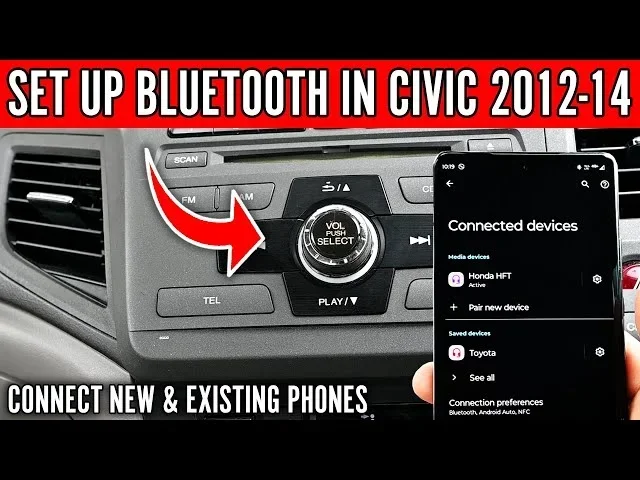
If your 2012 Honda Civic has Bluetooth, connecting your phone is straightforward. The process is similar for both iPhone and Android devices. Follow these steps carefully, and you will be paired in just a few minutes.
Step-by-Step Pairing Guide
- Turn on your car. You do not need to start the engine. Just turn the key to the accessory position or press the start button without pressing the brake.
- Activate Bluetooth on your phone. Go to your phone’s settings and turn on Bluetooth. Make sure it is set to be visible or discoverable.
- Put your car’s audio system in pairing mode. On most 2012 Civics, you press and hold the Bluetooth button on the radio face or steering wheel for a few seconds. You should hear a beep or see a message saying the system is ready to pair.
- Search for available devices on your phone. Your phone will scan for nearby Bluetooth devices. Look for a device named something like “Honda Civic” or “Audio System.”
- Select your car from the list. Tap on the device name to initiate the connection.
- Enter the passkey if prompted. Some systems use a default passkey like 0000 or 1234. Check your owner’s manual if you need the code.
- Confirm the connection. Once paired, you should see a confirmation on both your phone and your car’s display. You are now connected.
Quick Tips for Smooth Pairing
- Make sure your phone is within three feet of the car’s audio system when pairing.
- Turn off other Bluetooth devices nearby that might interfere with the connection.
- If pairing fails, restart both your phone and the car’s audio system and try again.
- Only pair one device at a time for the best results.
- Keep your phone’s software up to date, as older software can cause Bluetooth connection issues.
Bluetooth Features You Can Use in a 2012 Honda Civic
Once your phone is connected, you can enjoy several useful features. These features make driving safer and more fun. Let us look at what you can do with Bluetooth in your 2012 Civic.
Hands-Free Calling
Hands-free calling is one of the most important Bluetooth features. When you receive a call, you can answer it using the audio system in your car. The call audio plays through your car speakers, and the microphone picks up your voice. You do not need to hold your phone at all. This feature keeps your hands on the wheel and your eyes on the road, which is a big safety benefit.
To make a call, you can use your phone’s dialer or voice commands if your phone supports them. The 2012 Honda Civic Bluetooth system also supports call history, so you can easily call someone you spoke to recently. Just use the steering wheel controls to access your call list.
Wireless Music Streaming
Wireless music streaming is another great feature. Once paired, you can play music from apps like Spotify, Apple Music, Pandora, or YouTube Music directly through your car speakers. The audio quality is usually very good, especially with the upgraded audio systems found in higher trims.
You can also stream podcasts and audiobooks this way. It makes long drives much more enjoyable. Just open your music app on your phone and hit play. The sound will come through your car’s speakers automatically. You can control the volume and track selection from either your phone or the car’s audio controls.
Contact Syncing
Some 2012 Honda Civics with Bluetooth also support contact syncing. This means your phone’s contact list appears on your car’s display screen. You can then scroll through your contacts and make calls without typing any numbers. This feature is especially handy when you are driving and need to call someone quickly.
Common Bluetooth Problems and How To Fix Them
Bluetooth technology is reliable, but it can sometimes act up. Here are the most common issues people face with Bluetooth in 2012 Honda Civics and how to solve them.
Bluetooth Won’t Connect
If your phone will not connect to your car, try these steps:
- Turn Bluetooth off and back on both on your phone and in your car.
- Delete the car from your phone’s paired devices list and try pairing again.
- Restart your phone completely.
- Make sure your car’s audio system is not connected to another device already.
- Check that your phone is not in airplane mode.
Sometimes the simplest fix works. Just turning Bluetooth off and back on again can solve the problem. If that does not work, try resetting your car’s audio system by turning it off, waiting 30 seconds, and turning it back on.
Poor Audio Quality
If your music sounds choppy or distorted over Bluetooth, here are some things to try:
- Move your phone closer to the car’s audio system.
- Make sure nothing is blocking the Bluetooth signal between your phone and the car.
- Lower the volume on your phone and increase it on the car’s audio system instead.
- Check if other wireless devices in the car are causing interference, like a tablet or laptop.
- If you are using a streaming app, check your internet connection, as poor data can affect audio quality.
Bluetooth Keeps Disconnecting
A Bluetooth connection that keeps dropping can be frustrating. This often happens when your phone goes to sleep or when the car’s battery is low. To fix this, go into your phone’s Bluetooth settings and look for an option to prevent the device from sleeping or disconnecting automatically. Also, make sure your car battery is in good health, as a weak battery can affect the audio system’s performance.
Expert Insight: Many Bluetooth connection issues in older cars like the 2012 Honda Civic come from outdated phone software. Keeping your phone updated is one of the easiest ways to maintain a stable Bluetooth pairing. If you recently updated your phone and lost Bluetooth functionality, try unpairing and re-pairing the device.
Adding Bluetooth to a 2012 Honda Civic That Does Not Have It
If your 2012 Honda Civic does not have built-in Bluetooth, you are not stuck without options. There are several affordable ways to add Bluetooth functionality to your car. Let us look at the best methods.
Aftermarket Bluetooth Adapters
An aftermarket Bluetooth adapter is one of the best ways to add wireless connectivity to your car. These small devices plug into your car’s auxiliary input or cigarette lighter port. They create a new Bluetooth source that your car’s audio system can use.
Here are some popular options:
- Aux Bluetooth Adapters: These plug into the auxiliary input jack and provide Bluetooth streaming. They are small, affordable, and easy to install. Popular brands include Mpow, GOgroove, and Auris.
- Bluetooth FM Transmitters: These plug into the cigarette lighter and broadcast your phone’s audio to an unused FM radio frequency. Your car radio picks up this signal and plays it through the speakers.
- Bluetooth AUX Car Kits: These are all-in-one kits that include both a Bluetooth receiver and a USB charging port. They are a great two-for-one solution.
Comparison Table: Bluetooth Adapter Options
| Adapter Type | Price Range | Audio Quality | Ease of Install | Best For |
|---|---|---|---|---|
| Aux Bluetooth Adapter | $15 – $40 | Good | Very Easy | Best audio quality for the price |
| FM Transmitter | $10 – $30 | Fair to Good | Easy | Cars without an aux input |
| Bluetooth AUX Car Kit | $25 – $60 | Good | Easy | All-in-one solution with charging |
| Bluetooth Head Unit Replacement | $100 – $300 | Excellent | Moderate | Full audio system upgrade |
Bluetooth Head Unit Replacement
If you want a permanent and high-quality solution, consider replacing your car’s head unit with a new one that has Bluetooth built in. Many modern head units also support USB charging, Apple CarPlay, and Android Auto. This option costs more but gives you the best audio quality and the most features. Popular brands for replacement head units include Pioneer, Kenwood, and Sony.
Expert Tips for Better Bluetooth Performance in Your 2012 Civic
Want to get the most out of your Bluetooth connection in your 2012 Honda Civic? Here are some expert tips that make a real difference.
- Keep your phone charged. Bluetooth uses your phone’s battery. If your phone is low on battery, the connection can become unstable. Keep a charger in your car.
- Clear old paired devices. Over time, your car’s Bluetooth system stores many paired devices. Clearing old ones frees up memory and can improve connection speed.
- Use the correct audio profile. Make sure your phone is set to use the Hands-Free Profile (HFP) for calls and the Advanced Audio Distribution Profile (A2DP) for music streaming.
- Position your phone wisely. Place your phone in a cup holder or on the center console near the audio system. Avoid putting it in the glove box or back seat, as this weakens the signal.
- Update your car’s firmware. Some 2012 Honda Civics can receive firmware updates at the dealer. These updates can improve Bluetooth audio quality and fix known bugs.
- Limit the number of connected devices. Only keep the devices you use regularly paired. Too many paired devices can slow down the system.
Quick Tips Section
Quick Tip: If you are having trouble connecting, try resetting your phone’s network settings. This clears all Bluetooth pairings and Wi-Fi connections, giving you a fresh start. Just remember to reconnect to your Wi-Fi network after the reset.
Quick Tip: Use voice commands to answer calls when driving. Most phones let you say “Hey Siri” or “OK Google” to answer or make calls hands-free. This is the safest way to use Bluetooth while driving.
Quick Tip: If you notice static or interference during Bluetooth music streaming, try switching to a different Bluetooth codec on your phone if available. Some phones let you choose between SBC, AAC, or aptX codecs. SBC is the most compatible and works best with older car systems like the 2012 Honda Civic.
Common Mistakes People Make With Car Bluetooth
Even though connecting Bluetooth is easy, people still make mistakes that cause problems. Here are the most common ones to avoid.
- Leaving Bluetooth on when not in use. This drains your phone battery faster and can cause your phone to connect to random devices nearby.
- Pairing in a crowded area. Places like parking lots or shopping centers have many Bluetooth signals. This can interfere with your pairing process. Pair your phone inside your garage or in a quiet parking spot.
- Not checking the volume settings. Some people pair their phone but forget to turn up the car’s volume. The call or music is connected, but they cannot hear it because the volume is too low.
- Ignoring the car’s manual. Your owner’s manual has specific instructions for your car’s Bluetooth system. It can save you a lot of time and frustration.
- Assuming all Bluetooth is the same. Bluetooth hands-free calling and Bluetooth audio streaming are two different features. Some cars have one but not the other. Make sure you know which features your 2012 Civic supports.
Conclusion
So, do 2012 Honda Civics have Bluetooth? Yes, many of them do, especially the EX and Si trims. If your Civic came with built-in Bluetooth, you are ready to enjoy hands-free calling and wireless music streaming. The pairing process is simple and takes just a few minutes.
If your 2012 Honda Civic does not have Bluetooth, you have great options. Aftermarket Bluetooth adapters are affordable and easy to install. They bring wireless connectivity to any car, no matter the trim level. Whether you choose an aux adapter, an FM transmitter, or a full head unit replacement, you will be streaming music and making calls in no time.
Remember to keep your phone and car audio system updated for the best performance. Follow the troubleshooting tips if you run into any issues. And most importantly, always use Bluetooth hands-free calling to stay safe on the road. Enjoy your drives with your favorite music playing wirelessly through your car speakers.
Now that you know everything about Bluetooth in the 2012 Honda Civic, you can get connected and start enjoying all the benefits. Whether you are commuting to work or taking a weekend road trip, Bluetooth makes every drive better. Happy listening!
Frequently Asked Questions
Do all 2012 Honda Civics come with Bluetooth?
No, not all 2012 Honda Civics have Bluetooth. The feature was standard on the EX trim and higher, but the base LX and CX trims did not include it. You can check your car’s audio system or owner’s manual to confirm whether your specific model has Bluetooth.
How do I know if my 2012 Honda Civic has Bluetooth?
Look for a Bluetooth button on your car’s audio system or steering wheel controls. You can also check the audio settings menu for a Bluetooth option. Your original window sticker or owner’s manual will also list Bluetooth as a feature if your car has it.
Can I add Bluetooth to a 2012 Honda Civic that does not have it?
Yes, absolutely. You can add Bluetooth using an aftermarket Bluetooth adapter that plugs into your aux input, an FM transmitter that broadcasts to your car radio, or by replacing the head unit with a new one that has Bluetooth built in. All of these options are affordable and easy to install.
Why is my Bluetooth not connecting to my 2012 Honda Civic?
This is usually caused by a simple glitch. Try turning Bluetooth off and back on, deleting the car from your phone’s paired devices, and then pairing again. Also make sure your phone is within a few feet of the car’s audio system and that airplane mode is off.
What is the best Bluetooth adapter for a 2012 Honda Civic?
An aux Bluetooth adapter is the best option for most 2012 Civics. It provides good audio quality, is easy to install, and costs between $15 and $40. Popular brands include Mpow, GOgroove, and Auris. If your car does not have an aux input, an FM Bluetooth transmitter is a great alternative.
Is Bluetooth hands-free calling safe while driving?
Yes, Bluetooth hands-free calling is much safer than holding your phone while driving. It keeps your hands on the wheel and your eyes on the road. However, even hands-free calls can distract you, so it is best to keep conversations short and focus primarily on driving.
=== META DESCRIPTION ===
Find out if 2012 Honda Civics have Bluetooth and learn how to connect your phone for hands-free calling and music streaming in simple steps.