How Do You Use a Toyota Key Simple Step by Step Guide
Using a Toyota key is easy once you understand the basics of your key fob, blade, and push button start system. This guide walks you through every step of using a Toyota key, including battery replacement, programming, and common troubleshooting tips. Whether you drive a Camry, Highlander, or any other Toyota model, you will find practical advice to keep your key working smoothly.
Every Toyota owner should know how to use their key properly. Whether you just bought a new Toyota or have been driving one for years, understanding your key system makes life much easier. The Toyota key is more than just a piece of metal. It is your gateway to starting the engine, unlocking the doors, and even activating the alarm system.
Modern Toyota vehicles use advanced key systems. These include smart key fobs, push button start, and remote entry features. But sometimes these systems can confuse people. You might wonder why your key does not work, or how to replace the battery. This guide answers all those questions in simple, easy to follow steps.
We will cover everything from the basics of using a Toyota key fob to more advanced topics like key programming and troubleshooting. By the end of this article, you will feel confident using your Toyota key in any situation. Let us get started.
Key Takeaways
- Toyota keys come in two main types: traditional blade keys and modern smart key fobs with push button start.
- Replacing the key battery is simple and usually requires a CR2032 coin cell battery.
- Push button start systems let you drive without inserting the key, but the fob must be inside the vehicle.
- Common Toyota key problems include a dead battery, signal interference, and immobilizer errors.
- Programming a new Toyota key can often be done at home with a few simple steps.
- Regular maintenance keeps your Toyota key working reliably for years.
📑 Table of Contents
Understanding Your Toyota Key
Before you can use your Toyota key properly, you need to understand what type of key you have. Toyota has used different key systems over the years. Each type works a little differently, but they all serve the same purpose. They let you start your car and keep it secure.
Traditional Blade Keys
Older Toyota models use traditional blade keys. These are the simple metal keys that you insert into a lock cylinder. You turn them to unlock the door or start the engine. These keys do not have any electronics. They are reliable and very hard to break. Many people still prefer this simple design because there is less that can go wrong.
If you have a blade key, using it is straightforward. You put the key into the lock. You turn it. The door opens or the engine starts. That is it. No batteries. No batteries to worry about dying. However, these keys do not offer remote features like locking or unlocking from a distance.
Smart Key Fobs
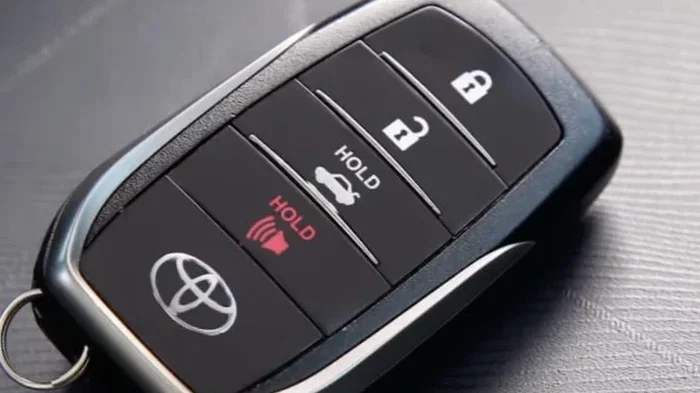
Most newer Toyota models come with smart key fobs. These are the remote control devices you carry in your pocket or purse. The smart key fob communicates with your car using radio signals. When you press a button, the car locks or unlocks. When you push the start button, the car starts if the fob is nearby.
The Toyota smart key system is very convenient. You do not need to take the fob out of your pocket. You just press the button on the door handle. The car detects the fob and unlocks. This is called passive entry. It is one of the most popular features in modern Toyota vehicles like the Camry and Highlander.
Key Blade Inside the Fob
Many Toyota smart key fobs also include a hidden blade key. This is useful if the fob battery dies. You can slide out the blade and use it to unlock the door manually. This backup option is very important to know about. If your Toyota key fob stops working suddenly, the blade key saves the day.
To access the blade key, look for a small button or latch on the side of the fob. Press it and the metal key slides out. Insert it into the door lock just like a traditional key. Once inside the car, you can place the fob near the start button to power up the vehicle.
How to Use the Toyota Key Fob
Using a Toyota key fob is simple once you know where all the buttons are. Each button has a specific function. Let us walk through them one by one.
Lock and Unlock Buttons
The lock and unlock buttons are the most used buttons on your Toyota key fob. The lock button secures all doors and the trunk. The unlock button releases all doors at once. On some Toyota models, you can also unlock just the driver door by pressing the unlock button once and pressing it again quickly.
Here is a quick tip. If you want to lock all doors but keep the driver door unlocked, press the lock button once. This is helpful when you are loading groceries and want to keep the driver door open. Just remember to lock the car again when you are done.
Panic Button
The panic button activates the car alarm. It makes a loud noise and flashes the lights. Use this button if you feel unsafe or if you need to draw attention. This button is especially useful in parking lots or when you think someone is tampering with your vehicle.
Trunk Release Button
Many Toyota key fobs include a trunk release button. Press it and the trunk opens. This is very handy when your hands are full of shopping bags or luggage. Some newer Toyota models also have a power liftgate that opens automatically when you press the button.
Push Button Start
The push button start system is one of the best features of modern Toyota vehicles. You do not need to insert the key into the ignition. Instead, you just press the start button while keeping your foot on the brake pedal. The car recognizes the smart key fob inside the cabin and starts the engine.
To use push button start, follow these steps:
- Make sure the key fob is inside the vehicle.
- Press the brake pedal firmly.
- Press the engine start button.
- The dashboard lights up and the engine starts.
If the fob battery is low, the system may not detect it right away. In that case, place the fob directly on the start button or on the designated spot near the steering column. The car will read the fob through proximity and start the engine.
Replacing the Toyota Key Battery
Your Toyota key fob runs on a small battery. Most Toyota smart keys use a CR2032 battery. This is a common coin cell battery that you can find at any store. When the battery gets weak, the range of your key fob decreases. You might need to stand closer to the car for the remote to work. Replacing the battery is quick and easy.
To replace the battery, follow these steps:
- Find the small notch on the side of the key fob.
- Use a flat tool like a coin or a small screwdriver to pry open the fob.
- Remove the old battery. Note which side faces up.
- Insert a new CR2032 battery with the positive side facing up.
- Snap the fob back together.
After replacing the battery, test the key fob by standing a few feet away from your car and pressing the unlock button. If it works, you are all set. If not, check that the battery is inserted correctly. You can also try checking your car battery if the key still does not respond.
One important thing to know. You can use a CR2032 battery in your Toyota key without any issues. This is the standard battery for most Toyota smart key models. Keep a spare battery in your glove box so you are never caught off guard.
How Often Should You Replace the Key Battery?
Most Toyota key fob batteries last about two to three years. However, this depends on how often you use the fob. If you lock and unlock your car multiple times a day, the battery may wear out faster. Cold weather can also drain the battery more quickly. If you notice the range getting shorter, it is time to replace the battery.
Programming a New Toyota Key
There may come a time when you need a new Toyota key. Maybe you lost yours, or the fob got damaged. Programming a new key is something you can do yourself in many cases. However, the process varies by Toyota model and year.
Steps to Program a Toyota Key at Home
Here is a general guide for programming a Toyota key. This method works for many Toyota models:
- Sit in the driver seat and close all doors.
- Turn the ignition to the ON position without starting the engine.
- Within five seconds, press and release the brake pedal three times.
- The door locks will cycle to indicate the system is in programming mode.
- Press any button on the new key fob within 30 seconds.
- The locks will cycle again to confirm the key is programmed.
- Repeat for additional keys if needed.
- Turn the ignition off and test the new key.
If this method does not work for your specific Toyota model, consult your owner manual. You can also visit a Toyota dealership for professional programming. Some keys require specialized equipment that only a dealer has.
When to Seek Professional Help
Sometimes a Toyota key issue is more complex than a simple battery replacement. If your Toyota key not working issue persists after replacing the battery, there may be a deeper problem. The immobilizer system could be malfunctioning. The key fob itself could be damaged. In these cases, it is best to seek help from a qualified mechanic or Toyota dealer.
You can also try fixing your immobiliser problem if the car will not recognize the key. Immobilizer issues are one of the most common reasons a Toyota key fails to start the engine.
Common Toyota Key Problems and Solutions
Even the best Toyota keys can have issues from time to time. Here are the most common problems and how to fix them.
Key Fob Does Not Unlock the Car
This is the most common Toyota key problem. Usually, it means the battery is dead. Replace the battery following the steps we covered earlier. If that does not work, the key fob may need to be reprogrammed. Signal interference can also cause this issue. Try standing closer to the car when pressing the button.
Push Button Start Does Not Respond
If the push button start does not work, the car may not detect the key fob. Move the fob closer to the start button. Check the fob battery. On some Toyota models, there is a backup slot specifically for this purpose. Place the fob in that slot and try again.
Key Gets Stuck in the Ignition
This happens sometimes with older Toyota models. Do not force the key out. Try gently wiggling it while turning the steering wheel left and right. The steering lock can sometimes prevent the key from turning. Once you release the lock, the key should come out easily.
Key Blade Breaks Inside the Lock
A broken key blade is frustrating but not uncommon. If this happens, do not try to pull it out with pliers. You could damage the lock. Instead, call a locksmith or visit a Toyota dealer. They have special tools to remove broken keys safely.
Tips for Keeping Your Toyota Key in Great Shape
Taking care of your Toyota key extends its life and keeps it working reliably. Here are some simple tips every Toyota owner should follow.
- Keep the fob dry. Water damage can ruin the electronics inside the key fob. Do not leave it in a pocket that might get wet.
- Replace the battery on schedule. Do not wait until the fob stops working. Replace the battery every two to three years.
- Avoid dropping the fob. Drops can damage the internal circuit board. Use a protective key case if you are hard on your keys.
- Keep spare keys. Always have a backup key in a safe place. If you lose your primary key, a spare saves you time and money.
- Store the fob away from other electronics. Other devices can sometimes interfere with the key fob signal. Keep it in a dedicated pocket or bag.
- Clean the fob regularly. Wipe it with a soft cloth to remove dirt and grime that can build up around the buttons.
Can You Drive Without a Key Fob?
Some Toyota owners wonder if they can drive without the key fob. The answer depends on your Toyota model and how much battery power the fob has left. In most cases, if the fob battery is completely dead, you can still start the car by placing the fob directly on the start button. The car reads the fob through proximity even with a dead battery.
However, you cannot use the remote features like locking or unlocking from a distance without a working fob battery. If you frequently deal with a dead fob battery, consider carrying the blade key as a backup. You can also learn more about driving without a key fob in our article on driving a Toyota Highlander without a key fob.
Toyota Key Maintenance Schedule
Like any other part of your vehicle, your Toyota key benefits from regular maintenance. Here is a simple maintenance schedule you can follow:
| Task | Frequency |
|---|---|
| Replace key fob battery | Every 2-3 years |
| Clean key fob buttons | Monthly |
| Test key fob range | Monthly |
| Inspect key blade for wear | Every 6 months |
| Check spare key battery | Every 2 years |
| Professional key inspection | Annually |
Following this simple schedule keeps your Toyota key working at its best. A well maintained key is one less thing to worry about in your daily driving routine.
Final Thoughts on Using Your Toyota Key
Using a Toyota key is straightforward once you understand the basics. Whether you have a traditional blade key or a modern smart key fob, knowing how your key works helps you avoid frustration. Replace the battery on schedule, keep a spare key handy, and address any issues quickly.
The Toyota key system is designed to make your life easier. Once you learn how to use it properly, you will wonder how you ever managed without it. From push button start to remote entry, these features add convenience and security to every drive.
Remember that every Toyota model may have slight differences in how the key system works. Always refer to your owner manual for model specific instructions. And if you ever run into a problem you cannot solve, do not hesitate to reach out to a professional. Your Toyota dealer and trusted mechanic are always there to help.
Take care of your Toyota key and it will take care of you. A little maintenance goes a long way toward keeping your key system working flawlessly for years to come. Drive safe and enjoy every trip in your Toyota.
Frequently Asked Questions
What type of battery does a Toyota key fob use?
Most Toyota smart key fobs use a CR2032 battery. This is a standard coin cell battery that is easy to find at any store. You can also check our guide on using a CR2032 battery in a Toyota key for more details.
How do I start my Toyota if the key fob battery is dead?
Place the dead fob directly on the push button start or on the designated fob detection spot near the steering column. The car can read the fob through proximity even with a dead battery. This is a built in backup feature on most modern Toyota models.
Can I program a Toyota key myself at home?
Yes, in most cases you can program a Toyota key at home using the ignition and door lock method. The process involves cycling the ignition and pressing buttons on the fob within specific time frames. Check your owner manual for model specific instructions.
Why does my Toyota key fob stop working after a battery change?
If the key fob still does not work after a battery change, the battery may be inserted incorrectly. Make sure the positive side faces up. You may also need to reprogram the fob or check for signal interference from nearby electronics.
How long does a Toyota key fob battery last?
A Toyota key fob battery typically lasts two to three years. Heavy use, cold weather, and frequent remote locking can shorten battery life. Replace the battery proactively before it completely dies to avoid being locked out.
What should I do if my Toyota key blade breaks in the lock?
Do not try to pull the broken key out with force. This can damage the lock cylinder. Instead, take your vehicle to a locksmith or Toyota dealer. They have professional tools to safely remove a broken key blade without damaging the lock.