How to Remote Start an Infiniti QX60 in 5 Simple Steps
Remote starting your Infiniti QX60 is easier than you think. With just your key fob and a few simple steps, you can warm up or cool down your vehicle before you even step inside. This guide walks you through the entire process in five straightforward steps, plus pro tips to keep your remote start system working flawlessly year round.
This is a comprehensive guide about How to Remote Start an Infiniti QX60.
Key Takeaways
- Step-by-step process: You can remote start your QX60 in just five easy steps using the key fob.
- Cold weather advantage: Remote starting lets your engine warm up and your cabin heat up before you drive.
- Battery matters: A healthy car battery is essential for the remote start system to work properly.
- Safety first: The QX60 includes built-in safety features that prevent unauthorized remote starts.
- Hybrid compatibility: The QX60 hybrid model also supports remote start with a few extra considerations.
[FEATURED_IMAGE_PLACEHOLDER]
Why Remote Starting Your Infiniti QX60 Is a Game Changer
There is something deeply satisfying about walking out to a warm car on a freezing morning. Or stepping into a cooled down cabin during a scorching summer afternoon. The Infiniti QX60 makes this possible with its built-in remote engine start feature. Yet many owners never fully use it.
Maybe you bought a used QX60 and never got the manual. Maybe you just discovered the feature by accident. Either way, you are in the right place. This guide will show you exactly how to remote start an Infiniti QX60 without any confusion or guesswork.
The QX60 is a popular three row SUV known for its comfort, reliability, and smart technology. The remote start system is part of what makes it so convenient for daily driving. Whether you commute in cold weather or simply want to arrive in a comfortable cabin, this feature adds real value to your ownership experience.
Before we dive into the steps, let us talk about what you need. You will need your Infiniti smart key, a vehicle with a functioning remote start system, and a battery that is in good health. If you are unsure about your battery, check out our guide on how to check your car battery to make sure everything is in order.
Step 1: Make Sure Your QX60 Is Ready to Remote Start
Not every QX60 comes with remote start standard. And even if yours does, the system needs to be in the right state. Let us walk through the basics first.
Check Your Trim Level and Package
The Infiniti QX60 offers remote start on most trims, but the exact availability depends on your model year and package. Higher trims like the Luxe and Monograph usually include it as standard. If you are unsure, check your owner manual or look for the remote start button on your key fob.
Confirm Your Key Fob Is Working
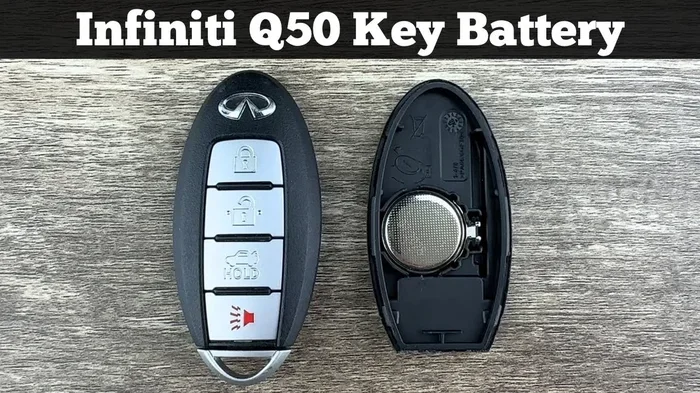
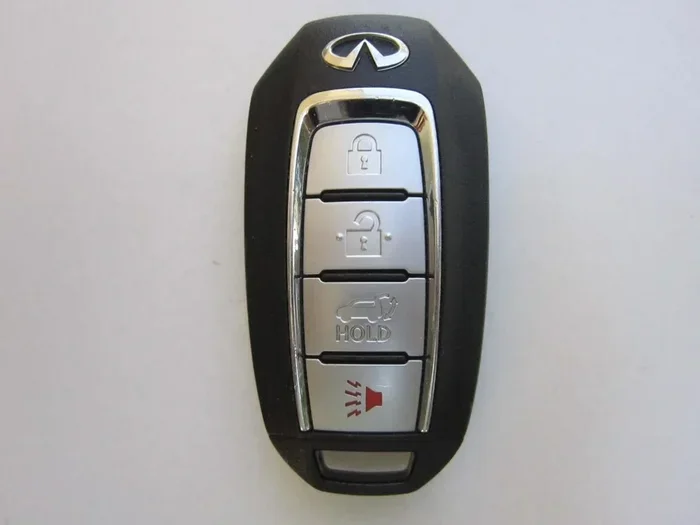
Your Infiniti smart key must be within range and have a charged battery. If the fob feels unresponsive, the remote start will not work. You can replace the fob battery yourself. It is a small CR2032 coin cell that costs just a few dollars.
Verify the Vehicle Is Properly Parked
The QX60 will only allow remote engine start when the transmission is in Park and the parking brake is engaged. This is a safety feature designed to prevent accidental movement. Always make sure you are in a safe, legal parking spot before using remote start.
If you ever need to reset any Infiniti systems, you may want to look at how to factory reset hybrid connect for related troubleshooting steps.
Step 2: Enter the Vehicle and Prepare for Remote Start
This step is quick but important. You need to be inside the vehicle to activate the remote start sequence properly.
Press the Brake Pedal
With the engine off and your foot on the brake pedal, press the Engine Start/Stop button. This puts the vehicle in a ready state. You will see the dashboard lights up, which confirms the systems are active.
Release the Brake and Exit
Now release the brake pedal and step out of the vehicle. Make sure all doors are closed and locked. The QX60 needs to detect that you have left the vehicle before it will accept a remote start command.
Double Check the Doors Are Locked
Use the key fob to lock all doors. Some owners skip this step and wonder why remote start fails. The system is designed to only respond to the start command when the vehicle is fully secured.
Step 3: Activate Remote Start Using the Key Fob
This is the moment you have been waiting for. Here is exactly how to fire up the engine from a distance.
Press the Remote Start Button
On most Infiniti QX60 key fobs, the remote start button is marked with a curved arrow icon. Press it once. You should hear the engine turn over within a few seconds. The parking lights will flash to confirm the system has received the command.
Wait for the Confirmation Signal
After pressing the button, listen for the engine to start. You may also see the dashboard lights flash or the headlights turn on briefly. This is normal and confirms the remote engine start was successful.
Repeat if Necessary
If nothing happens, do not panic. Wait a few seconds and try again. Sometimes the fob needs a moment to register. If it still fails, your key fob battery may be low, or the vehicle may not be in the correct state.
Step 4: Set the Climate Control Remotely
One of the best parts about the QX60 remote start is the ability to control the cabin temperature before you get in. This is especially valuable during cold weather months.
Use the Climate Buttons on the Key Fob
Some QX60 key fobs include climate control buttons. Press the heat or cool button to activate the automatic climate control system. The vehicle will begin warming or cooling the cabin based on your last settings.
Set Your Preferred Temperature First
For the best results, set your desired temperature while you are still inside the vehicle. The system will remember this setting and apply it when you trigger the remote start. This way, you walk into a perfectly comfortable cabin every time.
How Long Does Climate Pre Conditioning Last?
The QX60 typically runs the climate system for about 10 to 15 minutes during a remote start cycle. After that, the engine will shut off automatically unless you go ahead and drive the vehicle. This is a safety feature and also helps conserve fuel.
If you are dealing with extreme temperatures and your vehicle has been sitting for a while, check out our article on how long a car can sit in cold weather for helpful tips on protecting your engine and battery.
Step 5: Drive Away Safely After Remote Start
Once the engine is running and the cabin is comfortable, it is time to drive. But there are a few things to keep in mind for a smooth transition.
Insert the Key Fob into the Push Button Start
When you are ready to drive, bring the Infiniti smart key into the vehicle. Place it near the push button start area. The system needs to detect the fob before it will allow you to shift out of Park.
Press the Brake and Shift into Drive
Press the brake pedal and press the Engine Start/Stop button. The engine will switch from remote start mode to normal driving mode. Shift the transmission into Drive and you are good to go.
Remote Start Timer Limits
The QX60 remote start system has a built in timer. You can typically run the engine for up to 10 minutes remotely. If you want more time, you can repeat the remote start process once. However, most people find one cycle is enough to warm up or cool down the cabin.
Common Mistakes to Avoid When Remote Starting Your QX60
Even though the process is simple, people make mistakes that prevent remote start from working. Here are the most common ones.
- Forgetting to lock the doors: The system will not start if the vehicle is unlocked. Always confirm all doors are locked before pressing the remote start button.
- Not pressing the brake first: You must press the brake pedal and start the vehicle once before using remote start. Skipping this step is the number one reason remote start fails.
- Low key fob battery: A weak fob battery means the signal will not reach the vehicle. Replace the battery every 12 to 18 months to avoid surprises.
- Running the remote start in an enclosed space: Never use remote start in a garage with the door closed. Carbon monoxide is a serious danger. Always start your vehicle in an open area.
- Ignoring warning lights: If your dashboard shows a check engine light or any warning, the remote start may be disabled as a safety precaution. Address any warning lights first.
If you ever see a warning light and need help clearing it, our guide on how to clear a check engine code can be very helpful.
Tips to Keep Your QX60 Remote Start System in Top Shape
Like any feature, the remote start system works best with regular care. Here are some practical tips to keep it running smoothly.
Replace Your Key Fob Battery Regularly
A fresh battery in your smart key ensures a strong, reliable signal. Most Infiniti owners find that replacing the battery once a year keeps everything working perfectly. It takes less than two minutes and costs under five dollars.
Keep Your Vehicle Software Updated
Infiniti occasionally releases software updates that improve the remote start functionality. Check with your dealer or use the Infiniti InTouch system to see if any updates are available for your model.
Maintain Your Car Battery
The remote start system draws power from your vehicle battery. If your battery is weak or old, remote start may fail. For hybrid QX60 owners, keeping the hybrid battery in good condition is equally important. Check out our guide on how to make your hybrid battery last longer for useful maintenance tips.
Use Remote Start in Moderation
While it is tempting to remote start your vehicle every single day, excessive use can put extra wear on the engine and battery. Use it when you truly need the comfort benefit, and let the engine warm up naturally during shorter trips.
How Cold Weather Affects Your QX60 Remote Start
If you live in a region with harsh winters, the remote start feature becomes almost essential. The QX60 handles cold weather well, but there are a few things to understand.
When temperatures drop below freezing, engine oil thickens and takes longer to circulate. Remote starting your QX60 5 to 10 minutes before you drive allows the oil to warm up and flow properly. This reduces engine wear and gives you a smoother driving experience from the moment you pull out of the driveway.
The automatic climate control system in the QX60 is designed to defrost the windshield and warm the cabin simultaneously. You can press the defrost button before leaving the vehicle, and the system will prioritize clearing frost and fog when you remote start.
During extreme cold, you may notice the remote start engine shuts off sooner than usual. This is normal. The system protects the engine from overworking in freezing conditions. You can always repeat the remote start cycle for an additional 10 minutes if needed.
If you are also concerned about tire pressure or other cold weather effects, our article on how to defog a car windshield fast offers quick tips for maintaining clear visibility.
Frequently Asked Questions
Can I Remote Start My Infiniti QX60 With the Manual Key?
No, the remote start function requires the Infiniti smart key fob. The manual key does not have a remote start button. If your smart key battery dies, you can use the manual key to start the vehicle, but you will not be able to use the remote start feature until the fob battery is replaced.
How Far Away Can I Be From My QX60 When Remote Starting?
The typical range for the Infiniti QX60 remote start is around 200 feet. However, this can vary based on obstacles like buildings and walls. For best results, stay within line of sight of your vehicle when using the remote start function.
Is It Safe to Remote Start My QX60 in a Parking Lot?
Yes, it is safe as long as you are in a legal and open area. The QX60 will not move unless you insert the smart key and press the brake pedal. The vehicle stays in Park and the steering wheel remains locked until you physically enter and start driving.
Why Does My QX60 Remote Start Keep Failing?
The most common reasons are a low key fob battery, an unlocked door, or the vehicle not being in Park with the parking brake engaged. Check all of these first. If the problem persists, it could be a sensor or module issue that needs professional diagnosis.
Can I Use Remote Start With the Infiniti QX60 Hybrid?
Yes, the QX60 hybrid model supports remote start. However, the hybrid system has additional safety protocols. Make sure the hybrid battery is sufficiently charged and the vehicle is in a proper state before attempting remote start. For more on hybrid battery care, see our guide on making your hybrid battery last longer.
Does Remote Start Void My QX60 Warranty?
No, using the factory installed remote start system does not void your Infiniti warranty. This is an OEM feature designed and tested by Infiniti engineers. However, aftermarket remote start installations may affect warranty coverage depending on the situation, so always check with your dealer.
Final Thoughts on Remote Starting Your Infiniti QX60
The Infiniti QX60 remote start feature is one of those small luxuries that makes a big difference in your daily routine. Whether you are battling freezing winter mornings or humid summer afternoons, the ability to precondition your cabin from a distance is genuinely worth having.
The five steps we covered are simple, fast, and designed to keep you safe while maximizing comfort. From making sure your vehicle is ready, to pressing the remote start button, to driving away smoothly, every part of the process is intuitive once you have done it a few times.
Remember to take care of your car battery, keep your key fob battery fresh, and use the system responsibly. These small habits will keep your remote start system working reliably for years to come.
If you ever want to explore more about your QX60 or compare it with other vehicles, check out our guide on how much an Isuzu Double Cab costs for a comparison of mid size SUVs in a similar price range.
Now that you know how to remote start an Infiniti QX60, you can enjoy the comfort and convenience every single time you walk out to your vehicle. Stay warm in winter, stay cool in summer, and drive on with confidence.
Frequently Asked Questions
What is How to Remote Start an Infiniti QX60?
How to Remote Start an Infiniti QX60 is an important topic with many practical applications.