How to Change an Acura RDX Key Battery Step by Step
Changing the battery in your Acura RDX key fob is a simple task you can do at home in under five minutes. This guide walks you through every step, from opening the key fob to testing the new battery. You will learn which battery type to use, common mistakes to avoid, and how to reset your RDX key fob after the replacement.
Your Acura RDX key fob stopped working. Maybe the unlock button does nothing, or the remote start feature failed when you needed it most. Before you call a dealer or spend money on a replacement, take a breath. In most cases, the problem is a dead battery, and you can fix it yourself.
This guide shows you exactly how to change an Acura RDX key battery step by step. We cover everything from the tools you need to troubleshooting tips if the fob still does not work after the swap. Whether you own a 2019 RDX or a 2024 model, the process is nearly identical. Let us get your remote working again.
Key Takeaways
- Easy DIY fix: You do not need a mechanic or special tools to change your Acura RDX key battery.
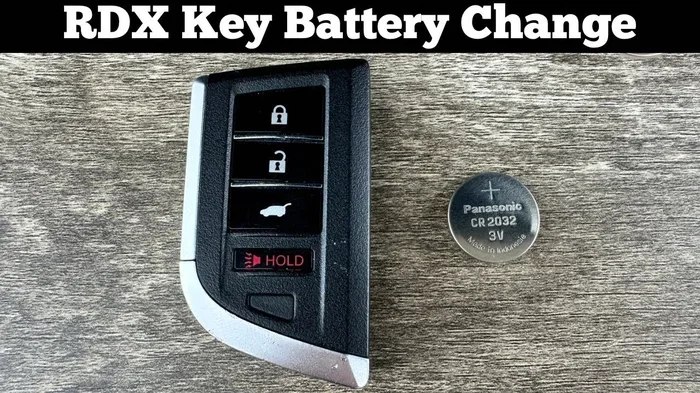
- CR2032 battery: This is the standard coin cell battery used in most Acura RDX key fobs.
- Quick process: The entire battery swap takes about three to five minutes.
- Reset required: You may need to reset a key fob after replacing the battery for full functionality.
- Cost effective: A replacement battery costs just a few dollars and lasts for years.
- No programming needed: Unlike some vehicles, the RDX key fob does not require reprogramming after a battery change.
- Preventive tip: Keep a spare CR2032 battery in your glove box for emergencies.
📑 Table of Contents
- Why Your Acura RDX Key Fob Battery Dies
- What You Need Before Starting
- Step-by-Step Guide to Changing Your Acura RDX Key Battery
- Troubleshooting: Fob Still Not Working After Battery Replacement
- How Often Should You Replace Your RDX Key Battery?
- Can You Replace the Battery Yourself, or Do You Need a Dealer?
- Acura RDX Key Fob Battery vs. Car Battery: Do Not Confuse Them
- Extending Your Acura RDX Key Fob Battery Life
- How Long Does the Replacement Process Take?
- Final Thoughts
Why Your Acura RDX Key Fob Battery Dies
Understanding why batteries die helps you prevent future problems. Most Acura RDX key fobs use a CR2032 coin cell battery. These small batteries power the remote unlock, lock, trunk release, and sometimes the push-to-start function.
On average, an RDX key fob battery lasts between two and four years. However, several factors can shorten that lifespan:
- Frequent use: If you press the buttons dozens of times a day, the battery drains faster.
- Cold weather: Low temperatures reduce battery efficiency and can cause the fob to stop working in winter.
- Moisture exposure: Sweat or rain can seep into the key fob and corrode the battery contacts.
- Proximity to electronics: Keeping the fob near strong electromagnetic fields can drain the battery slowly over time.
- Low-quality battery: Cheap off-brand batteries may not last as long as trusted names like Energizer or Duracell.
Signs Your RDX Key Battery Is Dying
Do not wait until the fob stops working completely. Watch for these early warning signs:
- The remote range becomes shorter. You need to stand closer to the vehicle to unlock it.
- The unlock or lock buttons feel less responsive.
- The key fob warning light on the dashboard appears intermittently.
- You need to press the button multiple times for the same action.
- The push-to-start feature fails to recognize the key fob.
If you notice any of these symptoms, it is time to replace the battery. Catching the problem early means you never get stranded with a dead fob.
What You Need Before Starting
One of the best things about this job is how little you need. No special equipment or dealer visits required. Here is your checklist:
- A CR2032 battery: This is the exact battery type for the Acura RDX key fob. You can find it at any grocery store, pharmacy, or auto parts shop for around three to five dollars.
- A small flathead screwdriver or a thin plastic pry tool: You use this to open the key fob casing. A plastic tool is safer and prevents scratches.
- A clean, dry workspace: A table with good lighting works perfectly.
- A soft cloth: This helps you clean the inside of the fob before closing it back up.
Pro tip: always keep a spare CR2032 battery in your glove box. It takes two minutes to swap in a spare, and you avoid the hassle of being locked out.
Step-by-Step Guide to Changing Your Acura RDX Key Battery
Now let us get into the actual process. Follow each step carefully, and you will have a working fob in minutes.
Step 1: Remove the Mechanical Key
Your Acura RDX key fob has a hidden mechanical key inside. Look for a small button or sliding mechanism on the side of the fob. Press or slide it, and the metal key blade pops out.
Set the mechanical key aside. You do not need it for the battery replacement, but keep it somewhere safe. Some RDX models use this key as a backup if the fob battery dies completely.
Step 2: Locate the Seam and Open the Fob
Turn the fob over so the buttons face down. Look for a thin seam running along the edge of the casing. This is where the two halves of the fob separate.
Insert your flathead screwdriver or plastic pry tool into the seam. Gently work it around the edge. The fob clips are not very tight, so you do not need much force. Just go slow and even.
Important: Avoid using metal tools on the inside of the fob. You risk scratching the circuit board or damaging the buttons. A plastic pry tool is the best choice.
Step 3: Remove the Old Battery
Once the fob is open, you will see the battery sitting in a small compartment. It is usually held in place by a tiny metal clip or just friction.
Look at which direction the battery sits. Note the positive side facing up. Use the screwdriver or a pair of tweezers to gently lift the old battery out. Dispose of the old battery properly. Do not throw coin cell batteries in the regular trash. Many stores have recycling bins for them.
Step 4: Insert the New CR2032 Battery
Take your new CR2032 battery and hold it with the positive side facing up. The positive side usually has a plus sign (+) and a slightly raised surface.
Place the battery into the compartment, matching the orientation of the old one. Push it down gently until it clicks into place under the metal clip. Make sure the battery sits flat and secure.
Quick tip: if the new battery feels loose, double-check that it is the correct type. A CR2025 battery is similar but slightly thinner and will not make proper contact.
Step 5: Close the Fob Casing
Align the two halves of the key fob carefully. Press them together firmly but gently. You should hear the clips snap into place along the seam.
Run your finger around the edge to make sure the fob is fully closed. If a gap remains, open it again and check for any debris or misalignment. A properly sealed fob protects the internal electronics from moisture and dust.
Step 6: Test the Key Fob
Stand near your Acura RDX and press the unlock button. The doors should respond immediately. Test the lock button, the trunk release, and the push-to-start if your model has it.
If the fob works, you are done. If nothing happens, do not panic. Move on to the troubleshooting section below.
After replacing the battery, you may wonder if you need to do anything else. Do you need to do anything after replacing a key fob battery? The answer is usually no, but some models benefit from a reset.
Troubleshooting: Fob Still Not Working After Battery Replacement
You replaced the battery, but the Acura RDX key fob still does not work. This happens more often than you might think. Here are the most common reasons and how to fix them.
Check the Battery Orientation
The most common mistake is inserting the battery upside down. Open the fob again and verify that the positive side faces up, matching the old battery’s position. A reversed battery will not power the fob, no matter how new it is.
Clean the Battery Contacts
Over time, corrosion can build up on the metal contacts inside the fob. Use a dry cloth or a cotton swab lightly dampened with rubbing alcohol to clean the contact points. Let them dry completely before inserting the new battery.
Reset the Key Fob
Sometimes the fob needs a reset after a battery change. Do you have to reset a key fob after replacing the battery? For the Acura RDX, a simple reset often solves the issue. To do this, sit inside your RDX with all doors closed. Insert the key into the ignition and turn it to the “ON” position without starting the engine. Press and hold the lock button on the fob for five seconds, then release. Turn the ignition off and back on. The fob should re-pair with the vehicle automatically.
Check for Water Damage
If the fob has been exposed to moisture, internal components may be damaged. Open the fob and inspect the circuit board for any green or white residue. If you see corrosion, the fob may need professional repair or replacement.
Try a Different Battery
Not all CR2032 batteries are created equal. Some cheap brands have lower voltage or drain faster. Try a name-brand CR2032 battery from Energizer, Duracell, or Panasonic. The difference in quality can be surprising.
How Often Should You Replace Your RDX Key Battery?
Most owners replace their Acura RDX key fob battery every two to three years. However, your experience may vary based on usage and climate.
Here are some general guidelines:
- Heavy users: If you use the remote functions daily, consider replacing the battery every two years.
- Light users: If you mostly use the push-to-start or physical key, the battery may last three to four years.
- Cold climates: Winter weather drains batteries faster. Replace annually if you live in a cold region.
- After any electrical work: If you recently had work done on your RDX electrical system, check the fob battery as a precaution.
Keeping track of when you last changed the battery helps you stay ahead of problems. Write the replacement date on the battery with a marker, or note it in your phone calendar.
Can You Replace the Battery Yourself, or Do You Need a Dealer?
The short answer is yes, you can absolutely do it yourself. The process does not require any special skills or tools. Thousands of RDX owners change their key fob batteries at home every year.
There are a few situations where visiting a dealer or locksmith makes sense:
- The fob casing is cracked or damaged and will not close properly.
- The circuit board inside the fob is visibly corroded or burned.
- You have tried a new battery and reset the fob, but it still does not work.
- You lost both key fobs and need a replacement programmed to your vehicle.
For routine battery changes, the DIY route saves time and money. A new CR2032 battery costs about three to five dollars. A dealer might charge you fifty dollars or more for the same simple task.
Acura RDX Key Fob Battery vs. Car Battery: Do Not Confuse Them
Some owners confuse the key fob battery with the car battery. These are two completely different components. The key fob battery is a tiny CR2032 coin cell. The car battery is a large 12-volt lead-acid battery under the hood.
If your RDX will not start and the dashboard lights are dim, the problem is likely the car battery, not the key fob. To check your car battery health, you can learn how to check my car battery with a simple multimeter or by visiting an auto parts store that offers free testing.
Understanding the difference prevents unnecessary trips and helps you diagnose problems faster.
Extending Your Acura RDX Key Fob Battery Life
Want to get the most life out of each new battery? Follow these simple practices:
- Keep the fob away from other electronics: Storing the fob near your phone or laptop can cause slow battery drain through electromagnetic interference.
- Avoid pressing buttons unnecessarily: Each press uses a small amount of energy. Only press buttons when you need them.
- Store the fob in a cool, dry place: Heat and moisture are the biggest enemies of coin cell batteries.
- Use quality batteries: Name-brand CR2032 batteries consistently outperform generic ones in both lifespan and reliability.
- Close the fob properly: An improperly sealed fob exposes the battery to air, which accelerates drainage.
These small habits add up over time and can extend your battery life by several months or even years.
How Long Does the Replacement Process Take?
From start to finish, changing your Acura RDX key battery takes about three to five minutes. That includes opening the fob, swapping the battery, closing it, and testing it. It is one of the fastest and easiest car maintenance tasks you will ever do.
Once you have done it a couple of times, you will be able to change the battery in under two minutes without even thinking about it.
Final Thoughts
Replacing the battery in your Acura RDX key fob is one of those simple maintenance tasks that saves you time, money, and frustration. With just a CR2032 battery and a few minutes of your time, you can bring your remote back to life without visiting a dealer or calling a locksmith.
Remember to always use the correct battery type, follow the steps carefully, and test the fob after the swap. If the fob still does not work, try resetting it or checking for damage to the internal components.
Keep a spare battery in your glove box, and you will never be caught off guard. Your Acura RDX key fob will keep working reliably for years to come.
Frequently Asked Questions
What type of battery does the Acura RDX key fob use?
The Acura RDX key fob uses a CR2032 coin cell battery. This is a standard 3-volt battery available at most grocery stores, pharmacies, and auto parts shops for just a few dollars.
How do I know when to replace my RDX key battery?
Watch for signs like reduced remote range, unresponsive buttons, or the key fob warning light on your dashboard. If you notice any of these symptoms, it is time to replace the battery.
Do I need to reprogram my Acura RDX key fob after changing the battery?
No. The Acura RDX key fob does not require reprogramming after a battery change. However, you may need to reset the fob by following a simple process of turning the ignition on and off while pressing the lock button.
How long does an Acura RDX key fob battery last?
On average, the CR2032 battery in an Acura RDX key fob lasts between two and four years, depending on usage frequency, climate, and battery quality.
Can I use a generic brand CR2032 battery for my RDX key fob?
Yes, but name-brand batteries like Energizer, Duracell, or Panasonic tend to last longer and provide more reliable performance. Avoid very cheap off-brand options that may have inconsistent voltage.
What should I do if the key fob still does not work after replacing the battery?
First, check that the battery is inserted correctly with the positive side up. Clean the contacts with a dry cloth, try resetting the fob, and test with a different battery. If none of these steps work, the fob may have internal damage and need professional repair.
=== CONCLUSION ===
Changing the battery in your Acura RDX key fob is quick, easy, and costs almost nothing. With this step-by-step guide, you have everything you need to handle the job yourself confidently. Keep a spare CR2032 battery on hand, follow the simple steps, and your RDX remote will keep working reliably for years. Do not let a dead key fob battery slow you down. Take five minutes today and do the swap yourself.