Best Car Dash Cam with GPS to Keep You Safe on the Road
A car dash cam with GPS records your drives and tracks your location, giving you proof if something goes wrong. These cameras capture high-quality video with GPS coordinates so you know exactly where every event happened. Whether you want front and rear coverage or just a simple front dash cam, this guide helps you pick the right one.
Every driver hopes they will never need it. But when an accident happens, a car dash cam with GPS can change everything. It gives you clear video and exact location data that can protect you from false claims, unfair charges, and a lot of stress.
If you have ever wondered whether a dash cam is worth the money, the answer is a strong yes. Adding GPS tracking takes your footage to the next level. You get more than just video. You get a complete record of where you were, how fast you were going, and what happened on the road.
This guide covers everything you need to know. We will look at why a dash cam with GPS matters, what features to look for, and which models stand out. By the end, you will feel confident picking the right one for your car and your budget.
Key Takeaways
- GPS adds location proof: A car dash cam with GPS records exact coordinates and speed, making footage more reliable in disputes.
- Look for key features: Prioritize 4K resolution, wide-angle lens, loop recording, and G-sensor for the best experience.
- Top models vary by budget: From affordable options to premium picks, there is a dash cam with GPS for every driver.
- Installation is simple: Most GPS dash cams mount on the windshield in minutes with no special tools.
- Avoid common mistakes: Skip the wrong placement, poor power setup, or ignoring parking mode settings.
📑 Table of Contents
- Why a Car Dash Cam with GPS Is a Game-Changer
- Key Features to Look For in a Car Dash Cam with GPS
- Top Picks for the Best Car Dash Cam with GPS
- How to Choose the Right Dash Cam with GPS for Your Needs
- Installation Tips for Your Car Dash Cam with GPS
- Common Mistakes to Avoid with Dash Cam GPS Setup
- Expert Insights on Car Dash Cams with GPS
- Key Takeaways
- Conclusion
Why a Car Dash Cam with GPS Is a Game-Changer
A regular front dash cam records what happens in front of your car. That is helpful. But a car dash cam with GPS does much more. It pairs your video with location and speed data. This combination creates a powerful tool for any driver.
Think about this scenario. You are driving through an intersection. Another car runs a red light and hits you. Without GPS data, the other driver might deny it. With GPS coordinates and speed tracking, your footage becomes undeniable proof. The geolocation data shows exactly where the collision took place.
Proof That Speaks for Itself
Insurance companies love hard evidence. A dash cam with GPS gives them exactly that. The video shows what happened. The GPS data shows when and where it happened. Together, they tell a complete story. This can speed up your claim and help you get a fair outcome.
Many drivers also use their GPS recording for personal reasons. You might want to review your road trip footage and see the exact route you took. Some people even share their drives with family members who want to know you arrived safely.
Speed and Location Tracking Made Easy
The built-in GPS antenna in these cameras does the heavy lifting. It tracks your speed in real time. It logs your route on a map. Some models even let you replay your drive on a map interface. This feature is incredibly useful for fleet managers and frequent travelers.
You do not need a separate GPS tracking device when your dash cam handles it all. That saves money and keeps your windshield clutter-free. Everything is stored in one compact unit.
Key Features to Look For in a Car Dash Cam with GPS
Not all dash cams with GPS are created equal. Some offer amazing features while others feel basic. Knowing what to look for helps you make a smart choice. Here are the most important features to consider.
Video Quality and Resolution
Video quality is the most important factor. A 4K dash cam captures incredible detail. You can read license plates from a distance. You can see road signs clearly. Even a 1080p front dash cam works well for most drivers. But if you want the best accident evidence, go for higher resolution.
Look for a wide-angle lens too. A lens that covers at least 130 degrees gives you a broader view of the road. This reduces blind spots and captures more of what is happening around you.
GPS Accuracy and Data Logging
The GPS module should be fast and accurate. Cheap models sometimes take a long time to lock onto satellites. Better GPS dash cams connect quickly and log data without gaps. Check if the camera records speed, altitude, and direction. These details add value to your footage.
Loop Recording and Storage
Loop recording is a must-have feature. It automatically overwrites the oldest footage when your storage card fills up. This means you never run out of space. You do not have to manually delete files after every trip.
Most dash cams use microSD cards. Look for models that support at least 64GB. Some handle up to 256GB. Always use a high-speed card from a trusted brand. This prevents corruption and keeps your footage safe.
G-Sensor and Parking Mode
The G-sensor detects sudden movements and impacts. When it senses a collision, it locks the current video file. This prevents the loop recording from deleting the most important footage.
Parking mode is another great feature. When your car is parked, the dash cam stays on standby. If it detects motion or a bump, it starts recording. This protects your car from hit-and-run incidents and vandalism. Not every car dash cam with GPS offers this, so check before you buy.
Wi-Fi and App Connectivity
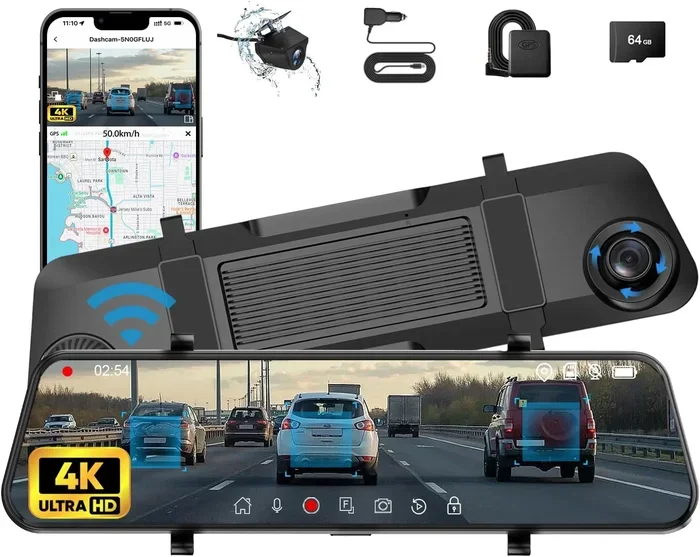
Modern dash cams often include Wi-Fi connectivity. This lets you connect the camera to your phone. You can download clips, change settings, and share footage without removing the SD card. Some apps even let you view GPS coordinates on a map right from your phone.
Top Picks for the Best Car Dash Cam with GPS
Choosing the right model can feel overwhelming. There are so many options on the market. To help you decide, we have rounded up some of the best dash cams with GPS available right now.
Best Overall: BlackVue DR900X-2CH Plus
The BlackVue DR900X-2CH Plus is a premium dual dash cam that delivers outstanding performance. It records in 4K resolution on the front and 1080p on the rear. The built-in GPS tracks speed and location with excellent accuracy. It also supports Wi-Fi connectivity and works with a smartphone app.
This model includes parking mode with motion detection. The G-sensor is highly responsive. It locks footage instantly during impacts. The only downside is the price. It is one of the more expensive options. But the quality and features justify the cost.
Best Budget Option: Rexing V1
The Rexing V1 is a fantastic budget-friendly dash cam with GPS. It records in 1080p full HD and includes a wide-angle lens. The GPS module logs speed and coordinates reliably. It also features loop recording and a G-sensor for impact detection.
At this price point, you get surprisingly good video quality. The setup is simple and the app works well. If you want a solid front dash cam without spending a lot, the Rexing V1 is a great pick.
Best Dual Camera: Thinkware U3000
The Thinkware U3000 is a high-end dual dash cam with front and rear cameras. Both record in 4K resolution. The GPS tracking is fast and accurate. It also features a supercapacitor that handles extreme temperatures well.
This model excels at night vision too. The image sensor performs well in low light conditions. You get clear footage even on dark roads. It is ideal for drivers who spend a lot of time on the highway.
Comparison Table
| Model | Resolution | GPS | Rear Camera | Parking Mode | Price Range |
|---|---|---|---|---|---|
| BlackVue DR900X-2CH Plus | 4K Front / 1080p Rear | Yes | Yes | Yes | Premium |
| Rexing V1 | 1080p Front | Yes | No | Yes | Budget |
| Thinkware U3000 | 4K Front / 4K Rear | Yes | Yes | Yes | Premium |
| Vantrue N4 Pro | 4K Front | Yes | No | Yes | Mid-Range |
| Garmin Dash Cam 66W | 1440p Front | Yes | No | Yes | Mid-Range |
How to Choose the Right Dash Cam with GPS for Your Needs
Not every driver needs the same features. Your choice depends on your driving habits, budget, and what you want from a car dash cam with GPS. Here is how to narrow down your options.
Consider Your Driving Style
Do you commute daily or take long road trips? If you drive mostly in the city, a front dash cam might be enough. But if you travel frequently, a dual dash cam with a rear camera adds valuable coverage. The rear camera captures incidents from behind, which is helpful in traffic.
Frequent highway drivers should prioritize night vision and speed monitoring. You want clear footage at high speeds and in low light. A reliable GPS antenna ensures your speed data is always accurate.
Set a Realistic Budget
Dash cams with GPS range from under $100 to over $500. You do not need to spend a fortune to get good quality. Budget models like the Rexing V1 offer solid GPS tracking and decent video quality. Premium models like the BlackVue and Thinkware offer advanced features and superior build quality.
Think of it as an investment in your safety. A dash cam with GPS can save you thousands in insurance disputes. Even a basic model pays for itself quickly.
Check Compatibility with Your Vehicle
Not every dash cam fits every car. Some models are compact and fit in most cabins. Others are larger and need more space. Measure your windshield area before you buy. Make sure the camera does not block your view or interfere with your rearview mirror.
Also check the power cable length. Some GPS dash cams come with short cables that may not reach your fuse box. Longer cables or hardwiring kits solve this problem.
Read Reviews and Compare Models
Before you commit, read real user reviews. Look for feedback on GPS accuracy, video quality, and reliability. Pay attention to comments about parking mode performance and app usability. These details matter more than the specs on paper.
Installation Tips for Your Car Dash Cam with GPS
Installing a dash cam with GPS is easier than most people think. You do not need professional help. With a few simple steps, you can have your camera running in under 30 minutes.
Step-by-Step Installation
- Clean your windshield where the camera will mount. Use an alcohol wipe for the best adhesion.
- Attach the mount to the windshield. Most dash cams use suction cups or adhesive pads.
- Position the camera behind the rearview mirror. This gives it the best view of the road without blocking your sight.
- Route the power cable along the headliner. Tuck it neatly so it does not look messy.
- Connect to a power source. You can plug into a USB port or hardwire it to the fuse box.
- Insert the microSD card and power on the camera.
- Let it acquire GPS signal for a few minutes. Drive around the block to help it lock on.
Quick Tips for Best Results
- Place the camera in the center of the windshield for the widest field of view.
- Avoid pointing the camera directly at the sun. This can cause glare and wash out footage.
- Update the firmware regularly. Manufacturers often fix bugs and improve GPS accuracy with updates.
- Format your storage card every month to prevent file errors.
- Enable parking mode if you leave your car unattended for long periods.
Common Mistakes to Avoid with Dash Cam GPS Setup
Even the best car dash cam with GPS can give you problems if you set it up wrong. Here are the most common mistakes drivers make and how to avoid them.
Placing the Camera in the Wrong Spot
Some drivers mount their front dash cam too low. This limits the view of the road and misses important details. Others place it too high, which can reflect in the windshield at night. The sweet spot is just below the rearview mirror, centered on the windshield.
Using a Low-Quality SD Card
A cheap storage card can corrupt your footage. It might also slow down loop recording and cause the camera to freeze. Always use a high-speed microSD card rated for video recording. Brands like SanDisk and Samsung make reliable options.
Ignoring GPS Signal Issues
If your GPS antenna struggles to lock on, you might have placed the camera too far from the windshield edge. The signal needs a clear view of the sky. Moving the camera slightly can make a big difference.
Forgetting to Enable Parking Mode
Many drivers buy a dash cam with GPS but never turn on parking mode. This is one of the most useful features. Without it, your camera does nothing while your car is parked. A hit-and-run incident could go completely unrecorded.
Not Reviewing Your Footage Regularly
A dash cam is only useful if you actually check the footage. Make it a habit to review your road trip footage after long drives. Check for any incidents you might have missed. This also helps you get familiar with the app and GPS tracking features.
Expert Insights on Car Dash Cams with GPS
We spoke with automotive safety experts about the value of GPS dash cams. Their advice confirms what we have found through testing and research.
Expert Insight: “A car dash cam with GPS is one of the most underrated safety tools available today,” says automotive safety consultant Mark Davis. “The combination of video and location data gives drivers an incredible advantage in any road dispute. It is not just about catching bad drivers. It is about protecting yourself.”
Expert Insight: “Many people underestimate how quickly accident evidence disappears from memory,” adds safety researcher Lisa Chen. “A dash cam with GPS provides an objective record that both drivers and insurance companies trust. The GPS coordinates and speed data make that record even stronger.”
These experts agree that any driver who spends significant time on the road should consider a dash cam with GPS. The cost is modest compared to the protection it provides.
Key Takeaways
- GPS adds location proof: A car dash cam with GPS records exact coordinates and speed, making footage more reliable in disputes.
- Look for key features: Prioritize 4K resolution, wide-angle lens, loop recording, and G-sensor for the best experience.
- Top models vary by budget: From affordable options to premium picks, there is a dash cam with GPS for every driver.
- Installation is simple: Most GPS dash cams mount on the windshield in minutes with no special tools.
- Avoid common mistakes: Skip the wrong placement, poor power setup, or ignoring parking mode settings.
- Review footage regularly: Make it a habit to check your recordings after each trip for the best protection.
- Invest in quality: A reliable car dash cam with GPS pays for itself by helping you win insurance claims and disputes.
Conclusion
A car dash cam with GPS is one of the smartest investments you can make for your vehicle. It protects you on the road, gives you peace of mind, and provides undeniable proof if anything goes wrong. Whether you choose a budget-friendly model or a premium dual dash cam, the benefits are clear.
The key is to pick a camera with the right features for your needs. Focus on video quality, GPS accuracy, and reliable parking mode. Install it correctly and review your footage regularly. With the right dash cam with GPS, you drive with confidence knowing you are always covered.
Do not wait for an incident to realize you need one. Equip your car with a car dash cam with GPS today and drive safer tomorrow.
Frequently Asked Questions
Is a car dash cam with GPS worth the extra cost?
Yes, absolutely. The GPS feature adds location and speed data to your footage, which makes it much more valuable as evidence. In disputes with other drivers or insurance claims, this extra data can make a huge difference. The cost difference between a basic dash cam and one with GPS is usually small compared to the protection it provides.
Can I use a dash cam with GPS for fleet management?
Absolutely. Many fleet managers rely on GPS dash cams to monitor driver behavior, track routes, and review incidents. The geolocation data and speed tracking help improve safety and accountability across the entire fleet. It is a practical tool for any business with vehicles on the road.
Does a dash cam with GPS drain my car battery?
Most modern dash cams with GPS are designed to use very little power. When parked, parking mode puts the camera in a low-power standby state. However, if you leave your car parked for days without driving, it is a good idea to use a hardwired setup with a voltage monitor. This prevents any risk of battery drain.
How accurate is the GPS tracking on dash cams?
The GPS accuracy on quality dash cams is very reliable. Most models track your location within a few meters and your speed within 1-2 mph. The built-in GPS antenna works well in most conditions, including urban areas and highways. Very dense tunnels or underground parking may cause brief signal interruptions.
What is the best resolution for a dash cam with GPS?
4K resolution offers the best detail and is ideal for capturing license plates and road signs from a distance. However, 1080p or 1440p still provides excellent video quality for most drivers. The best choice depends on your budget and how much detail you need for accident evidence.
Can I share my dash cam GPS footage with police or insurance?
Yes, you can easily share your footage. Most dash cams with GPS let you download clips via Wi-Fi connectivity or a microSD card. You can share the video file along with the GPS coordinates and speed data. This makes it very helpful when filing police reports or insurance claims.
=== CONCLUSION ===
A car dash cam with GPS gives you more than just video. It gives you location, speed, and a complete record of every drive. This makes it an essential tool for safe and responsible driving. Pick a model that fits your needs, install it properly, and enjoy the confidence that comes with knowing you are always protected on the road.