How Do I Reset My Oil Light After Every Oil Change
Resetting your oil light after an oil change is a quick and easy process that most car owners can do themselves. Whether you drive a Toyota, Honda, or Ford, this guide walks you through the exact steps to turn off your oil change reminder and keep your dashboard clean. You will learn why the light comes on, how different brands handle the reset, and when the light means something is seriously wrong with your engine.
You just got your oil changed. You feel good about it. But then you look at your dashboard and see that little oil can icon staring right back at you. It is frustrating. You did the right thing by getting your oil changed, so why is the light still on? The answer is simple. You need to reset your oil light. This is something every car owner should know how to do. It takes just a few minutes and saves you a trip to the mechanic.
In this guide, we will walk you through exactly how to reset your oil light after every oil change. We cover the steps for popular car brands, common mistakes to avoid, and what to do if the light refuses to turn off. By the end of this article, you will feel confident handling this yourself. No special tools needed. No expensive shop visits. Just clear, simple instructions.
Before we dive into the steps, let us talk about what your oil light actually means. Understanding this makes the whole process much easier to grasp.
Key Takeaways
- Resetting your oil light is simple: Most cars only need a few button presses on the dashboard or steering wheel controls.
- Different brands use different methods: Toyota, Honda, Ford, and Chevrolet all have their own reset procedures.
- Never ignore a flashing oil light: A steady oil change reminder is normal after service, but a flashing or persistent light could signal low oil pressure.
- Resetting too early causes problems: Always reset the light only after the oil change and filter replacement are fully complete.
- You can do it yourself: No mechanic or dealership visit is needed for a standard oil light reset.
📑 Table of Contents
Understanding Your Oil Light
Oil Pressure Warning vs. Oil Change Reminder
Here is something many drivers do not realize. There are actually two different lights on your dashboard that people often confuse. The first is the oil pressure warning light. This one usually looks like an old oil can with a drip coming out of it. It is red and it flashes. This light means your engine does not have enough oil pressure. This is a serious problem. If this light comes on while you are driving, pull over safely and check your oil level right away.
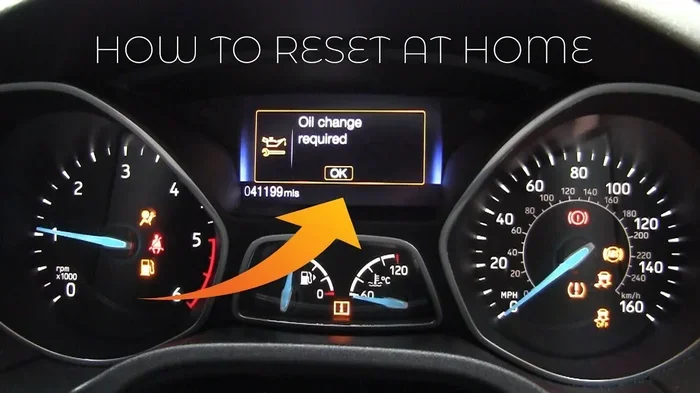
The second light is the oil change reminder. This one is usually yellow or orange. It looks like a service icon or a wrench symbol. This light is your car’s way of telling you it is time for an oil change. It is based on mileage or engine hours. It is not an emergency. It is simply a maintenance reminder. Once you get your oil changed, you just need to reset it. That is what this guide is all about.
Why Does the Oil Light Stay On After an Oil Change?
Your car does not automatically know you changed the oil. The reminder system is just a timer. It counts miles or engine cycles. When you reach the set interval, it turns on the light. Changing the oil does not automatically reset that counter. You have to tell the car, “Hey, I did the oil change. You are good now.” That is what resetting does. It zeroes out the maintenance counter and turns off the light.
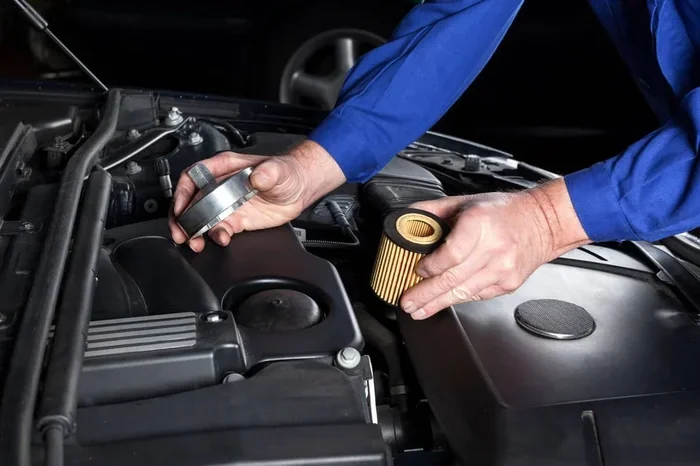
If you can you do an oil and filter change yourself, you can absolutely handle the reset too. It is part of the same process. The reset is the final step that many people forget or overlook.
How to Reset Your Oil Light (Step-by-Step)
Resetting your oil light is straightforward for most vehicles. The exact steps vary slightly depending on your car brand and model. But the general process is very similar across most makes and models. Here is what you need to know.
General Reset Procedure for Most Vehicles
Follow these steps for a standard oil light reset. Make sure your car is parked and turned off before you start. You should also have the ignition key or push-button start ready.
- Turn the ignition to the “ON” position. Do not start the engine. Just turn the key or press the start button without pressing the brake pedal. The dashboard lights should all come on briefly.
- Locate the reset button. On most cars, this is on the steering wheel, the instrument panel, or the center console. It may be labeled “RESET” or “INFO.” Sometimes it is the trip odometer reset stalk on the steering column.
- Press and hold the reset button. Hold it for about 5 to 10 seconds. Watch the dashboard. The oil light or service indicator should start to flash.
- Turn the ignition off and then back on. Some models require you to cycle the ignition. Turn it off, wait a second, then turn it back to “ON.”
- Release the reset button. The light should now be off. If it is still on, repeat the process.
- Start the engine and check. The oil light should be off now. If it is, congratulations. You are done.
Resetting with the Steering Wheel Controls
Many newer cars use steering wheel buttons for the reset. Look for a small button on the left or right side of the steering column. It may be next to the cruise control controls. In some models, you use the scroll wheel on the steering wheel to navigate to the maintenance menu and then press OK to reset. This is common in Toyota and Honda vehicles.
If you are not sure where the reset button is, check your owner’s manual. It will have a section specifically about the maintenance reminder system. You can also search online for your specific make and model plus “oil light reset procedure.”
Reset Methods for Popular Car Brands
Every car brand has its own way of handling the oil light reset. Here are the most common methods for popular brands.
Toyota Oil Light Reset
Toyota vehicles use a simple procedure for most models. Turn the ignition to “ON” without starting the engine. Use the trip meter reset stalk on the steering column. Hold it down until the maintenance light starts to flash. Then release the stalk, turn the ignition off, wait a few seconds, and turn it back to “ON.” The light should now be off. This works for most Toyota models including the Camry, Corolla, RAV4, and Highlander.
Honda Oil Light Reset
For Honda vehicles, turn the ignition to position II (just before starting). Press and hold the trip reset button on the instrument panel. The oil change indicator should start to blink. Release the button, then press and hold it again for about 10 seconds. The light should reset. Honda Civic, Accord, CR-V, and Fit owners can all use this same method.
Ford and Chevrolet Oil Light Reset
Ford vehicles often use the steering wheel controls. Navigate to the vehicle information menu using the steering wheel arrows. Scroll to “Oil Life System” and select “Reset.” Hold the OK button until the display shows the reset is complete.
Chevrolet vehicles follow a similar process. Turn the ignition to “ON.” Use the steering wheel buttons to scroll to the “Vehicle Info” menu. Find the “Oil Life” option and select “Reset.” Hold the button until the percentage resets to 100%.
If you are having trouble with your Ford or Chevy, remember that you can still drive my car if it says engine malfunction is a different situation entirely. The oil change reminder is not the same as an engine malfunction light. Do not confuse the two.
Common Mistakes When Resetting Your Oil Light
Resetting the oil light sounds easy, but people make mistakes all the time. Here are the most common ones and how to avoid them.
- Resetting before the oil change is complete. This is the number one mistake. Do not reset the light until the new oil is fully in the engine and the old oil has been drained. If you reset too early, the system thinks the oil change happened and will not remind you again until the next interval.
- Not holding the button long enough. Many people release the reset button too quickly. Hold it for at least 5 to 10 seconds. The light needs time to register the command.
- Starting the engine during the reset process. Keep the engine off while you are resetting. Starting the engine can interrupt the process and you will have to start over.
- Confusing the oil light with the check engine light. These are two completely different lights. The oil light is about oil levels or oil change reminders. The check engine light is about emissions and engine performance. They require different responses.
- Ignoring a persistent light after the reset. If you reset the light and it comes back on within a few days, something is wrong. Do not just reset it again. Have a mechanic check your oil level and oil pressure.
Quick Tips for a Smooth Reset
- Have your owner’s manual handy before you start.
- Make sure the car is in park (automatic) or neutral (manual).
- Do the reset right after the oil change while you are still at the shop or garage.
- Take a photo of the reset steps for your specific car model. You will thank yourself next time.
When the Oil Light Won’t Go Away
You followed all the steps. You held the button. You cycled the ignition. But the oil light is still on. What now? Do not panic. There are a few reasons this can happen.
Low Oil Pressure vs. Oil Change Reminder
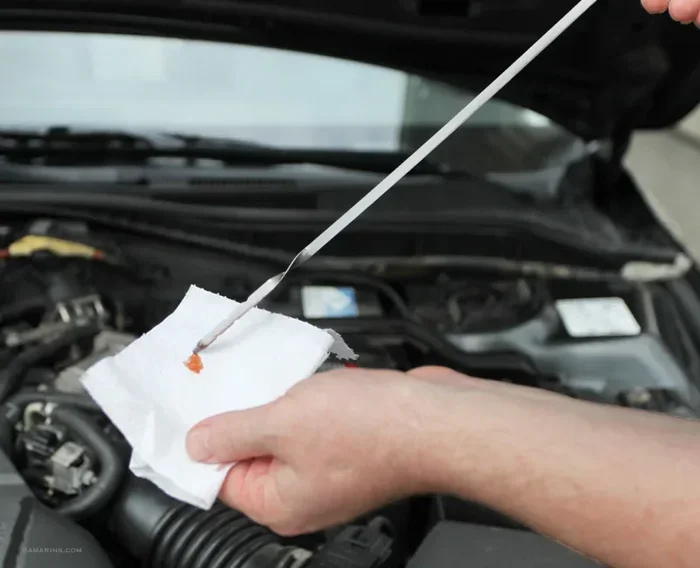
First, figure out which light you are dealing with. Is it the red oil pressure warning or the yellow oil change reminder? If it is the red light and it stays on, that is a real problem. Check your oil level immediately. Pull over and use the dipstick. If the oil level is low, add oil right away. Driving with low oil pressure can cause serious engine damage.
If the oil level is fine but the red light is still on, you may have a faulty oil pressure sensor. This is a repair that needs professional attention. Do not ignore it. Can I still drive my car if it says engine malfunction? is a similar situation. Both involve warning lights that should not be ignored.
Resetting the Oil Life System After Synthetic Oil Changes
Some cars use an “oil life” system instead of a simple mileage counter. This system monitors driving conditions like temperature, idling time, and driving style. It calculates when the oil actually needs to be changed. After you get an oil change, you need to reset the oil life system, not just the oil change reminder. The reset procedure is usually the same, but it may take a few extra steps in some models.
When to See a Mechanic
If you have tried resetting the light multiple times and it keeps coming back, it is time to see a professional. There could be a sensor issue, a wiring problem, or an actual oil pressure issue. A mechanic can run a diagnostic scan and read the error codes. This will tell you exactly what is going on.
Also, if you can you ignore maintenance required light on your Toyota, the answer is usually no. While it is technically possible to drive with the maintenance light on, it is not a good idea. The light exists to remind you of scheduled service. Ignoring it for too long can lead to overdue oil changes and potential engine problems.
How Often Should You Reset Your Oil Light?
You should reset the oil light every single time you get an oil change. That is it. It is a one-time action after each service. Most cars use a standard oil change interval of every 5,000 to 7,500 miles for conventional oil. Synthetic oil can go 10,000 to 15,000 miles between changes. Each time you reach that interval and get the oil changed, reset the light.
If you do your own oil changes at home, the reset is the final step. Once you have drained the old oil, installed the new filter, and filled with fresh oil, take a moment to reset the maintenance reminder. It only takes a couple of minutes and keeps your car running smoothly.
Keep track of your oil change intervals in a notebook or a phone app. This helps you stay on top of your car maintenance schedule and prevents the oil light from catching you off guard.
Can You Reset the Oil Light Without Changing the Oil?
Technically, yes. You can reset the light without changing the oil. But you should not. The light exists for a reason. Resetting it without actually changing the oil means your engine is running on old, degraded oil. This can lead to increased engine wear, reduced fuel efficiency, and eventually costly repairs. Always change the oil first. Then reset the light. That is the right order.
Expert Insights on Oil Light Maintenance
Many drivers think the oil light is just a nuisance. They want it off and forget about it. But experienced mechanics will tell you something different. The oil light is your car’s built-in reminder system. It is designed to protect your engine. When you respect that system and reset it properly after each oil change, you are taking an active role in your vehicle’s health.
One thing many people do not think about is the type of oil they use. Using the wrong engine oil type for your vehicle can trigger the oil light even after a change. Always check your owner’s manual for the recommended oil viscosity. For example, many modern Toyotas require 0W-20 oil. Using 5W-30 instead could cause issues with the oil life monitoring system.
Another important tip is to check your oil level between changes. Do not just rely on the light. Use the dipstick every few weeks. This gives you a real-time view of your oil health that no sensor can match. If you notice the level dropping frequently, have a mechanic inspect for leaks.
Finally, do not let the reset process intimidate you. It is one of the simplest maintenance tasks you can do. Almost every car owner can learn it in under five minutes. Once you have done it a couple of times, it becomes second nature.
Key Takeaways
- Resetting your oil light is simple: Most cars only need a few button presses on the dashboard or steering wheel controls.
- Different brands use different methods: Toyota, Honda, Ford, and Chevrolet all have their own reset procedures.
- Never ignore a flashing oil light: A steady oil change reminder is normal after service, but a flashing or persistent light could signal low oil pressure.
- Resetting too early causes problems: Always reset the light only after the oil change and filter replacement are fully complete.
- You can do it yourself: No mechanic or dealership visit is needed for a standard oil light reset.
- Check your owner’s manual: It has the exact reset procedure for your specific make and model.
- Reset every oil change: Make it a habit to reset the light right after each oil change for consistent maintenance tracking.
Frequently Asked Questions
How do I know if my oil light means low oil pressure or just a change reminder?
Check the color of the light. A red light means low oil pressure and is an emergency. A yellow or orange light is usually the oil change reminder. If the red oil pressure light is on, check your oil level immediately and do not drive until it is resolved.
Can I reset my oil light without an owner’s manual?
Yes, you can. Most reset procedures follow a similar pattern across car brands. Turn the ignition on, press and hold the reset button on the dashboard or steering wheel, cycle the ignition off and on, and release the button. You can also search online for your specific car model and year.
What happens if I never reset my oil light after an oil change?
The light will stay on and remind you that maintenance is due. It can be annoying and distracting. More importantly, the reminder system will not track your new oil change interval properly, which means you might get the next oil change reminder at the wrong time.
Why does my oil light come back on a few days after I reset it?
This usually means there is a real problem. Your oil level may be low, or there could be an oil pressure issue. Have a mechanic check your oil level and oil pressure as soon as possible. Do not just reset it again without investigating the cause.
Do I need to take my car to a dealership to reset the oil light?
No, you do not. You can reset the oil light yourself in most cases. It takes just a few minutes and requires no special tools. Dealerships will do it for you, but there is no need to pay for a service that is so easy to do at home.
Is it safe to drive with the oil change reminder light on?
Yes, it is generally safe for a short time. The light is just a reminder that an oil change is due. However, you should get the oil changed as soon as possible. Driving with old oil for too long can cause engine wear and damage over time.
=== CONCLUSION ===
Resetting your oil light after every oil change is one of the simplest and most important maintenance tasks you can do. It takes less than five minutes and keeps your dashboard clean and your maintenance schedule on track. Whether you drive a Toyota, Honda, Ford, or Chevrolet, the reset process is straightforward once you know the steps.
Remember to always reset the light after the oil change is fully complete. Never reset it without actually changing the oil. And if the light keeps coming back after you reset it, do not ignore it. Have a professional check your oil system. Your engine is the heart of your vehicle, and the oil light is one of its most important warning systems.
Take a few minutes right now to learn the reset procedure for your specific car. Write it down. Save it on your phone. The next time you get an oil change, you will know exactly what to do. You will handle it like a pro. And your car will thank you for staying on top of its maintenance.