How to Turn Off the Consider Taking a Break Alert on Hyundai
The consider taking a break alert on Hyundai vehicles is a safety feature designed to combat driver fatigue, but it can become annoying during long road trips. Turning off this alert is straightforward and can be done through your Hyundai infotainment system in just a few taps. We will walk you through the exact steps for popular Hyundai models and share tips on when to keep the feature active.
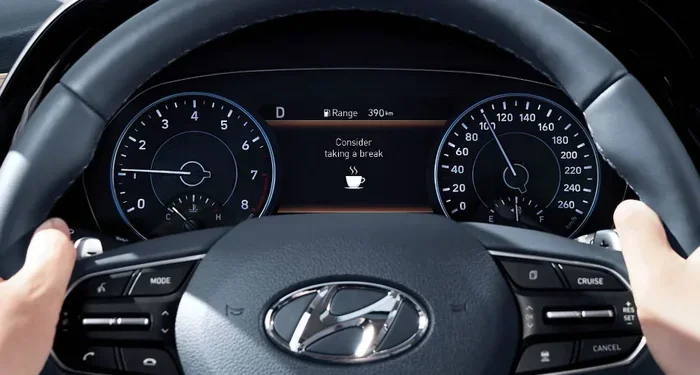
You are on a long highway drive. The sun is out. The music is playing. And then, your Hyundai screen pops up with a message that says Consider Taking a Break. It shows up again and again. It is helpful in theory, but after the third or fourth time, it starts to feel annoying. If you have been searching for a way to turn off the consider taking a break alert on Hyundai, you are in the right place.
This guide will walk you through everything you need to know. We will cover what this alert is, why Hyundai includes it, and exactly how to disable it on different Hyundai models. We will also talk about when you should actually keep it turned on. Let us get into it.
Key Takeaways
- Easy Access: The consider taking a break alert settings are found in the driver assistance or safety menu on your Hyundai infotainment screen.
- Model-Specific Steps: The process varies slightly between Hyundai models like the Sonata, Tucson, and Santa Fe.
- Safety First: Even if you turn off the alert, staying aware of fatigue signs is essential for safe driving.
- Quick Toggle: You can re-enable the alert anytime through the same settings menu.
- No Tools Needed: This is a simple software setting change that requires no mechanical work or dealership visits.
- Dashboard Connection: Similar to how low engine oil shows on the dashboard, this alert is part of your vehicle’s warning system.
📑 Table of Contents
- What Is the Consider Taking a Break Alert on Hyundai?
- Why Does Hyundai Include This Alert?
- How to Turn Off the Consider Taking a Break Alert on Hyundai
- When Should You Actually Keep the Alert On?
- Common Problems When Turning Off the Alert
- Tips for Staying Safe on Long Drives
- Frequently Asked Questions
- Conclusion
What Is the Consider Taking a Break Alert on Hyundai?
The consider taking a break alert is a driver fatigue warning system built into Hyundai vehicles. It is part of the broader Hyundai smart safety suite that includes features like forward collision avoidance and lane keeping assist. This particular alert monitors your driving patterns. It looks at things like steering corrections, time of day, and driving duration.
When the system thinks you might be tired, it displays a message on your dashboard or infotainment screen. The message typically says something like Consider Taking a Break or Fatigue Warning. Some Hyundai models also show a coffee cup icon to reinforce the message.
The system is not perfect. It can trigger during normal long drives even when you feel perfectly fine. This is why many Hyundai owners want to know how to turn off the consider taking a break alert. It is a reasonable request. The alert is meant to help, but constant pop-ups can be distracting.
How Does the System Detect Fatigue?
Hyundai uses a combination of sensors and algorithms. The system tracks steering input patterns. If you make frequent small corrections, it may interpret that as drowsiness. It also considers the time of day. Late night and early morning driving are more likely to trigger the alert. The system does not use a camera to watch your face. That is an important distinction from some other brands.
The driving fatigue alert is part of the Hyundai driver attention warning system. This system has been available on models like the Hyundai Sonata, Hyundai Tucson, Santa Fe, and Elantra. Each model may have slightly different wording or behavior, but the core function is the same.
Why Does Hyundai Include This Alert?
Hyundai includes the consider taking a break alert because driver fatigue is a real danger. According to the National Highway Traffic Safety Administration, drowsy driving causes thousands of crashes every year. Hyundai wants to help keep drivers safe. The alert encourages you to pull over and rest when the system detects patterns consistent with tired driving.
The feature is part of a broader trend in the auto industry. Almost every modern car brand now includes some form of driver fatigue warning. Mercedes has Attention Assist. Ford has Driver Alert. Toyota has a similar system. Hyundai is simply keeping up with safety standards. The good news is that you are not stuck with it if it bothers you.
It is also worth noting that this alert is different from the low engine oil warning you might see on your dashboard. That alert is critical and should never be ignored. The fatigue break alert, on the other hand, is advisory. You have the option to dismiss it or turn it off entirely.
How to Turn Off the Consider Taking a Break Alert on Hyundai
Now for the part you have been waiting for. Turning off the consider taking a break alert is done through your Hyundai infotainment system. The exact steps vary slightly depending on your model and year. Below, we break down the process for the most popular Hyundai vehicles.
Steps for Hyundai Sonata
Here is how to disable the fatigue alert on a Hyundai Sonata:
- Start your Sonata and make sure the infotainment screen is on.
- Tap the Settings icon on the home screen. It usually looks like a gear.
- Navigate to the Driver Assistance or Safety menu.
- Look for Driver Attention Warning or a similar option.
- Toggle off the Consider Taking a Break alert.
- Confirm your choice when prompted.
That is it. The alert should no longer appear during your drives. If you ever want to turn it back on, simply follow the same steps and toggle it back on.
Steps for Hyundai Tucson
The Hyundai Tucson follows a similar process but with slightly different menu names:
- Press the Home button on the Tucson infotainment system.
- Go to Settings and select Driver Assistance.
- Find the Driver Attention Warning section.
- Turn off the Break Reminder or Fatigue Alert option.
- Exit the menu. The change takes effect immediately.
Some Tucson models from 2021 and newer have a slightly different layout. If you do not see the option in Driver Assistance, try looking under Vehicle Settings or Smart Safety. The menu structure changes between model years.
Steps for Hyundai Santa Fe and Other Models
For the Hyundai Santa Fe, Elantra, and Kona, the process is very similar:
- Settings > Driver Assistance > Driver Attention Warning
- Toggle the break reminder off
- Confirm the change
If you are having trouble finding the setting, try using the search function on your infotainment screen. Type in break alert or driver attention. This should bring up the right menu quickly.
When Should You Actually Keep the Alert On?
We get it. The consider taking a break alert can be annoying. But there are times when keeping it on is a smart move. Here are some situations where you should think twice before turning it off.
- Long road trips: If you are driving hundreds of miles, fatigue is a real risk. The alert could save your life.
- Late night driving: Your body naturally wants to sleep at night. The alert helps counteract that.
- After a long work shift: If you are driving home exhausted, the alert serves as a helpful nudge.
- Unfamiliar roads: Driving in new areas requires more attention. Fatigue makes this even harder.
The Hyundai driver fatigue warning is a safety feature. It is there for a reason. Even if you turn it off most of the time, consider re-enabling it for long or late drives. You can always toggle it back on in the same settings menu.
Think of it this way. You would not ignore a low engine oil warning on your dashboard. The break alert is not as urgent, but it still serves an important purpose. Use your judgment. If you feel tired, pull over and rest. No alert is more important than your safety.
Common Problems When Turning Off the Alert
Sometimes things do not go as smoothly as we hope. Here are some common issues people face when trying to turn off the consider taking a break alert on their Hyundai, along with solutions.
The Setting Is Grayed Out
If the option to turn off the alert is grayed out, your vehicle may be in a mode that locks certain settings. Try putting the car in park and restarting the infotainment system. On some models, you need to be stationary with the engine running to access driver assistance settings.
The Alert Keeps Coming Back
This is a known issue on some Hyundai models. After you turn off the alert, it may re-enable itself after a software update or a battery disconnect. If this happens, simply go back into the settings and turn it off again. Updating your infotainment software to the latest version may also fix this.
The Menu Looks Different on My Model
Hyundai updates its infotainment interface across model years. If your screen looks different from what we described, do not worry. Look for keywords like Driver Assistance, Safety Settings, or Driver Attention. The option exists on all models that support this feature.
For more information about dashboard alerts and what they mean, check out our guide on does low engine oil show on the dashboard. Understanding your dashboard warnings helps you stay safe.
Tips for Staying Safe on Long Drives
Whether you turn off the consider taking a break alert or keep it on, staying safe on long drives is always important. Here are some practical tips from our team.
- Take a break every two hours. Even if you feel fine, a short rest helps maintain alertness.
- Stay hydrated. Dehydration causes fatigue faster than you might think.
- Keep the cabin cool. A warm car makes you drowsy. Use the AC or crack a window.
- Listen to upbeat music. Upbeat playlists help keep you engaged during long stretches of highway driving.
- Avoid driving during your usual sleep hours. Your body clock works against you during those times.
- Use a co-driver if possible. Sharing driving duties is the best way to avoid fatigue.
These tips work hand in hand with the Hyundai fatigue warning system. Even if you disable the alert, these habits will help you arrive at your destination safely. The goal is to stay sharp and aware behind the wheel.
Frequently Asked Questions
Can I turn off the consider taking a break alert on all Hyundai models?
Most modern Hyundai models support this feature, including the Sonata, Tucson, Santa Fe, Elantra, and Kona. However, older models or base trim levels may not have the driver attention warning system at all. Check your owner manual or infotainment settings to confirm your specific vehicle has this option.
Does turning off the alert affect my Hyundai warranty?
No. Turning off the consider taking a break alert is a simple settings change. It does not modify any hardware or software in a way that would void your warranty. You can change this setting as often as you like without any consequences.
Will the alert turn back on after a software update?
On some Hyundai models, yes. A software update can reset certain safety settings to their default values. If this happens, you will need to go back into the settings menu and turn the alert off again. Keeping your infotainment system updated helps minimize this issue.
Is the consider taking a break alert the same as the lane keeping assist warning?
No. These are two different systems. The lane keeping assist warning activates when you drift out of your lane. The consider taking a break alert focuses on driver fatigue based on steering patterns and driving duration. You can turn off each one independently in your settings.
Can I adjust how often the alert appears?
Some Hyundai models allow you to adjust the sensitivity of the driver attention warning system. This is usually found in the same Driver Assistance menu where you turn off the alert. Reducing the sensitivity may decrease how often the alert triggers without completely disabling it.
What should I do if the alert keeps appearing even after I turn it off?
First, try restarting your infotainment system. If that does not work, check for available software updates. A factory reset of the infotainment system may also help. If the problem persists, visit your local Hyundai dealer. They can check for known issues with your specific model and year.
Conclusion
The consider taking a break alert on Hyundai is a well-intentioned safety feature. It is designed to keep you and others safe on the road. But we all have those moments when we are wide awake and the alert just feels like an annoyance. Turning it off is simple, safe, and completely within your control.
We have walked you through the steps for the Hyundai Sonata, Tucson, Santa Fe, and other models. We have also covered common problems and shared tips for staying safe on long drives. The key is to use your judgment. Keep the alert on when you need it. Turn it off when it is just getting in the way.
Your Hyundai is a smart vehicle with many features designed to protect you. The driver fatigue warning system is just one of them. Whether you keep it or turn it off, the most important thing is that you stay alert and arrive safely. Drive safe, and enjoy the ride.