How to Reset the AEB System on Hyundai the Right Way
The AEB system on your Hyundai is a critical safety feature that can sometimes trigger false warnings or need a manual reset. Knowing how to reset the AEB system on Hyundai the right way can save you time, money, and unnecessary trips to the dealership. Whether you own a Tucson, Sonata, or Kona, this guide walks you through every step clearly and safely. We cover the most common causes of AEB warnings, the different reset methods, and when to seek professional help.
Have you ever been driving your Hyundai and suddenly seen a warning light pop up on the dashboard that says something about AEB? It can be a scary moment, especially if you are not sure what it means or how to fix it. The good news is that resetting the AEB system on Hyundai vehicles is something you can often do yourself at home.
The Autonomous Emergency Braking system is one of the most important safety features modern cars offer. It uses sensors and cameras to detect potential collisions and can apply the brakes automatically if the driver does not react in time. But like any electronic system, it can sometimes malfunction or throw a warning light for no obvious reason.
In this guide, we will walk you through exactly how to reset the AEB system on Hyundai cars the right way. We will cover what the AEB system does, why the warning light comes on, the different reset methods, and what to do if the light keeps returning. By the end, you will feel confident handling this issue on your own.
Key Takeaways
- AEB resets are simple: Most Hyundai AEB warnings can be cleared with basic steps like turning the car off and on again or disconnecting the battery briefly.
- Check your sensors first: Dirty or blocked radar and camera sensors are the most common reason the AEB system activates falsely.
- Driving with the AEB light on is risky: It is best to address the warning promptly so your safety features remain fully functional.
- You do not always need a dealership: Many reset methods can be done at home with no special tools.
- Persistent warnings mean a deeper issue: If the AEB light keeps coming back, the problem may be a faulty sensor or wiring issue that needs professional diagnosis.
- Regular maintenance helps: Keeping sensors clean and staying current with Hyundai software updates can prevent most AEB problems.
📑 Table of Contents
What Is the AEB System on Hyundai Vehicles?
The AEB system stands for Autonomous Emergency Braking. It is part of Hyundai’s broader suite of driver assistance features designed to keep you and your passengers safe on the road. The system uses a combination of front-facing cameras and radar sensors to monitor the road ahead.
How the AEB System Works
Here is a simple breakdown of how the system operates:
- Detection: The cameras and radar constantly scan the road for vehicles, pedestrians, and obstacles.
- Warning: If the system detects a potential collision, it first alerts the driver with a visual and audible warning.
- Braking: If the driver does not respond, the system automatically applies the brakes to reduce the severity of a crash or avoid it entirely.
- Reset: After the situation is resolved or the system is manually reset, the warning light turns off and the system returns to normal operation.
Hyundai vehicles like the Tucson, Sonata, and Kona all come equipped with this technology. It works at various speeds and is one of the reasons Hyundai vehicles consistently earn high safety ratings.
Why the AEB Warning Light Comes On
There are several reasons the AEB warning light might illuminate on your dashboard. Understanding these causes is the first step toward fixing the problem.
- Dirty or blocked sensors: Dirt, snow, or debris on the front radar or camera can interfere with the system.
- Sensor malfunction: A faulty radar or camera module can send incorrect signals to the car’s computer.
- Low battery voltage: The AEB system relies on the electrical system, and a weak battery can cause warnings.
- Software glitch: Sometimes a simple software hiccup triggers the light, and a reset clears it up.
- Wiring issues: Damaged or corroded wiring connections to the sensors can disrupt communication.
- Aftermarket modifications: Accessories like aftermarket bumpers or grilles can block the sensors and trigger the light.
Most of these issues are fixable, and many can be resolved with a simple reset. However, it is important to address the root cause before simply clearing the light.
How to Reset the AEB System on Hyundai the Right Way
Now that you understand what the AEB system does and why the light comes on, let us get into the actual reset process. There are several methods you can try, ranging from the simplest to more involved approaches. Always start with the easiest method and work your way up if needed.
Method 1: Turn the Car Off and Back On
The simplest and most common way to reset the AEB system is to turn your Hyundai off and then back on again. This method works because it refreshes the car’s electronic systems and clears temporary glitches.
- Pull your Hyundai to a safe, flat location.
- Turn the engine off completely.
- Wait at least 30 seconds.
- Turn the ignition back on without starting the engine.
- Wait for the dashboard lights to cycle through their self-check.
- Start the engine and check if the AEB warning light is off.
This method resolves the issue in many cases, especially when the warning was triggered by a temporary sensor glitch. If the light stays on after this, move on to the next method.
Method 2: Disconnect the Battery
If turning the car off and on does not work, the next step is to disconnect the battery. This fully resets the car’s electrical system and clears all stored error codes.
- Turn off the engine and remove the key from the ignition.
- Open the hood and locate the battery.
- Using a wrench, disconnect the negative (black) cable first.
- Wait for at least 10 to 15 minutes.
- Reconnect the negative cable and tighten it securely.
- Start the engine and check the dashboard.
Quick Tip: Some Hyundai models may need to relearn certain settings after a battery disconnect, such as radio presets or power window calibration. This is normal and usually only takes a few minutes to resolve.
This method is effective because it clears the car’s computer memory, including any error codes stored by the AEB system. Once the computer restarts, it performs a fresh self-check, and the warning light should be off if the underlying issue was minor.
Method 3: Use the Infotainment System
Many newer Hyundai models allow you to perform a system reset through the infotainment screen. This method is especially useful if the AEB warning is related to a software issue.
Here is how to do it:
- Start the engine and press the Home button on your infotainment screen.
- Navigate to Settings.
- Look for Vehicle Settings or Safety Settings.
- Find the option for Driver Assistance or AEB System.
- Select Reset or Initialize System.
- Follow the on-screen prompts to complete the reset.
Not all Hyundai models have this option, so check your owner’s manual if you cannot find the menu. The infotainment reset method is non-invasive and does not affect any other vehicle settings.
Method 4: Use an OBD-II Scanner
If the above methods do not work, an OBD-II scanner can help. This tool plugs into the diagnostic port under your dashboard and reads error codes stored in the car’s computer.
- Locate the OBD-II port under the dashboard on the driver’s side.
- Plug the scanner into the port.
- Turn the ignition to the ON position (do not start the engine).
- Follow the scanner’s instructions to read the AEB-related codes.
- Clear the codes using the scanner’s reset function.
- Start the engine and check if the warning light is off.
OBD-II scanners are affordable and widely available at auto parts stores. Some scanners are specifically designed for Hyundai vehicles and can provide more detailed diagnostic information. This method is especially helpful if the AEB light keeps coming back because it tells you exactly what error code triggered the warning.
Common Mistakes When Resetting the AEB System
Resetting the AEB system is straightforward, but there are some common mistakes people make that can cause problems. Avoid these errors to ensure a smooth reset process.
Skipping the Root Cause
The biggest mistake is simply clearing the warning light without finding out why it came on in the first place. If a dirty sensor triggered the light, a reset will not fix the problem for long. The light will come right back. Always inspect your sensors and wiring before resetting the system.
Using the Wrong Reset Method
Not every Hyundai model responds to the same reset method. For example, some older models do not have the infotainment reset option, while some newer models may not respond to a simple battery disconnect. Always refer to your specific model’s owner manual for guidance.
Ignoring the Light for Too Long
Some drivers see the AEB warning light and simply ignore it, hoping it will go away on its own. This is a dangerous mistake. The AEB system is a critical safety feature, and driving with it disabled leaves you vulnerable in emergency situations. If the light stays on after a reset, take your vehicle to a qualified technician.
Disconnecting the Battery Incorrectly
Always disconnect the negative cable first and reconnect it last. Reversing this order can cause electrical shorts and damage sensitive electronics. Also, make sure the engine is completely off before disconnecting any cables.
Not Checking for Software Updates
Hyundai regularly releases software updates that can fix known AEB issues. If your vehicle is due for an update, a reset alone may not solve the problem. Check with your dealership or use the Hyundai app to see if any updates are available for your model.
When Should You See a Professional?
While many AEB resets can be done at home, there are situations where professional help is the right choice. Knowing when to visit a mechanic or dealership can save you time and prevent further damage to your vehicle.
Warning Signs That Need Professional Attention
- The AEB warning light returns immediately after a reset.
- You hear grinding or clicking noises near the front sensors.
- The AEB system activates unexpectedly while driving.
- You notice damage to the front bumper or radar cover.
- Other warning lights are also illuminated on the dashboard.
- The reset methods described above do not clear the light after multiple attempts.
These signs could indicate a deeper issue such as a failed radar module, damaged wiring, or a problem with the car’s central computer. A professional technician can run a full diagnostic and repair the problem properly.
Expert Insight: According to Hyundai service guidelines, any AEB system that triggers a persistent warning should be diagnosed with a factory-level scanner. Dealerships have access to these tools and can recalibrate sensors with precision that consumer-grade scanners cannot match.
Can You Still Drive With the AEB Light On?
Technically, yes, you can still drive with the AEB light on. The vehicle will continue to operate normally in most cases. However, the AEB system may not engage during an emergency, which significantly reduces your vehicle’s crash prevention capability. It is not recommended to drive with the AEB warning light on for extended periods. If you must drive the vehicle to a repair shop, exercise extra caution and keep a safe following distance.
For more information about driving with warning lights on, you can check our guide on whether it is safe to drive with maintenance lights on. While that article focuses on Toyota vehicles, the general principle applies to all makes and models.
Preventing AEB System Issues in the Future
The best way to deal with AEB warnings is to prevent them from happening in the first place. Here are some simple habits that can keep your Hyundai’s AEB system working properly.
Keep Your Sensors Clean
The front radar and camera sensors are located behind the front bumper and near the rearview mirror. Regularly clean these areas with a soft cloth, especially after driving through mud, snow, or heavy rain. A simple wipe-down can prevent many false AEB warnings.
Address Dashboard Warnings Promptly
Do not ignore any warning lights on your dashboard, even if they seem minor. A small issue today can become a big problem tomorrow. The same applies to your Hyundai dashboard warning lights. If you notice anything unusual, investigate it early.
For more on dashboard indicators, check our article on how low engine oil warnings appear on the dashboard to better understand how your vehicle communicates problems.
Stay Current with Maintenance
Follow your Hyundai’s recommended maintenance schedule. Regular service appointments allow technicians to inspect the AEB sensors, check wiring, and update software before small issues become big problems. Keeping up with maintenance also helps your vehicle retain its resale value.
Be Careful With Aftermarket Accessories
If you install aftermarket bumpers, grilles, or sensors, make sure they do not obstruct the factory AEB sensors. Improperly installed accessories are a common cause of AEB warnings. Always consult a professional if you are unsure about an accessory’s compatibility.
Watch for Weather-Related Issues
Extreme weather can affect sensor performance. Heavy snow, ice, or fog can temporarily disable the AEB system. After bad weather, check your sensors and clean them if needed. This is especially important during winter months when road grime and salt can build up quickly.
AEB System Reset Comparison by Method
Here is a quick comparison of the different reset methods to help you decide which approach is best for your situation.
| Method | Difficulty | Time Required | Effectiveness | Tools Needed |
|---|---|---|---|---|
| Turn Off and On | Very Easy | 2 minutes | Good for temporary glitches | None |
| Battery Disconnect | Easy | 15 minutes | Good for most issues | Wrench |
| Infotainment Reset | Easy | 5 minutes | Good for software issues | None |
| OBD-II Scanner | Moderate | 10 minutes | Best for persistent issues | OBD-II Scanner |
| Professional Diagnosis | Easy (for you) | Varies | Best for hardware issues | Factory Scanner |
As you can see, each method has its place. Start with the simplest approach and work your way up. In most cases, the turn-off-and-on method or a battery disconnect will resolve the issue. If the problem persists, an OBD-II scanner or professional diagnosis is the way to go.
Final Thoughts
Resetting the AEB system on your Hyundai does not have to be complicated. With the right knowledge and a little patience, you can handle most AEB warnings from the comfort of your own driveway. The key is to understand what triggered the warning, try the appropriate reset method, and address any underlying issues.
Always remember that the AEB system is one of the most valuable safety features in your vehicle. Keeping it in good working order is not just about clearing a warning light, it is about protecting yourself and everyone on the road. If you ever feel unsure about any step in the reset process, do not hesitate to consult a professional technician.
Regular maintenance, clean sensors, and prompt attention to dashboard warnings will go a long way in keeping your Hyundai’s AEB system functioning perfectly for years to come. Drive safely, and enjoy the peace of mind that comes with knowing your vehicle’s safety systems are working as they should.
Frequently Asked Questions
What does the AEB warning light look like on a Hyundai?
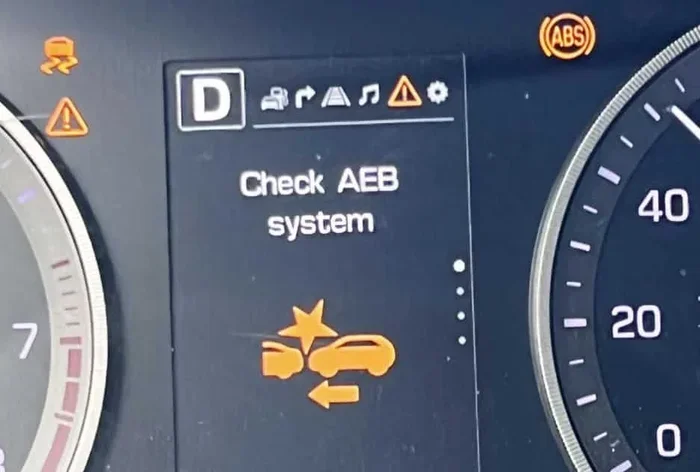
The AEB warning light on a Hyundai typically looks like a car with a collision icon or a triangle with exclamation marks. It may also display the text “AEB” or “Forward Collision Warning” on the dashboard display. The light is usually amber or red and illuminates briefly during startup as part of the normal self-check.
Can I drive my Hyundai if the AEB light is on?
You can still drive the vehicle, but the AEB system may not activate during an emergency. This means you lose an important layer of crash prevention. It is best to address the warning light as soon as possible and avoid driving in heavy traffic until the issue is resolved.
How much does it cost to fix the AEB system on a Hyundai?
The cost varies widely depending on the root cause. A simple sensor cleaning costs nothing, while replacing a faulty radar module can range from $200 to $800 including parts and labor. A software update at the dealership is often free under warranty. Always get a proper diagnosis before committing to repairs.
Does resetting the AEB system delete error codes permanently?
Not always. If the underlying issue that triggered the warning is not fixed, the error codes may return and the AEB light will come back on. A reset clears the current warning, but the system will re-detect the problem and trigger the light again if the fault persists.
How often should I clean my Hyundai’s AEB sensors?
It is a good practice to inspect and clean your AEB sensors at least once a month, or more frequently if you drive in harsh conditions like rain, snow, or on dusty roads. A quick wipe with a soft cloth during your regular car wash routine is usually sufficient.
Will a dead key fob battery affect the AEB system?
No, the key fob battery and the AEB system are independent of each other. A dead key fob battery will prevent you from starting the car remotely or using push-button start, but it will not affect the AEB system’s operation. If you need to replace your key fob battery, make sure to follow the proper steps for your Hyundai model.