How to Replace a Battery in Your BMW Key Fob Today
Replacing the battery in your BMW key fob is quick, easy, and costs just a few dollars. You can do it at home in under five minutes with a small screwdriver and a new CR2032 battery. This guide walks you through every step, from opening the fob to testing it afterward, so your BMW starts working perfectly again.
Your BMW key fob suddenly stops working. You press the button, and nothing happens. The car does not unlock, and the panic sets in. Before you call a locksmith or visit a dealership, take a deep breath. The problem is almost always a dead battery, and fixing it is easier than you think.
Replacing the battery in a BMW key fob is one of the simplest car maintenance tasks you can do. It takes just a few minutes, costs less than ten dollars, and requires no special skills. Whether you drive a BMW 3 Series, 5 Series, or X Series, the process is very similar across models.
In this guide, we walk you through every single step. You will learn which battery your BMW key fob needs, how to open the fob safely, how to swap the old battery for the new one, and what to do if the fob still does not work afterward. By the end, you will feel confident handling this fix on your own.
Key Takeaways
- No dealership visit needed: You can swap the battery yourself in minutes.
- CR2032 is the standard battery: Most BMW key fobs use this common coin-cell battery.
- Tools required are minimal: A small flathead screwdriver and the new battery are all you need.
- Reset may be required: Some BMW models need a simple reset after the battery swap.
- Cost is under $10: A replacement battery costs just a few dollars at any auto store.
- Preventive care extends lifespan: Proper handling keeps your BMW key fob working for years.
📑 Table of Contents
- Why Your BMW Key Fob Battery Dies
- What You Need Before You Start
- Step-by-Step Guide to Replacing the Battery
- What to Do If the Fob Still Does Not Work
- When to Seek Professional Help
- Tips to Extend Your BMW Key Fob Battery Life
- Common Mistakes to Avoid
- How to Replace a Battery in Your BMW Key Fob: Final Thoughts
Why Your BMW Key Fob Battery Dies
BMW key fobs use a small coin-cell battery, usually a CR2032. These batteries typically last between two and four years, depending on how often you use the fob. Cold weather, frequent button presses, and proximity to other electronics can shorten the battery life.
Some common reasons your BMW key fob battery drains faster than expected include:
- Daily use: Every time you press unlock or lock, the battery loses a tiny bit of power.
- Cold temperatures: Winter weather reduces battery performance significantly.
- Holding buttons too long: Pressing and holding buttons drains the battery faster.
- Old age: After three to four years, the battery naturally weakens.
- Proximity to electronics: Keeping the fob near phones or laptops can cause slow drain.
If you notice the range of your key fob shrinking, that is a clear sign the battery is dying. You do not need to wait until the fob stops working completely. Replacing the battery early saves you from being locked out of your car.
What You Need Before You Start
Gathering your tools before you begin makes the whole process smooth and fast. You do not need any fancy equipment. Here is everything you will need.
The Right Battery
Almost all BMW key fobs use a CR2032 battery. This is a standard 3-volt coin cell battery that you can find at any grocery store, pharmacy, or auto parts shop. Brands like Energizer, Duracell, and Panasonic all make reliable CR2032 batteries.
When buying a replacement battery, check the voltage and size markings on the package. You want a fresh battery, not one that has been sitting on a shelf for years. A brand-new CR2032 battery typically costs between one and five dollars.
Basic Tools
You need very few tools for this job:
- A small flathead screwdriver: This helps you pry open the fob case.
- A clean, dry cloth: Use this to wipe the inside of the fob before closing it.
- A well-lit workspace: Good lighting helps you see the tiny battery and internal components.
That is it. No special BMW tools. No expensive equipment. Just a screwdriver and a new battery.
Step-by-Step Guide to Replacing the Battery
Now let us get into the actual process. Follow these steps carefully, and your BMW key fob will be working again in no time.
Step 1: Locate the Seam on the Fob
Hold your BMW key fob in your hand and look closely at the edges. You will notice a thin seam or line running along the middle of the fob. This is where the two halves of the fob case meet. On most BMW models, the seam runs horizontally across the fob.
Some newer BMW key fobs have a small release button or slot near the seam. If your fob has one, press it gently before trying to separate the halves.
Step 2: Open the Fob Case
Insert the tip of your flathead screwdriver into the seam. Gently twist the screwdriver to pry the two halves apart. Work slowly around the entire edge of the fob. Do not force it. The case is plastic and can crack if you use too much pressure.
Once you feel the case loosen, carefully separate the two halves with your fingers. Set the back half down on a clean surface. The front half will hold the circuit board and the old battery in place.
Step 3: Remove the Old Battery
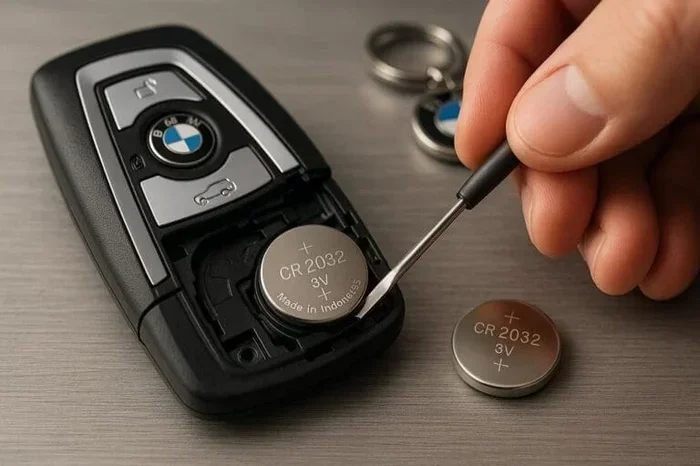
Look at the circuit board inside the fob. You will see the old CR2032 battery sitting in a small metal holder. The battery has a positive side (+) and a negative side (-). Note which way the battery is facing before you remove it.
Use the tip of your screwdriver or a small pair of tweezers to gently pop the old battery out of its holder. The battery should come out easily. Place it in a safe spot for proper disposal later.
Step 4: Insert the New Battery
Take your new CR2032 battery and hold it with the positive side facing up. The positive side usually has a “+” symbol and a slightly raised surface. The negative side is flat and has a “-” symbol.
Place the new battery into the holder in the same orientation as the old battery. Push it gently until it clicks into place. Make sure the battery sits flat and snug in the holder. A loose battery can cause the fob to malfunction.
Step 5: Close the Fob Case
Align the two halves of the fob case carefully. Press the front half gently onto the back half. You should hear a soft click when the case snaps shut. Run your finger along the seam to make sure the case is fully closed and even.
If the case does not close easily, check that the battery is seated correctly. A misaligned battery can prevent the case from closing properly.
Step 6: Test the Fob
Now comes the exciting part. Stand near your BMW and press the unlock button. Do you hear the car respond? Check all the fob functions:
- Lock: Press the lock button and confirm all doors lock.
- Unlock: Press the unlock button and confirm all doors unlock.
- Trunk release: If your fob has a trunk button, test it too.
- Panic alarm: Press and hold the panic button to test the alarm.
If all functions work, you are done. Congratulations, you just saved yourself a trip to the dealership.
What to Do If the Fob Still Does Not Work
Sometimes the fob still does not work even after you replace the battery. Do not panic. There are a few simple things you can try before seeking professional help.
Reset the Fob
Many BMW key fobs need a reset after a battery replacement. To reset, try the following:
- Press and hold the lock button for five seconds.
- Release the button and wait ten seconds.
- Press the unlock button twice in quick succession.
- Walk up to your BMW and try starting the car.
If this does not work, you may need to reprogram the fob. Some BMW models require a dealer visit for reprogramming, while others allow you to do it yourself. Check your BMW owner’s manual for specific reprogramming instructions.
Clean the Battery Contacts
Dust or corrosion on the battery contacts can prevent the fob from working. Use a clean, dry cloth to gently wipe the metal contacts inside the fob. If you see any greenish or white residue, use a cotton swab dipped in a tiny amount of white vinegar to clean it off. Dry the contacts thoroughly before inserting the new battery.
Check the Battery Orientation
This is the most common mistake. Double-check that the new battery is facing the correct direction. The positive side (+) must face up, matching the orientation of the old battery. A battery inserted backward will not work and can damage the fob’s circuit board.
When to Seek Professional Help
Most of the time, replacing the battery is all you need to do. But there are situations where professional help makes sense.
If you have tried everything and the fob still does not work, the problem might not be the battery. The circuit board inside the fob could be damaged. Water damage, drops, or general wear and tear can cause internal components to fail. In these cases, you may need a BMW key fob replacement rather than just a battery swap.
You should also consider professional help if your BMW key fob has a smart key or proximity sensor. These advanced fobs have more complex internal components, and improper handling can damage sensitive electronics. If you are not comfortable opening the fob yourself, a dealership or qualified locksmith can handle the battery replacement for you.
Some dealerships offer free or low-cost battery replacement services. It is worth calling your local BMW dealer to ask if they can help. You can also visit an auto parts store like AutoZone, which may be able to assist with the battery swap for a small fee.
Tips to Extend Your BMW Key Fob Battery Life
Once you have replaced the battery, you want to make it last as long as possible. Here are some simple tips that help extend the life of your BMW key fob battery.
- Do not press buttons unnecessarily: Only press the buttons when you actually need to lock or unlock your car.
- Store the fob properly: Keep the fob in a cool, dry place. Extreme heat and cold both shorten battery life.
- Remove the fob from other electronics: Keeping the fob away from phones and laptops reduces unnecessary battery drain.
- Replace the battery proactively: Do not wait until the fob stops working. Replace the battery every two to three years as a preventive measure.
- Use quality batteries: Name-brand CR2032 batteries tend to last longer and perform more reliably than cheap generic brands.
These small habits add up over time. You will get more life out of each battery and fewer surprises when the fob stops working.
Common Mistakes to Avoid
Even a simple task like battery replacement can go wrong if you are not careful. Here are the most common mistakes people make when replacing a BMW key fob battery.
- Forcing the fob open: Using too much pressure can crack the plastic case. Go slowly and gently.
- Using the wrong battery: Always use a CR2032 battery. Other battery sizes or types will not work.
- Touching the circuit board: Oils from your fingers can damage sensitive components. Handle the circuit board by the edges only.
- Forgetting to reset the fob: Some BMW models require a reset after the battery swap. Skipping this step can leave the fob non-functional.
- Disposing of the old battery improperly: Coin-cell batteries contain materials that should be recycled. Take the old battery to a recycling center or store drop-off.
Avoiding these mistakes keeps your fob safe and ensures the new battery works right away.
How to Replace a Battery in Your BMW Key Fob: Final Thoughts
Replacing the battery in your BMW key fob is one of the easiest car maintenance tasks you will ever do. It takes less than five minutes, costs under ten dollars, and requires no special skills or tools. You do not need to visit a dealership or pay for expensive repairs. With a new CR2032 battery and a small screwdriver, you can have your fob working like new in just a few minutes.
The key is to stay calm and follow the steps carefully. Open the fob, swap the battery, close the case, and test everything. If the fob still does not work, try a reset or check the battery orientation. These simple fixes solve the problem in most cases.
Keep a spare CR2032 battery in your glove box or junk drawer. You never know when you will need it, and having one on hand means you are always prepared. Taking care of your BMW key fob battery proactively saves you time, money, and the frustration of being locked out of your own car.
Now that you know exactly how to handle this simple fix, you can tackle it with confidence the next time your BMW key fob stops working. Your car is waiting for you to get back on the road, and now you have the power to make it happen.
Frequently Asked Questions
What type of battery does a BMW key fob use?
Most BMW key fobs use a CR2032 battery, which is a standard 3-volt coin-cell battery. You can find this battery at any grocery store, pharmacy, or auto parts shop for just a few dollars.
How long does a BMW key fob battery last?
A BMW key fob battery typically lasts between two and four years. The exact lifespan depends on how often you use the fob, the weather conditions, and the quality of the battery you choose.
Do I need to reset my BMW key fob after replacing the battery?
Some BMW models require a simple reset after a battery swap. Try pressing and holding the lock button for five seconds, then pressing the unlock button twice. Check your owner’s manual for model-specific reset instructions.
Can I replace the BMW key fob battery myself?
Absolutely. Replacing the battery yourself is quick, easy, and costs just a few dollars. You only need a small flathead screwdriver and a new CR2032 battery. No special tools or skills are required.
What should I do if my BMW key fob still does not work after replacing the battery?
First, check that the new battery is inserted in the correct orientation. Then try resetting the fob. If neither works, the circuit board may be damaged, or the fob may need reprogramming. Contact your BMW dealer for assistance in these cases.
How much does it cost to replace a BMW key fob battery?
The battery itself costs between one and five dollars. If you visit a dealership or locksmith, you may pay a service fee on top of the battery cost. Doing it yourself is the cheapest and fastest option.