How to Fix the BSD System on a Kia Quickly and Easily
The BSD (Blind Spot Detection) system on a Kia helps keep you safe during lane changes, but it can malfunction due to dirty sensors, blown fuses, or wiring issues. Fixing it yourself is often simple and saves you a trip to the dealer. This guide walks you through the most common causes and practical solutions.
The BSD system on a Kia is one of those features you don’t think about until it stops working. You’re merging onto the highway, and suddenly that helpful warning beep goes silent. Or worse, a warning light stays on your dashboard every time you drive.
BSD stands for Blind Spot Detection. It uses radar sensors mounted on the front and rear bumpers to monitor the areas beside and behind your vehicle. When a car enters your blind spot, the system alerts you with a visual or audible warning. It’s a genuinely useful safety feature that many Kia owners rely on daily.
But like any electronic system in your car, the BSD system can develop problems. The good news is that most issues are easy to fix without visiting a mechanic. In this guide, we’ll walk you through the step-by-step process to diagnose and repair the BSD system on your Kia.
Key Takeaways
- Dirty sensors are the #1 cause: Road grime and debris often block the BSD radar sensors on your Kia’s bumpers.
- Check the fuse box first: A blown fuse is a quick and free fix that many Kia owners overlook.
- Resetting the system works often: A simple restart or battery disconnect can clear temporary BSD errors.
- Wiring and connectors matter: Corroded or loose connectors under the bumper can trigger the BSD warning light.
- Professional help is sometimes needed: Persistent BSD issues may require a diagnostic scan tool or dealer-level repair.
📑 Table of Contents
Understanding the BSD System on Your Kia
Before you start fixing anything, it helps to understand how the system works. The Kia blind spot detection system relies on a network of sensors, wiring, and the car’s main computer to function properly.
How the BSD Sensors Work
The BSD system uses radar sensors. These small devices sit inside the rear bumper (and sometimes the front bumper too). They send out radio waves that bounce off nearby vehicles. When the system detects a car in your blind zone, it triggers a warning light on your side mirror or dashboard.
Most Kia models come with BSD as part of a larger safety package. You might find it bundled with lane change assist, rear cross-traffic alert, or blind spot collision warning. These systems all share similar sensors and wiring.
Common Kia Models With BSD
The BSD system appears on several popular Kia vehicles. The Kia Sorento, Kia Optima, and Kia Sportage are among the most common models equipped with this feature. If you drive one of these vehicles, you’ll want to pay close attention to any BSD warning signs.
What the BSD Warning Light Looks Like
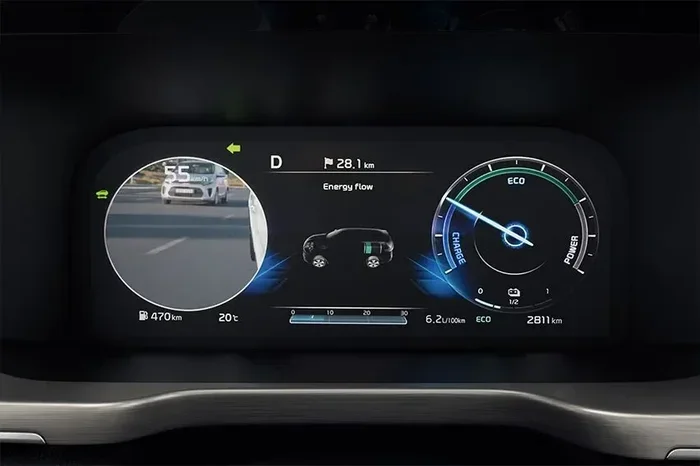
When the BSD system detects a problem, a warning light appears on your dashboard. It usually looks like a car outline with curved lines on the sides. Sometimes the light says “BSD” or “Blind Spot” in text. If this light stays on, the system is not working correctly.
Common Causes of BSD System Failure on a Kia
Not all BSD problems are the same. Understanding the root cause helps you choose the right fix. Here are the most common reasons the BSD system stops working on a Kia.
Dirty or Obstructed Sensors
This is the number one cause of BSD issues. The radar sensors sit behind the bumper covers. When mud, snow, ice, or road grime builds up on the bumper, the sensors can’t “see” properly. Think of it like a camera lens covered in dirt. The system can’t function if it can’t detect what’s around you.
Snow is especially problematic in winter months. A thick layer of snow over the rear bumper can completely disable the BSD system. Even a thin film of road salt or mud can interfere with the radar signals.
Blown Fuse
Every electronic system in your car has a fuse. The BSD system is no different. If the fuse blows, the system loses power and stops working. A blown fuse is a very common and very easy fix. You don’t need any special tools. Just check the fuse box and replace the fuse if needed.
Wiring and Connector Issues
The sensors connect to the car’s main computer through a wiring harness. Over time, these connections can become loose or corroded. Water can get into the connector ports under the bumper and cause rust. When the connection is bad, the signal from the sensor never reaches the computer.
Faulty Control Module
In rare cases, the BSD control module itself fails. This is the computer that processes all the sensor data. If it goes bad, the entire system goes down. This is the least common cause, but it does happen. Usually, a control module failure requires professional diagnosis and replacement.
Aftermarket Accessories Interference
Did you recently install a trailer hitch, bike rack, or aftermarket bumper guard? These accessories can sometimes block or interfere with the BSD sensors. The radar waves bounce off metal accessories in unexpected ways, causing false readings or system shutdowns.
How to Fix the BSD System: Step-by-Step Guide
Now let’s get into the actual fixes. Most BSD problems can be resolved at home with basic tools. Follow these steps in order for the best results.
Step 1: Clean the BSD Sensors
Start with the simplest fix. Grab a soft cloth and some warm soapy water. Gently clean the rear bumper area where the sensors are located. On most Kia models, the sensors sit in the lower portion of the rear bumper, near the tail lights.
Pay special attention to any mud, ice, or road buildup. Use a gentle touch. You don’t want to scratch or damage the sensor covers. After cleaning, dry the area thoroughly with a clean towel.
Quick Tip: After a heavy snowstorm or off-road drive, make it a habit to check your bumper sensors. A quick wipe-down can prevent BSD warnings from appearing unnecessarily.
Step 2: Check the BSD Fuse
Open your Kia’s fuse box. The location varies by model. In most Kias, you’ll find the fuse box under the dashboard on the driver’s side. Some models also have a fuse box in the engine bay.
Look for the fuse labeled “BSD” or “Blind Spot.” If you can’t find a specific label, check your owner’s manual. It will list the fuse location and amperage rating.
Pull the fuse out with a fuse puller or a pair of needle-nose pliers. Inspect it closely. If the metal wire inside the fuse is broken, the fuse is blown. Replace it with a new fuse of the same amperage.
Quick Tip: Keep a small pack of assorted fuses in your glove box. It’s a cheap and easy way to be prepared for minor electrical issues.
Step 3: Reset the BSD System
Sometimes the BSD system just needs a reset. This clears temporary errors and glitches. Start by turning off the engine and removing the key from the ignition.
Disconnect the negative battery terminal. Wait at least 15 minutes. This gives the car’s computer time to fully reset. Reconnect the battery terminal and start the engine. Check if the BSD warning light is gone.
Quick Tip: Some Kia owners find that simply turning the car off and back on is enough to reset the BSD system. Try this first before disconnecting the battery.
Step 4: Inspect the Wiring and Connectors
This step requires a little more effort. You’ll need to look under the rear bumper. Use a flashlight to inspect the wiring harness and connector plugs near the BSD sensors.
Look for any signs of damage. Check for corroded pins, loose connections, or frayed wires. If you find any corrosion, clean the connector pins with electrical contact cleaner. A cotton swab works well for this.
If a wire is damaged, you may need to replace it. Simple wire repairs are inexpensive and easy to do with basic electrical supplies.
Step 5: Use a Diagnostic Scan Tool
If the above steps don’t work, it’s time for a diagnostic scan. You can buy an OBD-II scan tool for under $50 at most auto parts stores. Plug it into the diagnostic port under your dashboard.
The scan tool will read error codes from the car’s computer. Look for codes related to the BSD system. Common codes include U3000, C1A00, or B1B00. Each code points to a specific problem area.
If you’re not comfortable interpreting the codes, many auto parts stores offer free diagnostic scanning. They can read the codes for you and give you a better idea of what’s wrong.
Preventing Future BSD System Problems
Once you’ve fixed the BSD system, you’ll want to keep it working properly. Prevention is always easier than repair. Here are some simple habits that help.
Keep Your Bumpers Clean
Regular car washing goes a long way toward protecting the BSD sensors. Make it a point to clean the bumper area every time you wash your car. Pay extra attention after driving in muddy, snowy, or salty conditions.
Avoid Harsh Bumper Impacts
The BSD sensors are mounted in the bumper. A hard impact from a parking curb or a minor collision can damage the sensors or shift their alignment. Be careful when parking and avoid low-speed bumps whenever possible.
Check for Recalls and Software Updates
Kia occasionally releases software updates that improve the BSD system’s performance. You can check for recalls on your specific model at the NHTSA website. Staying up to date with recalls ensures your safety systems work as intended.
Be Careful With Aftermarket Parts
If you install aftermarket accessories like bumper guards or tow hitches, make sure they don’t block the BSD sensors. Some aftermarket parts are specifically designed to work with factory sensor placements. Always check compatibility before installing.
When to See a Professional Mechanic
Most BSD issues are fixable at home. But some situations call for professional help. If you’ve tried all the steps above and the BSD warning light still appears, it’s time to visit a mechanic.
A professional mechanic has access to advanced diagnostic tools that can pinpoint problems faster. They can also test the sensors with specialized equipment to check their output strength. If the control module needs replacement, a professional should handle that job.
Also, if you notice the BSD system working intermittently, don’t ignore it. Intermittent failures often indicate a wiring problem that will get worse over time. Catching it early saves you from a bigger repair bill later.
Cost to Fix the BSD System on a Kia
The cost varies widely depending on the cause. Cleaning the sensors costs nothing. Replacing a fuse costs a few dollars. A diagnostic scan might run $50 to $100 at a shop.
Sensor replacement is the most expensive fix. A single BSD radar sensor can cost between $200 and $500, depending on your Kia model. Labor costs add another $100 to $200 if you have a shop install it.
Control module replacement is the priciest option. The module itself can cost $500 to $1,000, plus labor. But remember, this is a rare cause of BSD failure. Most owners never need to replace the control module.
Final Thoughts
The BSD system on your Kia is a valuable safety feature. When it stops working, it can feel alarming. But most of the time, the fix is simple and straightforward. Start with the basics: clean the sensors, check the fuse, and reset the system.
If those steps don’t solve the problem, move on to inspecting the wiring and using a diagnostic scan tool. With a little patience and the right approach, you can get your Kia blind spot detection working again in no time.
Don’t ignore the BSD warning light. A working blind spot detection system protects you and your passengers every time you hit the road. Take care of it, and it will take care of you.
Frequently Asked Questions
What does the BSD warning light mean on a Kia?
The BSD warning light on a Kia means the blind spot detection system has detected a malfunction. It could be as simple as a dirty sensor or as complex as a faulty control module. Check your sensors and fuses first before assuming the worst.
Can I drive my Kia safely with the BSD system off?
Yes, you can still drive safely. The BSD system is an additional safety feature, not a required one. However, you should be extra cautious when changing lanes and always check your mirrors manually. Get the system fixed as soon as possible.
How much does it cost to repair the BSD system on a Kia?
Costs range from free (cleaning sensors) to several hundred dollars (sensor or module replacement). Most common fixes like fuse replacement or sensor cleaning cost very little. A diagnostic scan at a shop typically runs $50 to $100.
Can weather affect the BSD system on my Kia?
Yes, weather definitely affects the BSD system. Heavy snow, ice, mud, and road salt can all block or interfere with the radar sensors. This is why it’s important to keep your bumper sensors clean, especially during winter months.
Will an aftermarket bumper guard interfere with the BSD system?
Some aftermarket bumper guards can interfere with the BSD sensors. The guard may block the radar signals or cause false readings. Always check with the manufacturer to ensure the accessory is compatible with your Kia’s BSD system before installing.
How often should I have my BSD system checked?
There’s no set schedule for BSD system checks. However, it’s a good idea to inspect the sensors visually every time you wash your car. If you notice any warning lights, address them immediately. Regular maintenance prevents small issues from becoming big problems.