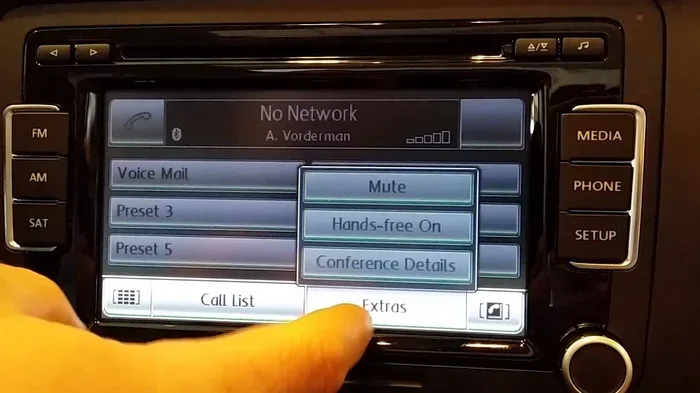
How to Connect Bluetooth in a 2012 Volkswagen Jetta Easy
Learning how to connect Bluetooth in a 2012 Volkswagen Jetta is simple and takes just a few minutes. This guide walks you through each step, from turning on your phone’s Bluetooth to pairing it with your Jetta’s infotainment system. You will also find quick tips for fixing common connection problems.
Staying connected on the road has never been more important. Whether you are taking a long road trip or just commuting to work, having your phone linked to your car makes everything easier. If you own a 2012 Volkswagen Jetta, you are in luck. This model comes with a built-in Bluetooth system that lets you make calls, stream music, and stay hands-free while driving. In this guide, we will walk you through the entire process step by step.
Many car owners feel intimidated by the idea of setting up Bluetooth pairing in their vehicles. The truth is, it is much simpler than it sounds. You do not need any special tools or technical skills. All you need is your phone and a few minutes of your time. By the end of this article, you will know exactly how to connect Bluetooth in a 2012 Volkswagen Jetta and get everything working smoothly.
The 2012 Volkswagen Jetta Bluetooth system supports both hands-free calling and audio streaming. This means you can answer phone calls through your car speakers and also play music from your phone without any wires. It is a great feature that adds convenience and safety to your daily drive. Let us dive into the details and get you connected.
Key Takeaways
- Easy Pairing Process: Connecting Bluetooth in a 2012 Volkswagen Jetta follows a straightforward four-step process that anyone can do.
- Hands-Free Calling: Once paired, you can make and receive calls without touching your phone, keeping your eyes on the road.
- Audio Streaming: You can stream music and podcasts from your phone through your Jetta’s speakers wirelessly.
- Quick Troubleshooting: Most Bluetooth issues can be fixed by restarting devices, checking settings, or resetting the connection.
- Heat Matters: Extreme temperatures can affect Bluetooth performance, so parking in shade helps maintain strong connections.
- Multiple Devices: The 2012 Jetta can store several paired devices, making it easy to switch between phones.
📑 Table of Contents
- Why Bluetooth Matters in Your 2012 Volkswagen Jetta
- How to Connect Bluetooth in a 2012 Volkswagen Jetta: Step-by-Step
- Setting Up Hands-Free Calling and Audio Streaming
- Common Bluetooth Problems and How to Fix Them
- Tips for Better Bluetooth Performance in Your Jetta
- When to Seek Professional Help
- Comparing Bluetooth in the 2012 Jetta to Other Cars
- Key Takeaways
- Conclusion
Why Bluetooth Matters in Your 2012 Volkswagen Jetta
Bluetooth technology has become a standard feature in most modern vehicles. The 2012 Jetta is no exception. Having wireless connectivity in your car offers several real benefits that make your driving experience better every day.
First and foremost, hands-free calling keeps you safe. Instead of holding your phone while driving, you can use your car’s speakers and microphone to talk and listen. This reduces distractions and helps you keep your eyes on the road. Many states now have laws against holding a phone while driving, so Bluetooth calling is not just convenient, it is also the legal thing to do.
Second, audio streaming lets you enjoy your favorite music and podcasts through your car stereo. You do not need to plug in any cables or worry about compatibility. As long as your phone has Bluetooth, you can stream audio directly to your Jetta’s speakers. This is a huge upgrade over using a radio or CD player.
Third, Bluetooth connectivity reduces clutter in your cabin. No more tangled charging cables or awkward phone holders. Everything runs wirelessly, keeping your dashboard clean and your focus on driving. The Volkswagen Jetta 2012 Bluetooth setup is designed to be user-friendly, so you can get started right away.
How to Connect Bluetooth in a 2012 Volkswagen Jetta: Step-by-Step
Now let us get into the actual process. Connecting your phone to your Jetta is a simple task. Follow these steps carefully and you will be paired in no time.
Step 1: Turn on Bluetooth on Your Phone
Before you do anything in your car, you need to make sure Bluetooth is turned on your phone. On most phones, you can do this by going to Settings and then tapping on Bluetooth. Toggle the switch to turn it on. Your phone will then start searching for nearby devices.
Make sure your phone is fully charged or plugged in before you start. A low battery can sometimes cause pairing problems. Also, keep your phone within arm’s reach of the car’s center console during the setup process. This ensures a strong signal during the initial device pairing phase.
Step 2: Access the Jetta’s Bluetooth Menu
Now turn on your car’s ignition. You do not need to start the engine, but the electronics need to be powered on. Look for the Audio or Media button on your dashboard or center console. Press it to bring up the infotainment screen.
On the 2012 Jetta, you will find the Bluetooth settings under the Phone or Audio menu. Use the dial or touchscreen to navigate to Settings, then look for Bluetooth or Phone Setup. Select Search for Devices or Add New Device. Your Jetta will now begin scanning for nearby Bluetooth devices.
If you have previously paired another phone with your Jetta, you may need to go into Device List first and clear old connections. This helps avoid confusion during the new Bluetooth setup process.
Step 3: Search and Pair Your Device
Once your Jetta starts searching, your phone should appear on the screen within a few seconds. Select your phone from the list of available devices on the car’s display.
You may be asked to enter a pairing code. This is a security measure to ensure only authorized devices can connect. The code is usually a simple four to six digit number. Enter the same code on both your phone and the car’s screen to confirm the connection.
After you enter the code, the devices will pair automatically. You should see a confirmation message on both screens. The 2012 Jetta can store multiple paired devices, so you can connect different phones for different drivers. This is great for families or carpool situations.
Step 4: Test the Connection
Once pairing is complete, it is important to test everything. Make a test call to a friend or family member and check if your voice comes through the car speakers clearly. Ask the person on the other end if they can hear you without any static or echo.
Next, try playing some music from your phone. Open your favorite music app and start a song. The audio should stream through your Jetta’s speakers without any delay or interruption. If the sound is clear and the call quality is good, you are all set.
If you notice any issues, do not worry. We will cover troubleshooting in the next section. But in most cases, the connection works perfectly the first time. This is one of the easiest car Bluetooth setup processes you will encounter.
Setting Up Hands-Free Calling and Audio Streaming
After your phone is paired, you can take advantage of both hands-free calling and audio streaming. Let us look at how each feature works in the 2012 Jetta.
Hands-Free Calling Setup
Hands-free calling is one of the most useful features of Bluetooth connectivity. Once your phone is paired, your Jetta’s system will automatically recognize incoming calls. When someone calls you, the car stereo will mute and the call audio will play through the speakers.
To make a call, you can use the steering wheel controls if your Jetta has them. Simply press the call button and use the voice command or dial pad on the infotainment screen. You can also access your phone’s contact list directly through the car’s display. This makes dialing numbers much safer and more convenient while driving.
Keep in mind that Bluetooth range is typically about 30 feet. If you walk away from your car while a call is connected, the call may drop. This is normal and not a sign of a problem. The connection will resume once you return to the vehicle.
Audio Streaming Configuration
Audio streaming lets you play music, podcasts, and audiobooks through your car’s sound system. The 2012 Jetta supports A2DP (Advanced Audio Distribution Profile), which is the standard protocol for high-quality audio streaming over Bluetooth.
To start streaming, simply open your music app on your phone and hit play. The audio should automatically route to your Jetta’s speakers. You can control the volume using the car’s audio controls or your phone’s volume buttons. Both methods work, but using the car’s controls gives you a more seamless experience.
If you want to switch back to the radio or a CD, you can do so easily. Just press the Radio or CD button on the console. The Bluetooth audio will pause automatically. When you switch back to Bluetooth, the music will resume from where you left off.
Common Bluetooth Problems and How to Fix Them
Even though the setup process is simple, you may run into occasional issues. Here are the most common problems and their solutions.
Phone Not Showing Up on the Car Screen
If your phone does not appear in the Jetta’s Bluetooth search list, try these steps. First, make sure Bluetooth is turned on and visible on your phone. Some phones have a hidden Bluetooth mode that prevents other devices from seeing them. Go to your phone’s Bluetooth settings and make sure it is set to Visible or Discoverable.
Second, restart both your phone and the car’s infotainment system. Turn off your car, wait 30 seconds, and turn it back on. On your phone, toggle Bluetooth off and then back on. This often resolves temporary Bluetooth troubleshooting issues quickly.
Paired but No Audio
If the devices are connected but you cannot hear any sound, check the audio source. Make sure the Jetta’s infotainment system is set to Bluetooth Audio or Media mode. Sometimes the system defaults to the radio after pairing, which can be confusing.
Also check your phone’s volume. The media volume on your phone controls the streaming audio level. Turn it up and see if the sound comes through. If the issue persists, try unpairing the device and pairing it again from scratch.
Connection Drops Frequently
A weak or unstable connection can be frustrating. The most common cause is distance. If your phone is in your back pocket or buried in a bag, the Bluetooth signal may be weak. Keep your phone in the center console or cup holder for the best connection.
Extreme heat can also affect Bluetooth performance. If your car has been sitting in the sun all day, the electronics may not work at their best. Parking in a shaded area or using a windshield sunshade can help. If you want to learn more about how heat affects your car, check out how hot a car can get in the sun.
Paired Device List Is Full
The 2012 Jetta can store a limited number of paired devices. If the list is full, you may not be able to add a new phone. Go to the Bluetooth settings menu and delete any old or unused devices. This frees up space for new connections.
Tips for Better Bluetooth Performance in Your Jetta
Once you have your Bluetooth connected, a few simple habits can keep everything running smoothly. Here are some expert tips to get the best experience from your Jetta’s Bluetooth system.
- Keep Your Phone Updated: Software updates often include Bluetooth improvements. Make sure your phone’s operating system is up to date for the best wireless connectivity experience.
- Restart Regularly: Just like any electronic device, your phone and car system benefit from occasional restarts. This clears temporary glitches and keeps things running fast.
- Limit Connected Devices: Only keep the devices you use regularly in the paired list. Too many connected devices can slow down the system and cause confusion.
- Use Quality Music Apps: Some music apps handle Bluetooth streaming better than others. Apps like Spotify, Apple Music, and Pandora are all optimized for car audio system streaming.
- Charge Your Phone: Bluetooth streaming uses more battery than regular phone use. Keep your phone charged or plugged in during long drives to avoid interruptions.
When to Seek Professional Help
Most Bluetooth issues can be solved at home with the tips above. However, if you have tried everything and the problem persists, it may be time to seek professional help. A certified Volkswagen technician can diagnose issues with the car’s infotainment system and Bluetooth module.
Before you take your Jetta in for service, it is a good idea to check if there is a diagnostic fee. You can find more information about this at do dealers charge a diagnostic fee. Understanding potential costs ahead of time helps you make informed decisions about car repairs.
If your Jetta is still under warranty, Bluetooth issues may be covered. Contact your local Volkswagen dealership to check your warranty status. They can also help with software updates that may improve Bluetooth compatibility with newer phone models.
Comparing Bluetooth in the 2012 Jetta to Other Cars
The 2012 Volkswagen Jetta offers a solid Bluetooth experience for its class. To put it in perspective, many cars from the same era also offered Bluetooth connectivity. For instance, if you are curious about how Bluetooth worked in other 2012 models, you might want to check whether 2012 Honda Civics had Bluetooth for a comparison.
The Jetta’s system is straightforward and reliable. It may not have all the fancy features of newer models, but it covers the essentials well. Hands-free calling and audio streaming work without any hassle. For most drivers, this is all they need from a car phone integration system.
Newer cars now offer advanced features like voice commands and wireless charging. But the 2012 Jetta still holds up well in the Bluetooth department. It is a testament to Volkswagen’s engineering that a car from over a decade ago can still provide a dependable wireless connection.
Key Takeaways
- Easy Pairing Process: Connecting Bluetooth in a 2012 Volkswagen Jetta follows a straightforward four-step process that anyone can do.
- Hands-Free Calling: Once paired, you can make and receive calls without touching your phone, keeping your eyes on the road.
- Audio Streaming: You can stream music and podcasts from your phone through your Jetta’s speakers wirelessly.
- Quick Troubleshooting: Most Bluetooth issues can be fixed by restarting devices, checking settings, or resetting the connection.
- Heat Matters: Extreme temperatures can affect Bluetooth performance, so parking in shade helps maintain strong connections.
- Multiple Devices: The 2012 Jetta can store several paired devices, making it easy to switch between phones.
- Keep It Updated: Regular software updates on your phone help maintain strong and stable Bluetooth connectivity.
Conclusion
Connecting Bluetooth in a 2012 Volkswagen Jetta is a quick and rewarding process. With just a few simple steps, you can enjoy hands-free calling, wireless music streaming, and a cleaner, less cluttered driving experience. The system is designed to be user-friendly, so even if you are not very tech-savvy, you will find it easy to follow along.
Remember to keep your phone updated, maintain your devices, and troubleshoot minor issues before seeking professional help. These simple habits will keep your Bluetooth connection strong and reliable for years to come. The 2012 Volkswagen Jetta Bluetooth system may not be the newest on the market, but it gets the job done exceptionally well.
Now that you know how to set everything up, go ahead and give it a try. Grab your phone, get in your Jetta, and follow the steps in this guide. You will be connected and cruising in no time. Safe travels and enjoy the wireless convenience!