How Do I Wipe My Touch Screen Clean Without Damaging It
Learning how do I wipe my touch screen safely is easier than most people think. Using the wrong cloth or cleaner can cause permanent damage to your car’s digital dashboard. This guide covers the best methods, products, and habits to keep your touchscreen looking brand new.
Your car’s touch screen is one of the most-used features in your vehicle. You tap it for directions. You swipe it to change music. You pinch it to zoom into maps. Over time, all that touching leaves behind fingerprints, smudges, and grime. But here is the thing many people do not realize. Wiping your touchscreen the wrong way can cause real damage.
So how do I wipe my touch screen without hurting it? The answer is simpler than you might think. With the right tools and a few basic steps, you can keep your screen looking crisp and clean every single day. In this guide, we walk you through everything you need to know. From the best cloths to the safest cleaning solutions, we have you covered.
Whether you drive a sedan or an SUV, your digital dashboard deserves proper care. A clean screen also improves visibility while driving, which makes your trips safer. Let us dive into the full breakdown.
Key Takeaways
- Use only microfiber cloths: Paper towels and rough fabrics scratch your screen.
- Never use ammonia or alcohol-based cleaners: They strip the oleophobic coating.
- Turn off your screen before cleaning: This helps you see smudges and avoid moisture damage.
- Wipe gently in circular motions: Pressing too hard damages the touchscreen display.
- Apply a screen protector: It adds a layer of defense against fingerprints and grime.
- Clean regularly: Daily quick wipes prevent buildup that becomes harder to remove.
- Use distilled water or a dedicated screen cleaner: Tap water leaves mineral spots.
📑 Table of Contents
- Why Keeping Your Touch Screen Clean Matters
- What You Need Before You Start Wiping
- Step-by-Step Guide to Safely Wiping Your Touch Screen
- Common Mistakes That Damage Touch Screens
- Best Cleaning Products for Automotive Touch Screens
- How to Maintain a Clean Touch Screen Long-Term
- Expert Tips for Tough Smudges and Stains
Why Keeping Your Touch Screen Clean Matters
Most people think a dirty screen is just an annoyance. But there is more at stake than aesthetics. A smudged or greasy touchscreen can reduce your ability to read maps and respond to alerts quickly. That matters a lot when you are behind the wheel.
Over time, oils from your fingers build up on the screen surface. This layer of grime can actually interfere with touchscreen responsiveness. You might notice that your taps do not register as well as they used to. In some cases, the screen becomes harder to navigate altogether.
Beyond functionality, dirt and debris can also cause micro-scratches. These tiny marks add up over months and years. Eventually, your once-clear display starts looking dull and cloudy. Regular cleaning prevents this buildup and keeps your screen looking sharp.
There is also a hygiene angle to consider. Think about all the surfaces you touch before you touch your screen. Your hands carry oils, dirt, and even bacteria. A clean screen means a cleaner driving environment for you and your passengers.
What You Need Before You Start Wiping
Before you grab anything and start scrubbing, let us talk about what you should and should not use. Having the right supplies makes all the difference. Using the wrong materials is the number one cause of touchscreen damage.
Microfiber Cloth Is Your Best Friend
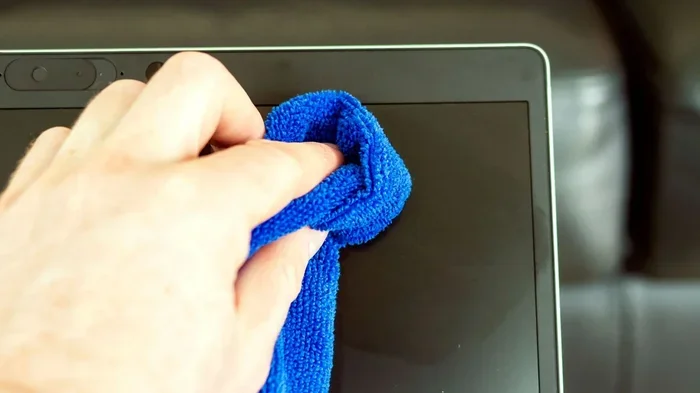
A soft microfiber cloth is the single best tool for cleaning any touchscreen. These cloths are gentle on surfaces. They lift away oils and smudges without scratching. You can find microfiber cloths at most auto parts stores or online for just a few dollars.
Never use paper towels or regular rags. These materials are too rough. They contain wood fibers that create tiny scratches on your screen. Over time, these scratches become visible and can permanently dull your display.
Cleaning Solutions That Are Safe
Not all cleaning sprays are created equal. For automotive touchscreens, you want a solution that is free of ammonia and alcohol. Both of these chemicals break down the protective coating on your screen. That coating is what makes your screen feel smooth and responsive.
Distilled water works great for light cleaning. You can also buy screen-safe cleaners made specifically for electronics. These products are designed to evaporate quickly and leave no residue behind.
Here is a quick list of what to have on hand:
- Microfiber cleaning cloth (at least two, so you always have a clean one)
- Distilled water in a small spray bottle
- Screen-safe electronic cleaner (alcohol-free and ammonia-free)
- Compressed air can (for removing dust from corners and edges)
- Soft-bristled brush (for gently removing loose debris before wiping)
What to Avoid at All Costs
Knowing what not to use is just as important as knowing what to use. Here are the top things to keep far away from your touchscreen:
- Window cleaners like Windex contain ammonia that damages screen coatings
- Household all-purpose cleaners are too harsh for delicate electronics
- Bleach or abrasive wipes will scratch and discolor your screen
- Regular tap water leaves mineral spots that are hard to remove
- Rough fabric towels like old t-shirts or bath towels create micro-scratches
Step-by-Step Guide to Safely Wiping Your Touch Screen
Now that you have the right supplies, let us walk through the actual cleaning process. Follow these steps every time for the best results.
Step One: Power Down Your Screen
Before you touch anything, turn off your touchscreen or dim it to its lowest setting. This is a simple step that many people skip. When the screen is dark, you can easily see all the smudges and fingerprints that need to be cleaned. It also reduces the risk of moisture getting into the screen’s internal components.
Step Two: Remove Loose Dust and Debris
Use a dry microfiber cloth or a soft-bristled brush to gently sweep away any loose particles. Do this in light, sweeping motions. Skipping this step is a common mistake. Rubbing dirt or dust against your screen can create scratches, even with a soft cloth.
If your car has a lot of dust buildup around the screen edges, a quick burst of compressed air helps dislodge particles from crevices. Hold the can upright and use short bursts.
Step Three: Apply Your Cleaning Solution
Never spray liquid directly onto your touchscreen. Instead, spray your cleaning solution onto the microfiber cloth. This prevents moisture from seeping into the screen’s edges or buttons. A lightly dampened cloth works best. You do not want it dripping wet.
If you are using distilled water, a light mist on the cloth is all you need. For commercial screen cleaners, follow the product instructions. Less is more when it comes to liquid near your electronics.
Step Four: Wipe in Gentle Circular Motions
This is the most important technique to learn. Wipe your screen using soft, circular motions. Do not press down hard. Let the cloth do the work. Heavy pressure can damage the touchscreen sensors underneath the surface.
Work from the center of the screen outward. This pushes smudges toward the edges where they are easier to clean up. If you notice a stubborn spot, go over it a few more times gently rather than pressing harder.
Step Five: Dry the Screen Completely
Use the dry side of your microfiber cloth to remove any remaining moisture. Buff the screen lightly in circular motions until it is completely dry. A screen that is even slightly damp can attract new dust and fingerprints quickly.
Once dry, turn your screen back on and check for any remaining streaks. If you see any, a quick pass with a dry microfiber cloth should take care of them.
Common Mistakes That Damage Touch Screens
Even with the best intentions, people make mistakes that harm their screens. Here are the most common errors and how to avoid them.
Using the Wrong Cloth
This is the mistake we see most often. People grab whatever cloth is nearby. A napkin, a sleeve, a paper towel. None of these are safe for your touchscreen. The fibers in these materials are too coarse and create fine scratches that add up over time.
Always keep a clean microfiber cloth in your car. They are inexpensive and last for months with proper care. Toss them in with your laundry and reuse them.
Applying Too Much Pressure
Your touchscreen is sensitive by design. It responds to light touches, not heavy pressure. When cleaning, use the lightest touch possible. Pressing too hard can misalign the touch sensors or even crack the display in extreme cases.
Think of it like cleaning a camera lens. You want gentle, careful motions. That is exactly the approach you should take with your car screen.
Skipping Regular Cleaning
Many people only clean their screen when it looks really dirty. By that point, oils and grime have already built up and become harder to remove. A quick wipe with a dry microfiber cloth takes just a few seconds and should become a daily habit.
Try keeping a microfiber cloth in your center console. Every time you park, give your screen a quick once-over. This takes less than 30 seconds and prevents buildup.
Ignoring Screen Protectors
A good screen protector is one of the best investments you can make for your car’s touchscreen. It adds a physical barrier between your screen and the outside world. When the protector gets dirty, you replace it. Your actual screen stays safe underneath.
Look for protectors that are specifically designed for your car model. They should be easy to apply and not interfere with touchscreen responsiveness.
Best Cleaning Products for Automotive Touch Screens
The market is full of cleaning products, but not all of them are safe for your car’s screen. Here are some of the best options that professionals recommend.
| Product Type | Pros | Cons |
|---|---|---|
| Microfiber Cloth Only | Free, gentle, works for daily dust | Not enough for stubborn smudges |
| Distilled Water + Microfiber | Very affordable, safe for all screens | Less effective on oily fingerprints |
| Alcohol-Free Screen Cleaner | Designed for electronics, streak-free | Costs a bit more than DIY options |
| Pre-Moistened Electronic Wipes | Convenient, portable, easy to use | Check labels for alcohol content |
| UV Screen Protector with Cleaner Kit | Protects and cleans in one system | Requires replacement every few months |
When shopping for a screen cleaner, always read the label. Look for products that are labeled safe for LCD, LED, and OLED screens. These formulations are designed to clean without damaging the oleophobic coating that makes your screen feel smooth.
Some car detailers also recommend ceramic-coated screen protectors. These create an extra layer of protection that repels fingerprints and makes cleaning even easier. The initial cost is higher, but they last a long time and reduce the frequency of cleaning sessions.
How to Maintain a Clean Touch Screen Long-Term
Cleaning is only half the battle. The other half is building habits that keep your screen clean for longer. Here are some simple maintenance tips that make a big difference.
Wash Your Hands Before Driving
This sounds obvious, but it makes a real difference. Clean hands mean fewer oils and fingerprints on your screen. Make it a habit to wash your hands before getting behind the wheel, especially after eating or applying hand lotion.
Keep Your Car Interior Clean
Dust and dirt from your car’s interior can settle on your screen over time. Regularly vacuuming your dashboard and wiping down surfaces reduces the amount of debris that ends up on your touchscreen. A clean car interior means a cleaner screen.
Avoid Direct Sunlight When Possible
Prolonged exposure to direct sunlight can degrade your screen’s coating over time. UV rays break down the protective layers and make your screen more vulnerable to smudges and scratches. Using a sunshade when parked helps protect your entire dashboard, including the touchscreen.
Replace Your Screen Protector Regularly
Even the best screen protector wears out over time. Replace it every three to six months depending on how much you use your screen. A fresh protector keeps your screen looking new and provides the best protection against daily wear.
Do a Deep Clean Once a Month
In addition to your daily quick wipes, do a thorough deep clean once a month. This involves using your screen-safe cleaner, compressed air for edges and corners, and a thorough buffing with a dry microfiber cloth. A monthly deep clean keeps buildup from becoming a serious problem.
Expert Tips for Tough Smudges and Stains
Sometimes you face smudges that a simple wipe cannot handle. Here are a few expert tricks for dealing with the toughest grime.
Breathe on the screen first. Just like cleaning eyeglasses, a light breath creates a thin layer of moisture that helps lift smudges. Follow up immediately with your microfiber cloth.
Use a pencil eraser for stubborn marks. A clean, soft pencil eraser can gently remove stuck-on grime without scratching. Rub lightly and wipe away the residue with a damp microfiber cloth afterward.
Try a small amount of white vinegar mixed with distilled water. A 50/50 solution in a spray bottle works as a safe, natural cleaner. Spray it on the cloth, not the screen, and wipe gently.
Invest in an anti-glare screen protector. These protectors reduce the visibility of fingerprints and make your screen easier to keep clean. They also reduce glare while driving, which improves visibility.
Keep a cleaning kit in your car. A small bag with a microfiber cloth, a mini spray bottle of screen cleaner, and a soft brush makes it easy to clean your screen whenever you need to. Storing it in your glove box means it is always within reach.
Taking care of your car’s touchscreen is not complicated. It just requires the right approach and a little consistency. When you know how do I wipe my touch screen safely, you can keep your display looking perfect for years to come. The key is using gentle tools, safe solutions, and proper technique every single time.
A clean screen makes your car feel newer and more polished. It also improves your daily driving experience by making navigation and entertainment controls easier to use. Plus, maintaining your touchscreen protects your investment. Modern vehicles with digital dashboards can have expensive screen replacements, so prevention is always better than cure.
Start today. Grab a microfiber cloth, give your screen a gentle wipe, and notice the difference. Once you make it a habit, you will wonder how you ever drove without doing it. Your touchscreen will thank you with years of clear, responsive performance.
Remember that every car and every touchscreen is slightly different. Always check your vehicle owner’s manual for any specific cleaning recommendations from the manufacturer. Some screens have special coatings or treatments that require particular care. When in doubt, stick to the basics: a soft microfiber cloth, a safe cleaning solution, and gentle circular motions. That simple routine will serve you well and keep your screen looking its best.
Your digital dashboard is more than just a screen. It is a window into your vehicle’s technology and a tool that keeps you connected and informed on the road. Treat it well, and it will keep working beautifully for many miles to come.
Frequently Asked Questions
Can I use regular glass cleaner on my car touch screen?
No, regular glass cleaners like Windex contain ammonia and other chemicals that can damage the oleophobic coating on your touchscreen. Always use a cleaner that is specifically labeled safe for electronics and automotive screens.
How often should I clean my car touch screen?
A quick wipe with a dry microfiber cloth should be done daily or every time you drive. A deeper clean using a safe solution should happen at least once a month to prevent buildup of oils and grime.
Is it safe to use water to clean my touch screen?
Distilled water is safe and effective for light cleaning. However, tap water contains minerals that can leave spots on your screen. Always use distilled water and apply it to the cloth, not directly to the screen.
Can I use baby wipes to clean my car touchscreen?
Most baby wipes contain chemicals and moisturizers that can leave a residue on your screen. Some are also too wet and can allow moisture to seep into the edges. Stick to microfiber cloths and screen-safe cleaners instead.
Will a screen protector make cleaning easier?
Yes, a screen protector adds a protective layer that catches fingerprints and smudges. When the protector gets dirty, you simply replace it. This keeps the actual screen underneath clean and protected from scratches.
What should I do if my touchscreen becomes unresponsive after cleaning?
This is usually temporary and caused by residual moisture. Turn off the screen and let it dry completely for a few minutes. If the issue persists, check that you are not using a cleaning solution that is too harsh or that moisture has not seeped into the screen edges.
=== CONCLUSION ===
Keeping your touch screen clean does not have to be complicated. The secret is using the right tools, the right technique, and a little bit of regular care. A soft microfiber cloth and a safe, alcohol-free cleaner are all you really need. Avoid harsh chemicals, skip the paper towels, and always wipe gently in circular motions.
Now you know exactly how do I wipe my touch screen without causing any damage. The steps are simple, the supplies are affordable, and the results are worth it. A clean screen improves visibility, responsiveness, and the overall look of your car’s interior.
Make it a habit. Keep a microfiber cloth within reach. Do a quick wipe whenever you park. And give your screen a deeper clean once a month. Your touchscreen will stay looking great and working smoothly for many years of driving ahead.