How Do I Turn Off Emergency Braking And Get Control
Emergency braking systems are designed to keep you safe, but sometimes they activate when you don’t need them. This guide shows you exactly how to turn off emergency braking in most vehicles. You will learn the steps, reasons, and safety tips to get full control back.
Have you ever been driving along, minding your own business, when suddenly your car slams on the brakes for no reason? It is a scary moment. Your heart races. You grip the wheel. And you wonder, how do I turn off emergency braking and get control back?
You are not alone. Many drivers face this exact situation every day. Whether it is a false alarm, a sensor glitch, or just a feature you prefer to manage yourself, knowing how to turn off emergency braking is an essential skill. This guide will walk you through everything you need to know. We will cover different car models, common triggers, step-by-step instructions, and important safety tips. By the end, you will feel confident and in control every time you drive.
Let us be clear about something first. Emergency braking systems exist for a very good reason. They save lives. They prevent collisions. They act faster than any human ever could. But there are times when you might need to disable automatic emergency braking. Maybe the sensors are too sensitive. Maybe you are driving in conditions that cause false triggers. Or maybe you just want more manual control over your vehicle. Whatever the reason, this article has you covered.
Key Takeaways
- Know Your System: Understanding how your vehicle’s emergency braking works is the first step to controlling it.
- Multiple Methods Exist: Different cars use different buttons, menus, or switches to disable automatic emergency braking.
- Safety First: Always consider the risks before turning off any safety feature on your vehicle.
- Common Triggers: Dust, sensors, and low battery can cause false emergency braking activations.
- Model-Specific Steps: The process varies by manufacturer, so check your owner’s manual for exact instructions.
- Reset Is Possible: Many systems can be reset easily if they malfunction or activate incorrectly.
- Professional Help Helps: If you cannot turn it off, a mechanic or dealership can assist you quickly.
📑 Table of Contents
- Understanding Emergency Braking Systems
- How to Turn Off Emergency Braking in Different Vehicles
- Common Reasons Emergency Braking Activates Unexpectedly
- Step-by-Step Guide to Disabling Automatic Emergency Braking
- Safety Considerations When Turning Off Emergency Braking
- Troubleshooting Emergency Braking Issues
- How to Re-Enable Emergency Braking After Turning It Off
- Expert Insights on Emergency Braking and Driver Control
- Final Thoughts on Regaining Control of Your Vehicle
Understanding Emergency Braking Systems
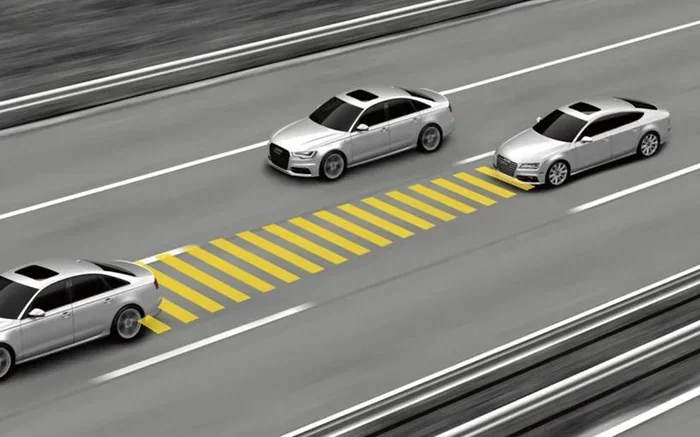
Before you learn how to turn things off, it helps to understand how they work. Automatic emergency braking, often called AEB, is a safety feature found in most modern vehicles. It uses sensors, cameras, and radar to detect potential collisions. When it senses danger, it applies the brakes automatically.
How Does Automatic Emergency Braking Work?
The system constantly scans the road ahead. It measures the distance between your car and objects in front of you. If it detects that a crash is imminent, it triggers the brakes. This happens in milliseconds. Most drivers never even notice it working because it prevents accidents before they happen.
Here are the key components of most emergency braking systems:
- Front-facing cameras that scan the road
- Radar sensors located in the front bumper
- Control modules that process data in real time
- Brake actuators that apply pressure to the wheels
- Warning systems that alert you before braking
Types of Emergency Braking Systems
Not all emergency braking systems are the same. Different manufacturers use different names and technologies. Here are the most common types you will encounter:
- Automatic Emergency Braking (AEB): The most common type. It activates automatically when a collision is detected.
- Collision Avoidance System: Found in many Toyota and Lexus models. It warns you and can apply brakes if needed.
- Forward Collision Warning: Alerts you with sounds or vibrations but does not always brake automatically.
- Pedestrian Detection: A specialized system that looks for people in or near the road.
- Cross-Traffic Braking: Activates when reversing and detecting approaching vehicles or objects.
Understanding which type your car has is the first step toward knowing how to manage it. Check your vehicle owner’s manual or look up your specific make and model online.
How to Turn Off Emergency Braking in Different Vehicles
Now for the part you have been waiting for. How do I turn off emergency braking? The answer depends on your vehicle. Every manufacturer has its own method. Some make it easy with a simple button. Others require you to navigate through menus. Let us break it down by brand.
Turning Off AEB in Toyota and Lexus Vehicles
Toyota vehicles with Pre-Collision System can be adjusted. Here is how to access the settings:
- Press the Setup button on the steering wheel or center console.
- Navigate to Vehicle Settings using the touchscreen or dial.
- Select Safety Sense or Pre-Collision System.
- Look for the Emergency Braking or Daytime/Nighttime Braking option.
- Toggle the setting to off or adjust sensitivity.
Some Toyota models also have a physical ECM button (Emergency Collision Mitigation) near the steering wheel. Pressing it can temporarily disable the system.
Turning Off AEB in Honda and Acura Vehicles
Honda uses Collision Mitigation Braking System. The steps are slightly different:
- Go to the Settings menu on the infotainment screen.
- Select Driver Assistance or Safety Settings.
- Find Collision Mitigation Braking.
- Toggle it off to disable automatic braking.
Honda vehicles also have a CMBS off indicator on the dashboard when the system is disabled. You will see a light that confirms the change.
Turning Off AEB in Ford and Lincoln Vehicles
Ford vehicles use Pre-Collision Assist with Automatic Emergency Braking. Here is how to turn it off:
- Press the steering wheel controls to access the main menu.
- Go to Settings then Driver Assistance.
- Select Automatic Emergency Braking.
- Choose Off to disable the feature.
Some Ford models also allow you to adjust the sensitivity level instead of turning it off completely. This can be a good middle ground if you find the system too aggressive.
Turning Off AEB in Chevrolet and GMC Vehicles
GM vehicles use Front Automatic Emergency Braking. To turn it off:
- Access the Infotainment System.
- Go to Vehicle Settings.
- Select Safety or Driver Assistance.
- Find Automatic Emergency Braking and toggle it off.
Chevrolet also offers a Driver Confidence Package that lets you customize how active safety features behave.
General Steps for Other Vehicle Brands
If your car is not listed above, the general process usually follows a similar pattern. Look for a Settings menu, then navigate to Safety or Driver Assistance features. From there, you should find the option to disable automatic emergency braking. If you cannot find it, your vehicle owner’s manual is your best friend. It will have exact instructions for your specific model.
Common Reasons Emergency Braking Activates Unexpectedly
Knowing how to turn off emergency braking is helpful. But understanding why it activates when you do not want it to is just as important. Here are the most common reasons automatic braking triggers falsely.
Sensor Obstruction or Dirt
The sensors on your vehicle need a clear view to work properly. Dirt, snow, ice, or even bugs on the front bumper can block them. When the sensors cannot see clearly, they may misinterpret the environment. This can cause the emergency braking system to activate when there is no actual danger.
Quick Tip: Keep your front sensors clean. A gentle wipe with a soft cloth after washing your car can prevent false triggers. Never use high-pressure water directly on sensor areas.
Low Light or Poor Weather Conditions
Cameras and sensors struggle in low-light conditions. Heavy rain, fog, and snow can also confuse the system. The collision avoidance system may detect shadows or reflections as obstacles. This leads to sudden, unexpected braking that can startle you and other drivers.
Quick Tip: If you are driving in heavy rain or fog, consider reducing the sensitivity of your safety features if your vehicle allows it.
Sensor Calibration Issues
After a windshield replacement or front-end repair, sensors may need recalibration. If they are not calibrated correctly, they can send false signals to the brake assist system. This is a common issue after any front-end work on the vehicle.
Quick Tip: Always have sensors recalibrated after any windshield or front bumper repair. This is not optional. It is essential for proper system function.
Software Glitches or Updates
Modern vehicles run on complex software. Sometimes a software glitch can cause the emergency braking system to malfunction. A recent software update might also change how the system behaves. If your car starts braking unexpectedly after an update, this could be the cause.
Quick Tip: Check for vehicle software updates regularly. Many manufacturers offer over-the-air updates that fix known bugs and improve system performance.
Step-by-Step Guide to Disabling Automatic Emergency Braking
Let us walk through the process in a clear, simple way. Follow these steps to turn off automatic emergency braking safely and effectively.
Step 1: Park Your Vehicle Safely
Always make these changes while your car is parked and stationary. Do not adjust safety settings while driving. Find a safe spot, turn off the engine, and take your time with the process.
Step 2: Locate the Settings Menu
Access your vehicle’s infotainment system. Look for a Settings icon, usually a gear symbol. Tap or click on it to open the menu.
Step 3: Navigate to Safety or Driver Assistance
Scroll through the menu options until you find Safety Settings, Driver Assistance, or something similar. The exact name varies by manufacturer.
Step 4: Find the Emergency Braking Option
Look for options like Automatic Emergency Braking, AEB, Collision Mitigation, or Pre-Collision System. Select it to view the available settings.
Step 5: Toggle the System Off
Switch the setting to off. Some vehicles let you choose between full off, reduced sensitivity, or daytime-only mode. Choose the option that suits your driving style.
Step 6: Confirm the Change
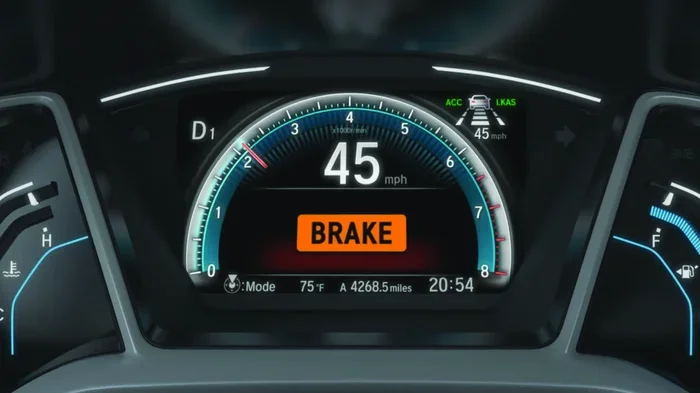
Most vehicles will display a confirmation message. Look for a dashboard indicator light that confirms the system is now off. This light is usually yellow or orange and shows a car with collision waves.
Expert Insight: Even after you turn off AEB, many vehicles keep the forward collision warning active. This means you will still get alerts, but the car will not brake for you automatically. This is often the best compromise between safety and control.
Safety Considerations When Turning Off Emergency Braking
Before you disable emergency braking, you need to understand the risks involved. This is not something to take lightly. Safety features exist because they save lives. Let us look at what you need to consider.
Increased Risk of Rear-End Collisions
When automatic emergency braking is turned off, you lose the safety net that reacts faster than you can. In stop-and-go traffic or sudden situations, this can increase your risk of a rear-end collision. Studies show that AEB systems reduce rear-end crashes by up to 50 percent. That is a significant number.
Insurance and Warranty Implications
Some insurance companies offer discounts for vehicles equipped with advanced driver assistance systems. Turning off safety features could affect your premium. Additionally, if you are involved in an accident and the braking system was disabled, it could complicate your insurance claim.
When It Is Okay to Turn It Off
There are legitimate reasons to turn off automatic braking. Here are some situations where it might make sense:
- You are driving in deep snow or mud where sensors constantly trigger false alarms
- You are towing a trailer and the sensors are misaligned
- The system is malfunctioning and causing dangerous unexpected braking
- You are a professional driver who prefers full manual control
- The sensors are damaged and need repair
Key Takeaway: If you turn off emergency braking, do so with full awareness of the consequences. You are removing a layer of protection that was designed to keep you safe. Use this option wisely and only when necessary.
Troubleshooting Emergency Braking Issues
Sometimes the problem is not that you want to turn the system off. Sometimes it is that the system is not working correctly. Here are some common issues and how to fix them.
Emergency Braking Activates but No Obstacle Is Present
This is a false activation. The most common cause is a dirty or obstructed sensor. Clean the front of your vehicle thoroughly, especially the sensor areas near the bumper and windshield. If the problem persists, a sensor recalibration may be needed.
Emergency Braking Does Not Activate When It Should
If your car does not brake when it should, the sensors may be blocked or the system may need a software update. Check for dirt on sensors first. Then check with your dealer for any available system updates. A malfunctioning brake actuator could also be the culprit.
Warning Lights Stay on the Dashboard
A persistent warning light means the system has detected a fault. This could be a sensor failure, a wiring issue, or a software error. Do not ignore this light. Have your vehicle inspected by a qualified mechanic as soon as possible.
Emergency Braking Feels Too Aggressive
Some vehicles allow you to adjust the braking sensitivity without turning the system off completely. This is a great option if you find the automatic braking too harsh. Check your settings menu for sensitivity or responsiveness adjustments.
Common Mistakes to Avoid:
- Do not spray water directly onto sensors when washing your car
- Do not ignore dashboard warning lights
- Do not modify or block sensors with aftermarket accessories
- Do not turn off safety features without understanding the risks
- Do not attempt to repair sensor systems yourself unless you are trained
How to Re-Enable Emergency Braking After Turning It Off
If you have turned off your automatic emergency braking and want to turn it back on, the process is usually simple. Go back to the same settings menu where you turned it off. Toggle the switch back to on. Confirm the change when prompted. Check the dashboard for the confirmation light. Your collision avoidance system should be fully active again.
Some vehicles require a ignition cycle to fully re-enable the system. Turn the car off, wait a few seconds, and start it again. The system should reinitialize with the default safety settings.
Expert Insights on Emergency Braking and Driver Control
We spoke with automotive safety experts to get their take on turning off emergency braking. Here is what they had to say:
Dr. Sarah Mitchell, Automotive Safety Researcher: “Automatic emergency braking is one of the most effective safety innovations in modern cars. I always recommend keeping it on. But I understand that some drivers find it intrusive. In those cases, adjusting sensitivity is a better option than turning it off entirely.”
James Rivera, Certified Auto Technician: “I see a lot of drivers who want to disable AEB because of false activations. In most cases, those false activations are caused by dirty sensors. A simple cleaning fixes the problem 80 percent of the time. I always tell my customers to try that first.”
Lisa Chen, Driving Instructor: “The best drivers use technology as a supplement, not a replacement. Even if you turn off automatic braking, stay alert and keep a safe following distance. No feature replaces good driving habits.”
Final Thoughts on Regaining Control of Your Vehicle
Knowing how to turn off emergency braking gives you more control over your driving experience. Whether you need to disable it temporarily or adjust its behavior, the steps are straightforward for most vehicles. Always remember that these systems exist to protect you. Use the disable option thoughtfully and only when you have a clear reason to do so.
Keep your sensors clean. Stay up to date with software. And most importantly, stay alert behind the wheel. Technology is a great helper, but you are still the most important safety system in your vehicle. Take control, drive confidently, and enjoy the road with the knowledge that you can manage your car’s safety features exactly the way you want.
Now that you know the answer to how do I turn off emergency braking, you are better prepared for whatever the road throws at you. Drive safe, stay informed, and always keep learning about the features in your vehicle.
Frequently Asked Questions
Can I turn off automatic emergency braking on any vehicle?
Most modern vehicles with AEB allow you to adjust or disable the system through the settings menu. However, some manufacturers do not offer a full off switch. Always check your vehicle owner’s manual to see what options are available for your specific model.
Is it legal to turn off emergency braking in my car?
Yes, it is generally legal to turn off automatic emergency braking in most countries. However, some regions may have regulations about certain safety features. Always check local laws and consider the safety implications before disabling any active safety system.
Will turning off emergency braking affect my car’s warranty?
Turning off emergency braking through the normal settings menu should not void your warranty. However, physically modifying or tampering with the sensors or braking components could void your warranty. Always use the manufacturer-approved methods to adjust your safety features.
Why does my emergency braking keep turning itself back on?
Many vehicles re-enable automatic emergency braking each time you start the engine. This is a safety default designed by manufacturers. If your system keeps reactivating unexpectedly, it could indicate a sensor issue or software glitch that needs professional diagnosis.
Can I adjust the sensitivity of emergency braking instead of turning it off?
Yes, many vehicles allow you to adjust the sensitivity level without fully disabling the system. This is often the best approach if you find the braking too aggressive but still want the protection it provides. Look for sensitivity or responsiveness settings in your driver assistance menu.
What should I do if my emergency braking system malfunctions?
If your system malfunctions, first check and clean the sensors. Then restart your vehicle. If the problem persists, consult your owner’s manual for error codes. Contact a certified mechanic or your dealership for professional diagnosis and repair. Do not continue driving with a malfunctioning safety system.
=== CONCLUSION ===
Understanding your vehicle’s emergency braking system is one of the most valuable skills you can develop as a driver. Whether you need to turn off emergency braking temporarily or adjust how it works, you now have the knowledge and confidence to do it. Remember to always consider safety first. Keep your sensors clean, stay updated on software, and use the disable options wisely. Your car is designed to protect you. Knowing how to manage its features puts you in the driver’s seat in every sense of the word. Stay safe, stay informed, and enjoy every drive.