Can You Override Lane Keep Assist And Should You Do It
Can you override lane keep assist? Yes, you can. Most vehicles let you disable or override the lane keep assist system through steering inputs, buttons, or settings. However, overriding lane keep assist comes with real risks that every driver should understand before turning it off.
Modern cars are smarter than ever. They can brake for you, steer for you, and even keep you inside your lane. But what happens when the car does too much? That is where lane keep assist comes in. And the big question many drivers ask is simple: can you override lane keep assist?
The short answer is yes. You can override lane keep assist in almost every vehicle that offers this feature. But the real question is whether you should. There are good reasons to turn it off, and there are dangerous reasons too. This guide breaks down everything you need to know about overriding lane keep assist, how different cars handle it, and when it makes sense to do so.
Whether you drive a Tesla, a Ford, a Honda, or anything in between, the basics are similar. Your car uses cameras and sensors to track lane lines on the road. When you start drifting, the system nudges the steering wheel back. Some cars also vibrate the seat or steering wheel to warn you. This is part of the broader advanced driver assistance system or ADAS family of features.
But these systems are not perfect. Ice, faded road lines, construction zones, and curved roads can confuse the cameras. That is when many drivers want to take back control. Let us dive deep into how lane keep assist override works and what you need to keep in mind.
Key Takeaways
- You can override lane keep assist in nearly every vehicle that has the feature.
- Most cars let you turn it off with a steering wheel button or through the infotainment menu.
- Overriding is useful in certain situations like heavy snow or tight parking lots.
- Disabling lane keep assist removes an important safety net, so use caution.
- Different car brands handle lane keep assist override differently.
- Driver monitoring systems may alert you if you disable assistance features.
- Understanding how lane departure warning and lane centering work helps you make smarter decisions.
📑 Table of Contents
- What Is Lane Keep Assist?
- Can You Override Lane Keep Assist?
- How Different Car Brands Handle Lane Keep Assist Override
- When Should You Override Lane Keep Assist?
- Risks and Dangers of Overriding Lane Keep Assist
- Expert Tips for Using Lane Keep Assist Safely
- Common Mistakes Drivers Make with Lane Keep Assist
- Key Takeaways
- Conclusion
What Is Lane Keep Assist?
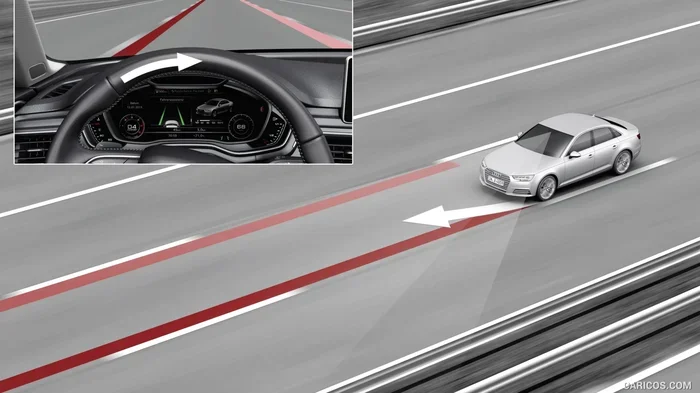
Before we talk about overriding, let us understand what lane keep assist actually does. The system uses a forward-facing camera, usually mounted behind the rearview mirror, to read lane markings on the road. When the car detects you are moving toward a lane line, it applies gentle steering input to guide you back to the center.
Most people confuse lane keep assist with lane departure warning. They are related but different. Lane departure warning only beeps or flashes a warning when you cross a line. Lane keep assist actually moves the steering wheel for you. Some systems also include lane centering, which keeps the car dead center in the lane while driving.
Here is a quick look at how these features differ:
- Lane Departure Warning: Alerts you when you drift out of your lane. Does not steer for you.
- Lane Keep Assist: Gently corrects your steering when you approach a lane line.
- Lane Centering: Actively keeps the car centered between lane lines on highways.
All three are part of the driver assistance system package found in most new cars today. They work hand in hand with adaptive cruise control to give you a semi-autonomous driving experience on highways.
Can You Override Lane Keep Assist?
Yes, you absolutely can. Every automaker that offers lane keep assist also gives you a way to override or turn it off. The method varies by car brand and model, but the options are pretty standard across the industry.
How to Override Lane Keep Assist by Steering Input
The simplest way to override lane keep assist is to just turn the steering wheel. When the system is active and you apply deliberate steering force, the car will usually let you take over. This is called steering wheel torque override. The sensors detect your hands on the wheel and the force you apply, and they back off immediately.
This works in most situations. If you need to swerve around debris or make a sharp turn, the system will not fight you. It is designed to assist, not control. You are always the driver.
How to Override Lane Keep Assist with Buttons
Most cars have a dedicated button on the steering wheel to turn off lane keep assist. On many Ford and Lincoln models, you press the steering wheel controls to access the lane keep assist settings. On Toyotas and Hondas, the button is often labeled with a lane icon. On General Motors vehicles, it might be part of the steering wheel control cluster.
Some vehicles also let you toggle the system on and off through the infotainment screen. You can usually find it under the driver assistance settings or the vehicle settings menu. This is helpful if you want to disable it for an entire trip.
How to Override Lane Keep Assist Through the Infotainment System
Many newer cars give you more granular control through the touchscreen. You can turn off lane centering while keeping adaptive cruise control on. Or you can disable the entire lane keeping system altogether. This level of control is especially useful in vehicles like Tesla, where the Autopilot system includes multiple sub-features you can toggle independently.
For example, in a Tesla Model 3, you can go to Controls, then Autopilot, and adjust the lane keep settings. In a GM truck with Super Cruise, you can press the steering wheel button to deactivate lane keeping while keeping cruise control active.
How Different Car Brands Handle Lane Keep Assist Override
Not all cars handle lane keep assist override the same way. Each brand has its own approach, and understanding the differences can help you use the system more effectively.
Tesla Lane Keep Assist Override
Tesla vehicles are among the most configurable when it comes to driver assistance features. You can choose between different Autopilot modes, adjust how aggressive lane keeping is, and even turn off the feature entirely. Tesla calls its lane keep feature Autosteer, and it is part of the broader Autopilot suite.
To override Autosteer on a Tesla, you simply grab the steering wheel and turn it. The system will disengage temporarily and re-engage once you let go. You can also fully disable Autosteer through the touchscreen settings. Tesla vehicles also feature a driver monitoring system that tracks your attention and can warn you if your hands are off the wheel for too long.
Ford and Lincoln Lane Keep Assist Override
Ford vehicles use a system called Lane Keeping System that includes both lane departure warning and lane keep assist. To override it, you press the steering wheel controls. The system will turn off temporarily and can be reactivated with another press of the button.
Ford also offers a feature called BlueCruise on select models, which is a hands-free highway driving system. Even with BlueCruise active, you can override the steering by grabbing the wheel. The system monitors your attention through an infrared camera on the dashboard.
Toyota and Honda Lane Keep Assist Override
Toyota and Honda vehicles offer lane keep assist as part of their Toyota Safety Sense and Honda Sensing suites, respectively. Both brands allow you to override the system by applying steering input or pressing a button on the steering wheel.
On Toyota models, the lane keep assist button is usually located on the left side of the steering wheel. On Honda models, it is often on the right side. Both systems will temporarily disable when you turn the wheel and can be re-enabled with a button press.
GM Super Cruise Lane Keep Override
GM’s Super Cruise system is one of the most advanced hands-free driving systems available. It uses a driver monitoring system with an infrared camera to ensure you are paying attention. When Super Cruise is active, you do not need to hold the steering wheel, but you can override it at any time by turning it.
Super Cruise also uses GPS and high-definition mapping to navigate curves more accurately. If you override the system, it will pause and wait for you to re-engage. The system is designed to be intuitive and responsive to driver input.
When Should You Override Lane Keep Assist?
There are several situations where overriding lane keep assist makes sense. Understanding these scenarios can help you use the system more safely and effectively.
Heavy Snow or Ice
When the road is covered in snow, the lane keep assist cameras cannot see the lane lines. The system may vibrate the steering wheel or try to correct steering that does not need correcting. In these conditions, it is smart to turn off lane keep assist and rely on your own judgment. The system can actually make driving in snow more confusing if it keeps trying to “help” when it cannot see the road.
Construction Zones
Construction zones often have temporary lane markings, cones, and shifted traffic patterns. Lane keep assist systems are not designed for these conditions. They may try to steer you toward a cone or a barrier. In construction zones, you should always take manual control and override the system.
Tight Parking Lots and Maneuvering
Lane keep assist is designed for highway driving. It does not work well in parking lots, tight turns, or low-speed maneuvering. The system may keep trying to center the car even when you need to make sharp turns. Overriding it in these situations gives you full control when you need it most.
Worn or Faded Road Markings
Old roads with faded lane markings can confuse the cameras. The system may not detect the lines properly and could give false corrections. If you notice the lane keep assist beeping or acting erratically on a road with poor markings, it is a good idea to override it manually.
Narrow Roads Without Clear Lanes
On narrow country roads or one-lane highways, lane keep assist may not work correctly because there are no clear lane divisions. Overriding the system in these situations prevents unwanted steering corrections that could make driving more difficult.
Risks and Dangers of Overriding Lane Keep Assist
Overriding lane keep assist is not inherently dangerous, but it does remove a layer of protection. Understanding the risks is important before you decide to turn it off.
Reduced Safety on Highways
Highway driving is where lane keep assist is most helpful. On long, straight highways with clear markings, the system reduces driver fatigue and helps prevent unintentional lane departures. When you override it, you take on full responsibility for staying in your lane. This can be tiring on long drives and increases the risk of driver fatigue.
Increased Risk of Drowsy Driving
Lane keep assist acts as a safety net for drowsy drivers. If you start to drift out of your lane while tired, the system can correct your path before an accident happens. When you override lane keep assist, you lose this protection. Drowsy driving is a serious problem on American roads, and disabling assistance features makes it worse.
False Sense of Control
Some drivers override lane keep assist and feel more in control. But overconfidence can be just as dangerous as relying too much on the system. The best approach is to use driver assistance features as a supplement to your driving, not a replacement for your attention.
Insurance and Liability Considerations
In the event of an accident, insurance companies may look at whether driver assistance features were active. Disabling lane keep assist could potentially affect liability claims. While this is still a developing area of law, it is worth keeping in mind.
Expert Tips for Using Lane Keep Assist Safely
Getting the most out of your lane keep assist system means knowing how to use it properly. Here are some expert tips to keep in mind.
Keep Your Hands on the Wheel
Even when lane keep assist is active, keep your hands on the steering wheel at all times. Most systems will warn you if your hands are off the wheel for too long. Some vehicles will even reduce the level of assistance if they detect you are not paying attention.
Understand Your Vehicle’s Specific System
Every car is different. Take time to read your owner’s manual and understand exactly how your lane keep assist system works. Know what triggers it, how to override it, and what the warning signals mean. This simple step can make a huge difference in how safely you drive.
Use Lane Keep Assist on Highways, Not City Streets
Lane keep assist works best on controlled-access highways with clear lane markings. City streets with frequent turns, intersections, and pedestrians are not ideal environments for this system. Use it where it was designed to work.
Keep Your Camera Clean
The forward-facing camera that powers lane keep assist needs to be clean to work properly. After a car wash or in rainy conditions, the system may not function as well. If you notice the system acting strangely, check that the camera area near the rearview mirror is clean and unobstructed.
Do Not Rely on Lane Keep Assist Alone
Lane keep assist is a helpful tool, but it is not a substitute for attentive driving. Always stay alert, keep your eyes on the road, and be ready to take control at any moment. The system is designed to assist you, not drive for you.
Common Mistakes Drivers Make with Lane Keep Assist
Even experienced drivers make mistakes when using lane keep assist. Here are some common errors to avoid.
- Assuming the system will work in all conditions: Lane keep assist relies on visible lane markings. It will not work on unpaved roads, in heavy fog, or during heavy snow.
- Ignoring warning alerts: If your car beeps or vibrates the steering wheel, pay attention. These are warnings that the system is having trouble or that you are drifting.
- Overriding the system too often: If you find yourself constantly overriding lane keep assist, the system may not be a good fit for your driving conditions. Consider adjusting the sensitivity or turning it off entirely.
- Not updating the system: Some vehicles receive software updates that improve lane keep assist performance. Keep your car’s software up to date for the best results.
- Confusing lane keep assist with full self-driving: Lane keep assist is not autonomous driving. You must always be ready to take control of the vehicle.
Key Takeaways
- You can override lane keep assist in virtually every vehicle that has the feature, using steering input, buttons, or the infotainment menu.
- Overriding lane keep assist is useful in situations like heavy snow, construction zones, and narrow roads where the system cannot function properly.
- Different car brands handle lane keep assist override differently, so learn your specific vehicle’s method.
- Disabling lane keep assist removes an important safety feature, especially on long highway drives where driver fatigue is a risk.
- Always keep your hands on the steering wheel and your eyes on the road, regardless of whether assistance features are active.
- Lane departure warning and lane centering work together with lane keep assist to create a comprehensive safety system.
- Understanding your driver assistance system fully helps you make informed decisions about when to use it and when to override it.
Conclusion
Can you override lane keep assist? Yes, you can, and now you know exactly how. Whether you turn the steering wheel, press a button, or dig into the infotainment menu, every vehicle gives you the ability to take back control. The real question is whether you should, and that depends on your driving conditions, your comfort level, and your awareness of the risks involved.
Lane keep assist is a valuable safety feature that can help prevent accidents and reduce driver fatigue. But it is not perfect. Snow, construction, faded markings, and narrow roads can all challenge the system. In those moments, overriding lane keep assist is not just okay, it is often the smart choice.
The key is balance. Use the system when it helps you, and override it when it does not. Stay informed about how your specific vehicle works, keep your attention on the road, and always remember that you are the driver. No amount of technology can replace your judgment, your reflexes, and your focus behind the wheel.
Next time you get behind the wheel, take a moment to understand your lane keep assist settings. Know how to activate it, how to override it, and when each option makes sense. That small bit of knowledge can make a big difference in your safety on the road.
Frequently Asked Questions
Is it safe to override lane keep assist while driving?
It is safe when done intentionally and in appropriate conditions. If you need to swerve around an obstacle or navigate a construction zone, overriding the system is not only safe, it is necessary. The key is to stay alert and take control deliberately rather than turning the system off and ignoring it entirely.
Will my car warn me if I override lane keep assist?
Most vehicles will give you a visual or audible alert when you override lane keep assist. Some cars show a message on the dashboard indicating that the system has been temporarily disabled. Others simply stop the steering correction and wait for you to re-engage it.
Can overriding lane keep assist affect my insurance rates?
There is no direct evidence that overriding lane keep assist affects insurance rates. However, insurance companies are increasingly looking at driver assistance feature usage in accident claims. Keeping safety features active is generally considered a positive factor.
Why does my lane keep assist keep turning off by itself?
Several factors can cause lane keep assist to deactivate automatically. These include camera obstruction, faded road markings, heavy rain or snow, and steering wheel input that the system interprets as a manual override. Cleaning the camera area and checking your vehicle settings can often resolve this issue.
Do all new cars come with lane keep assist?
Not all new cars come with lane keep assist as standard. Many manufacturers offer it as part of a safety package or trim-level feature. However, it is becoming increasingly common across all vehicle segments, from economy cars to luxury SUVs.
How do I know if lane keep assist is active in my car?
Most vehicles display a lane icon on the dashboard or instrument cluster when lane keep assist is active. The icon is usually green or blue when the system is engaged and may turn gray or disappear when it is off. Check your owner’s manual for the specific indicator for your vehicle model.
=== END ===