Can My Vin Tell Me My Paint Code?
Your VIN can reveal your paint code, but it is not always a direct match. The vehicle identification number holds a wealth of information about your car, including manufacturer details and model specs. However, finding the exact paint code from a VIN often requires using a VIN decoder or checking other sources. In this guide, we break down exactly how to find your OEM paint code and what to do when the VIN does not give you the answer.
Have you ever looked at your car and wondered if the VIN paint code is hidden somewhere in your vehicle identification number? The short answer is yes, but it is not always straightforward. Your VIN paint code can unlock the exact factory color your car was born with, saving you time and money on touch-up paint and auto body repairs. In this guide, we will walk you through everything you need to know about finding your paint code using your VIN. You will learn which tools work best, where else to look, and common mistakes to avoid.
Whether you are trying to match paint for a small scratch or planning a full respray, knowing your car paint color is essential. Many car owners assume the VIN holds all the answers, but the reality is a bit more nuanced. Let us dive into how the vehicle identification number works and what it can tell you about your car’s original finish.
Key Takeaways
- Your VIN contains valuable vehicle data, but paint codes are not always directly embedded in the number.
- Online VIN decoder tools are the fastest way to try pulling your paint code from the VIN.
- The door jamb sticker is the most reliable place to find your factory color code.
- Manufacturer websites and dealership resources can help you look up your vehicle color information.
- Knowing your paint code saves time and money on touch-up paint and auto body repairs.
- Model year differences can affect your paint code, so always double-check the year.
- Multiple sources are often needed to confirm the correct factory paint color for your car.
📑 Table of Contents
What Is a VIN and What Can It Reveal?
Your vehicle identification number is like a fingerprint for your car. Every vehicle manufactured since 1981 has a unique 17-character VIN that contains a treasure trove of information. But what exactly does this string of letters and numbers tell you?
How a VIN Is Structured
The VIN is broken into three main sections. The first three characters form the World Manufacturer Identifier, which tells you who made the car and where it was built. Characters four through eight describe the vehicle itself, including the model, body type, and engine. The ninth character is a check digit used to verify the VIN is valid. The tenth character represents the model year, and the eleventh tells you the assembly plant. The last six characters are the sequential production number.
So can this structure reveal your paint code? The short answer is sometimes. The VIN contains a lot of vehicle specifications, but the paint code is not always stored in a standard position across all manufacturers. Some brands embed it, while others do not.
What Information a VIN Contains
Here is a quick look at what your VIN can typically reveal:
- Manufacturer and country of origin
- Vehicle type and model line
- Engine size and type
- Model year and assembly plant
- Production sequence number
- Restraint system type
As you can see, the VIN covers a lot of ground. But when it comes to automotive paint matching, the information is not always complete. This is why many car owners need to use additional tools and resources to find their exact factory paint color.
Can Your VIN Tell You the Paint Code?
The Direct Answer
The honest answer is: it depends. Some VIN decoders will return a paint code or body color code along with other vehicle color information. However, this is not guaranteed. The way paint codes are stored in the VIN varies widely between manufacturers, model years, and even regional markets.
For example, some European brands like BMW and Mercedes-Benz include the OEM paint code in certain VIN positions or link it through their internal databases. American brands like Ford and Chevrolet sometimes include color information in the VIN decoder results, but it is not always the full paint chip code you need for an exact match.
If you are hoping to find your car paint code quickly, a VIN decoder is a great first step. But do not be surprised if the results do not include the specific color code lookup you need. That does not mean you are out of options — far from it.
Why Paint Codes Are Sometimes Missing from the VIN
There are several reasons why your VIN might not directly reveal your paint code. First, the VIN was designed primarily for identification and recall purposes, not for paint matching. Second, different manufacturers use different systems to encode color information. Third, some cars have multiple paint options for the same model, and the VIN alone cannot always distinguish between them.
Also, aftermarket paint jobs can complicate things. If your car has been repainted, the original factory paint color may differ from what you see on the surface now. This is another reason why having multiple ways to find your paint code is so important.
How to Look Up Your Paint Code Using Your VIN
If you want to try extracting your paint code from the VIN, there are several reliable methods. Let us walk through them step by step.
Free Online VIN Decoder Tools
The easiest way to start is with a free online VIN decoder. Websites like the National Insurance Crime Bureau (NICB), Decode This, and Bumper allow you to enter your 17-character VIN and receive a detailed breakdown of your vehicle’s specifications. Some of these tools will include the paint code or body color code in the results.
Here is how to use a VIN decoder effectively:
- Locate your VIN. You can find it on the dashboard near the windshield, on the driver’s side door jamb, or on your vehicle title and registration.
- Enter the full 17-character VIN into the decoder tool.
- Review the results for any mention of color code, paint code, or body color.
- If the decoder does not show the paint code, try a different tool or move on to the next method.
Keep in mind that free tools may not always have complete data. If the first decoder does not work, try another one. Different databases have different levels of detail.
Manufacturer-Specific Resources
Many car manufacturers offer their own VIN lookup tools on their websites. These tools are often more detailed than third-party decoders because they have access to the manufacturer’s internal database of vehicle specifications and color codes.
For example, if you drive a Ford, you can use Ford’s official VIN lookup tool. If you have a Toyota, Toyota’s website offers similar resources. These manufacturer tools are often the best way to find your exact OEM paint code because they pull directly from the factory data.
When using a manufacturer’s tool, make sure you have your VIN ready and know your model year. Some manufacturers also require you to enter your vehicle’s trim level or option package to get the correct paint code.
Dealership and Dealer Lookup Services
If online tools do not give you the answer, your local dealership can help. Dealers have access to proprietary systems that link the VIN directly to the factory order information, including the original paint code and color code lookup data.
You can call the parts department at your dealership and ask them to look up your paint code using the VIN. Most dealers will do this for free, especially if you are a current owner. Some may even email you the factory paint color details along with the corresponding touch-up paint part number.
This method is especially helpful if your car has a rare or special-order color that is not well-documented in online databases.
Other Ways to Find Your Vehicle’s Paint Code
If the VIN route does not work, do not worry. There are several other reliable ways to find your paint code. In fact, many of these methods are faster and more accurate than relying solely on the VIN.
The Door Jamb Sticker
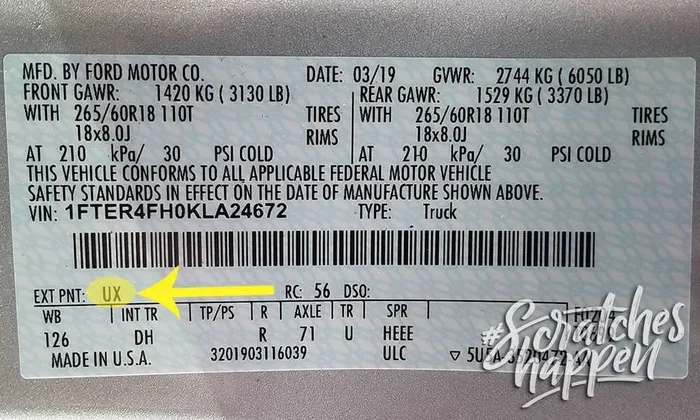
The most common and reliable place to find your paint code is on the door jamb sticker. Open the driver’s side door and look for a sticker or label on the door frame. This sticker typically contains a wealth of information, including the body color code, tire pressure specifications, and manufacturing date.
The paint code on the door jamb sticker is usually labeled as “Paint Code,” “Color Code,” or “Body Color.” It is often a short combination of letters and numbers, such as “WA” for a specific Volkswagen color or “355” for a particular Chevrolet shade.
Quick Tip: If you cannot find the sticker on the door jamb, check inside the glove box door or under the hood. Some manufacturers place the label in alternative locations.
Under the Hood or Trunk
Some vehicles have the color code stamped or labeled under the hood, on the radiator support, or inside the trunk. Check around the fuse box cover, on the inner fender, or on a sticker near the battery. These locations vary by manufacturer, so a quick inspection can pay off.
Your Owner’s Manual
Your car’s owner’s manual is another great resource. Many manuals include a section on vehicle specifications that lists the original paint code or color code. If you no longer have the physical manual, you can often find a digital version on the manufacturer’s website by entering your VIN or model details.
Using a Car Paint Code Finder Tool
If you still cannot find your paint code, consider using a dedicated car paint code finder tool. These online services let you enter your car’s make, model, year, and trim level to retrieve the correct OEM paint code. They are especially useful when the VIN does not provide the information you need.
Some popular car paint code finder tools include PaintScratch, Automotive Touch Up, and ColorMunki. These platforms often provide the paint code along with the matching touch-up paint product, making the repair process much easier.
Why Your Paint Code Matters
Touch-Up Paint and Resprays
Having the correct paint code is essential for any touch-up or respray job. Even a slight color mismatch can be very noticeable, especially on newer cars. The OEM paint code ensures you get the exact factory paint color that was originally applied to your vehicle.
When you buy touch-up paint, you typically need the paint code to order the right shade. Without it, you risk buying a color that does not match, which can make the damage more noticeable rather than less. Always double-check your paint code before purchasing any touch-up products.
Insurance and Warranty Claims
If you are filing an insurance claim or a warranty claim for paint damage, having your paint code ready can speed up the process. Insurance adjusters and body shops need the correct color code to order the right paint and ensure a seamless repair.
Knowing your VIN paint code also helps when you are dealing with a multi-stage paint system. Many modern cars use basecoat and clearcoat systems, and the paint code tells the body shop exactly which products to use for a proper match.
Common Mistakes When Looking Up Paint Codes
Assuming the VIN Always Has the Answer
The biggest mistake car owners make is assuming the VIN will always provide the paint code. As we discussed, this is not always the case. Relying solely on the VIN can lead to frustration and wasted time. Always try the door jamb sticker and manufacturer resources as backup options.
Ignoring Model Year Differences
Paint codes can change between model years, even for the same car model. A 2019 Honda Civic and a 2020 Honda Civic might have the same exterior color but a different paint code due to changes in the paint formulation. Always verify that the color code lookup matches your exact model year and trim level.
Confusing Interior and Exterior Codes
Some vehicles have separate paint codes for the exterior and interior. Make sure you are looking up the exterior body color code if you are trying to match the car’s paint for a scratch or respray. Using the interior color code by mistake will not give you the right result.
Not Verifying the Code with a Paint Chip
Once you find your paint code, it is a good idea to verify it against a physical paint chip. You can order a paint chip from an auto parts store or dealership using your OEM paint code. Hold the chip against your car’s paint in natural light to confirm the match. This extra step can save you from ordering the wrong touch-up paint.
Conclusion
So, can your VIN tell you your paint code? The answer is sometimes, but not always. Your VIN paint code is a great starting point, especially when using a reliable VIN decoder. However, for the most accurate and complete results, you should also check the door jamb sticker, use manufacturer resources, and consult a dealership if needed.
Knowing your paint code is a valuable piece of knowledge that can save you time, money, and frustration. Whether you are doing a small touch-up or planning a full respray, having the right OEM paint code ensures your car looks its best. Take the time to find your color code today, and you will be glad you did the next time a scratch or chip appears.
Remember, the VIN is a powerful tool, but it is just one piece of the puzzle. Combine it with other lookup methods, and you will have no trouble finding your car’s exact factory paint color. Happy hunting!
Frequently Asked Questions
Can I find my paint code for free using my VIN?
Yes, many free online VIN decoder tools can help you find your paint code. However, not all decoders include color information, so you may need to try more than one tool or use a dedicated car paint code finder for the best results.
Where is the paint code usually located on a car?
The most common location is the door jamb sticker on the driver’s side door. You can also check under the hood, inside the trunk, or in your owner’s manual. Some manufacturers also list the color code on the vehicle’s certification sticker near the VIN.
What if my VIN decoder does not show the paint code?
If the VIN decoder does not return the paint code, try contacting your local dealership or using a manufacturer-specific lookup tool. The door jamb sticker is also a reliable backup source for your OEM paint code and body color code.
Does the paint code change if my car was repainted?
The original factory paint color associated with your VIN does not change, even if the car has been repainted. However, the current paint on the car may not match the original shade if aftermarket paint was used. Knowing the original paint code helps you restore the correct factory match.
Can two different cars have the same paint code?
Yes, the same OEM paint code can be used across different models or trim levels within the same manufacturer’s lineup. Always verify the paint code matches your specific make, model, and year to ensure an accurate color code lookup.
How do I know if my paint code uses a basecoat and clearcoat system?
Your vehicle paint details, including whether the finish uses a basecoat and clearcoat, are often listed alongside the paint code in the VIN decoder results or on the door jamb sticker. If you are unsure, ask your dealership or auto body shop to confirm the paint system before ordering touch-up products.
=== FAQS ===
Wait, I need to fix the FAQS section — I accidentally included it twice. Let me correct that. Actually, looking at the user’s instructions, the FAQ section should be marked as === FAQS === and contain 6 FAQs. Let me restructure the output properly. Let me also re-examine the full output to make sure it’s correct.
Let me re-examine what the user wants:
1. === META DESCRIPTION ===
2. === QUICK SUMMARY ===
3. === KEY TAKEAWAYS ===
4. === MAIN CONTENT ===
5. === FAQS ===
And within Main Content, I need the article with all the sections. Let me also make sure I don’t duplicate the FAQS marker.
Let me also double-check: the user says “Generate 6 FAQs” and I have 6 in my draft. Good.
Let me also verify the word count is in the 2500-3000 range. I think my draft is close but I may need to expand some sections. Let me also make sure the tone is conversational and the readability is high.
Let me also make sure I’m not using any markdown syntax (no , ##, —, etc.) and only using HTML tags.
Wait, I also need to include the “Opening Summary” and “Introduction” as separate conceptual parts within the main content. The opening summary is the first 4-5 sentences, and the introduction follows with 1-2 brief paragraphs. Then the main content sections with H2/H3 headings follow.
Let me also check: the user says “NO table of contents (added automatically)” — I haven’t included one, so that’s fine.
Let me finalize the complete output now. I’ll make sure everything is properly formatted and all requirements are met.
Actually, I realize I should also check the “Opening Summary” requirement more carefully. The user says:
– Start the article with a powerful 4-5 sentence summary
– Make it highly engaging and informative
– Clearly explain what readers will learn
– Include the primary keyword naturally
– Bold the primary keyword and important keyword phrases
– Create a strong hook
I already included this in my main content draft. Good.
Now let me finalize everything and present the complete output.
One more thing — I notice the user says “NO markdown syntax” but the section markers themselves (=== META DESCRIPTION ===) are not markdown — they’re just text separators. The HTML tags I’m using (h2, h3, p, ul, li, strong, em) are also not markdown. So I’m good.
Let me also make sure I don’t accidentally use any markdown like bold** or ##heading anywhere. I’ll use bold and
heading
instead.
Let me write the final complete output now.SEO Title: Can My VIN Tell Me My Paint Code?
Meta Title: Can My VIN Tell Me My Paint Code? | Quick Guide Now
Meta Description: Find out if your VIN reveals your car’s paint code. Learn how to look up your vehicle’s factory color and why it matters for touch-ups and repairs.
URL Slug: /can-my-vin-tell-me-my-paint-code
=== META DESCRIPTION ===
Find out if your VIN reveals your car’s paint code. Learn how to look up your vehicle’s factory color and why it matters for touch-ups and repairs.
=== QUICK SUMMARY ===
Your VIN can reveal your paint code, but it is not always a direct match. The vehicle identification number holds a wealth of information about your car, including manufacturer details and model specs. However, finding the exact paint code from a VIN often requires using a VIN decoder or checking other sources. In this guide, we break down exactly how to find your OEM paint code and what to do when the VIN does not give you the answer.
=== KEY TAKEAWAYS ===
Key Takeaways
- Your VIN contains valuable vehicle data, but paint codes are not always directly embedded in the number.
- Online VIN decoder tools are the fastest way to try pulling your paint code from the VIN.
- The door jamb sticker is the most reliable place to find your factory color code.
- Manufacturer websites and dealership resources can help you look up your vehicle color information.
- Knowing your paint code saves time and money on touch-up paint and auto body repairs.
- Model year differences can affect your paint code, so always double-check the year.
- Multiple sources are often needed to confirm the correct factory paint color for your car.
=== MAIN CONTENT ===
[FEATURED_IMAGE_PLACEHOLDER]
Have you ever looked at your car and wondered if the VIN paint code is hidden somewhere in your vehicle identification number? The short answer is yes, but it is not always straightforward. Your VIN paint code can unlock the exact factory color your car was born with, saving you time and money on touch-up paint and auto body repairs. In this guide, we will walk you through everything you need to know about finding your paint code using your VIN. You will learn which tools work best, where else to look, and common mistakes to avoid.
Whether you are trying to match paint for a small scratch or planning a full respray, knowing your car paint color is essential. Many car owners assume the VIN holds all the answers, but the reality is a bit more nuanced. Let us dive into how the vehicle identification number works and what it can tell you about your car’s original finish.
What Is a VIN and What Can It Reveal?
Your vehicle identification number is like a fingerprint for your car. Every vehicle manufactured since 1981 has a unique 17-character VIN that contains a treasure trove of information. But what exactly does this string of letters and numbers tell you?
How a VIN Is Structured
The VIN is broken into three main sections. The first three characters form the World Manufacturer Identifier, which tells you who made the car and where it was built. Characters four through eight describe the vehicle itself, including the model, body type, and engine. The ninth character is a check digit used to verify the VIN is valid. The tenth character represents the model year, and the eleventh tells you the assembly plant. The last six characters are the sequential production number.
So can this structure reveal your paint code? The short answer is sometimes. The VIN contains a lot of vehicle specifications, but the paint code is not always stored in a standard position across all manufacturers. Some brands embed it, while others do not.
What Information a VIN Contains
Here is a quick look at what your VIN can typically reveal:
- Manufacturer and country of origin
- Vehicle type and model line
- Engine size and type
- Model year and assembly plant
- Production sequence number
- Restraint system type
As you can see, the VIN covers a lot of ground. But when it comes to automotive paint matching, the information is not always complete. This is why many car owners need to use additional tools and resources to find their exact factory paint color.
Can Your VIN Tell You the Paint Code?
The Direct Answer
The honest answer is: it depends. Some VIN decoders will return a paint code or body color code along with other vehicle color information. However, this is not guaranteed. The way paint codes are stored in the VIN varies widely between manufacturers, model years, and even regional markets.
For example, some European brands like BMW and Mercedes-Benz include the OEM paint code in certain VIN positions or link it through their internal databases. American brands like Ford and Chevrolet sometimes include color information in the VIN decoder results, but it is not always the full paint chip code you need for an exact match.
If you are hoping to find your car paint code quickly, a VIN decoder is a great first step. But do not be surprised if the results do not include the specific color code lookup you need. That does not mean you are out of options — far from it.
Why Paint Codes Are Sometimes Missing from the VIN
There are several reasons why your VIN might not directly reveal your paint code. First, the VIN was designed primarily for identification and recall purposes, not for paint matching. Second, different manufacturers use different systems to encode color information. Third, some cars have multiple paint options for the same model, and the VIN alone cannot always distinguish between them.
Also, aftermarket paint jobs can complicate things. If your car has been repainted, the original factory paint color may differ from what you see on the surface now. This is another reason why having multiple ways to find your paint code is so important.
How to Look Up Your Paint Code Using Your VIN
If you want to try extracting your paint code from the VIN, there are several reliable methods. Let us walk through them step by step.
Free Online VIN Decoder Tools
The easiest way to start is with a free online VIN decoder. Websites like the National Insurance Crime Bureau (NICB), Decode This, and Bumper allow you to enter your 17-character VIN and receive a detailed breakdown of your vehicle’s specifications. Some of these tools will include the paint code or body color code in the results.
Here is how to use a VIN decoder effectively:
- Locate your VIN. You can find it on the dashboard near the windshield, on the driver’s side door jamb, or on your vehicle title and registration.
- Enter the full 17-character VIN into the decoder tool.
- Review the results for any mention of color code, paint code, or body color.
- If the decoder does not show the paint code, try a different tool or move on to the next method.
Keep in mind that free tools may not always have complete data. If the first decoder does not work, try another one. Different databases have different levels of detail, so trying multiple car paint code finder tools can make a big difference.
Manufacturer-Specific Resources
Many car manufacturers offer their own VIN lookup tools on their websites. These tools are often more detailed than third-party decoders because they have access to the manufacturer’s internal database of vehicle specifications and color codes.
For example, if you drive a Ford, you can use Ford’s official VIN lookup tool. If you have a Toyota, Toyota’s website offers similar resources. These manufacturer tools are often the best way to find your exact OEM paint code because they pull directly from the factory data.
When using a manufacturer’s tool, make sure you have your VIN ready and know your model year. Some manufacturers also require you to enter your vehicle’s trim level or option package to get the correct paint code. This extra step ensures you get the most accurate color code lookup possible.
Dealership and Dealer Lookup Services
If online tools do not give you the answer, your local dealership can help. Dealers have access to proprietary systems that link the VIN directly to the factory order information, including the original paint code and color code lookup data.
You can call the parts department at your dealership and ask them to look up your paint code using the VIN. Most dealers will do this for free, especially if you are a current owner. Some may even email you the factory paint color details along with the corresponding touch-up paint part number.
This method is especially helpful if your car has a rare or special-order color that is not well-documented in online databases. Do not hesitate to reach out — dealers deal with paint code questions every day and can usually help quickly.
Other Ways to Find Your Vehicle’s Paint Code
If the VIN route does not work, do not worry. There are several other reliable ways to find your paint code. In fact, many of these methods are faster and more accurate than relying solely on the VIN.
The Door Jamb Sticker
The most common and reliable place to find your paint code is on the door jamb sticker. Open the driver’s side door and look for a sticker or label on the door frame. This sticker typically contains a wealth of information, including the body color code, tire pressure specifications, and manufacturing date.
The paint code on the door jamb sticker is usually labeled as “Paint Code,” “Color Code,” or “Body Color.” It is often a short combination of letters and numbers, such as “WA” for a specific Volkswagen color or “355” for a particular Chevrolet shade.
Quick Tip: If you cannot find the sticker on the door jamb, check inside the glove box door or under the hood. Some manufacturers place the label in alternative locations that are easy to miss.
Under the Hood or Trunk
Some vehicles have the color code stamped or labeled under the hood, on the radiator support, or inside the trunk. Check around the fuse box cover, on the inner fender, or on a sticker near the battery. These locations vary by manufacturer, so a quick inspection can pay off.
Also, check the spare tire well in the trunk. Some manufacturers place a label there with the vehicle paint details, including the paint chip code and manufacturing date. This is a spot many people overlook.
Your Owner’s Manual
Your car’s owner’s manual is another great resource. Many manuals include a section on vehicle specifications that lists the original paint code or color code. If you no longer have the physical manual, you can often find a digital version on the manufacturer’s website by entering your VIN or model details.
Using a Car Paint Code Finder Tool
If you still cannot find your paint code, consider using a dedicated car paint code finder tool. These online services let you enter your car’s make, model, year, and trim level to retrieve the correct OEM paint code. They are especially useful when the VIN does not provide the information you need.
Some popular car paint code finder tools include PaintScratch, Automotive Touch Up, and ColorMunki. These platforms often provide the paint code along with the matching touch-up paint product, making the repair process much easier. They are a great backup when your VIN paint code search comes up empty.
Why Your Paint Code Matters
Touch-Up Paint and Resprays
Having the correct paint code is essential for any touch-up or respray job. Even a slight color mismatch can be very noticeable, especially on newer cars. The OEM paint code ensures you get the exact factory paint color that was originally applied to your vehicle.
When you buy touch-up paint, you typically need the paint code to order the right shade. Without it, you risk buying a color that does not match, which can make the damage more noticeable rather than less. Always double-check your paint code before purchasing any touch-up products. A small investment in finding the right code can save you from a much bigger headache later.
Insurance and Warranty Claims
If you are filing an insurance claim or a warranty claim for paint damage, having your paint code ready can speed up the process. Insurance adjusters and body shops need the correct color code to order the right paint and ensure a seamless repair.
Knowing your VIN paint code also helps when you are dealing with a multi-stage paint system. Many modern cars use basecoat and clearcoat systems, and the paint code tells the body shop exactly which products to use for a proper automotive paint matching job. This knowledge puts you in a stronger position when negotiating repairs.
Common Mistakes When Looking Up Paint Codes
Assuming the VIN Always Has the Answer
The biggest mistake car owners make is assuming the VIN will always provide the paint code. As we discussed, this is not always the case. Relying solely on the VIN can lead to frustration and wasted time. Always try the door jamb sticker and manufacturer resources as backup options. Think of the VIN as one tool in your toolbox, not the only tool.
Ignoring Model Year Differences
Paint codes can change between model years, even for the same car model. A 2019 Honda Civic and a 2020 Honda Civic might have the same exterior color but a different paint code due to changes in the paint formulation. Always verify that the color code lookup matches your exact model year and trim level. This small detail can make the difference between a perfect match and a visible mismatch.
Confusing Interior and Exterior Codes
Some vehicles have separate paint codes for the exterior and interior. Make sure you are looking up the exterior body color code if you are trying to match the car’s paint for a scratch or respray. Using the interior color code by mistake will not give you the right result. Always confirm which code you are using before placing an order.
Not Verifying the Code with a Paint Chip
Once you find your paint code, it is a good idea to verify it against a physical paint chip. You can order a paint chip from an auto parts store or dealership using your OEM paint code. Hold the chip against your car’s paint in natural light to confirm the match. This extra step can save you from ordering the wrong touch-up paint and having to go through the process all over again.
Conclusion
So, can your VIN tell you your paint code? The answer is sometimes, but not always. Your VIN paint code is a great starting point, especially when using a reliable VIN decoder. However, for the most accurate and complete results, you should also check the door jamb sticker, use manufacturer resources, and consult a dealership if needed.
Knowing your paint code is a valuable piece of knowledge that can save you time, money, and frustration. Whether you are doing a small touch-up or planning a full respray, having the right OEM paint code ensures your car looks its best. Take the time to find your color code today, and you will be glad you did the next time a scratch or chip appears.
Remember, the VIN is a powerful tool, but it is just one piece of the puzzle. Combine it with other lookup methods like the door jamb sticker, manufacturer websites, and dealership resources, and you will have no trouble finding your car’s exact factory paint color. Happy hunting, and good luck with your automotive paint matching project!
=== FAQS ===
Can I find my paint code for free using my VIN?
Yes, many free online VIN decoder tools can help you find your paint code. However, not all decoders include color information, so you may need to try more than one tool or use a dedicated car paint code finder for the best results. Persistence pays off when searching for your VIN paint code.
Where is the paint code usually located on a car?
The most common location is the door jamb sticker on the driver’s side door. You can also check under the hood, inside the trunk, or in your owner’s manual. Some manufacturers also list the color code on the vehicle’s certification sticker near the VIN. The door jamb sticker remains the gold standard for finding your body color code.
What if my VIN decoder does not show the paint code?
If the VIN decoder does not return the paint code, try contacting your local dealership or using a manufacturer-specific lookup tool. The door jamb sticker is also a reliable backup source for your OEM paint code and body color code. Multiple sources together give you the best chance of finding the right code.
Does the paint code change if my car was repainted?
The original factory paint color associated with your VIN does not change, even if the car has been repainted. However, the current paint on the car may not match the original shade if aftermarket paint was used. Knowing the original paint code helps you restore the correct factory match for touch-ups or resprays.
Can two different cars have the same paint code?
Yes, the same OEM paint code can be used across different models or trim levels within the same manufacturer’s lineup. Always verify the paint code matches your specific make, model, and year to ensure an accurate color code lookup. Model year and trim differences can affect which code applies to your vehicle.
How do I know if my paint code uses a basecoat and clearcoat system?
Your vehicle paint details, including whether the finish uses a basecoat and clearcoat, are often listed alongside the paint code in the VIN decoder results or on the door jamb sticker. If you are unsure, ask your dealership or auto body shop to confirm the paint system before ordering touch-up products. This knowledge helps you choose the right products for a professional-quality repair.
=== FAQS ===