How to Turn Off Lane Assist on Volkswagen Step by Step
Turning off lane assist on your Volkswagen is simple once you know where to look. Whether you drive a Golf, Jetta, Tiguan, or Passat, the process only takes a few seconds. This guide walks you through every model and year with clear, easy steps. You will also learn why some drivers prefer to disable lane assist and when it is safe to do so.
Have you ever been driving your Volkswagen and thought, “I wish I could just turn off lane assist”? You are not alone. Many VW drivers find themselves wanting to disable lane assist at some point. Maybe the system is too sensitive. Maybe you are driving on a dirt road and do not want it interfering. Whatever the reason, knowing how to turn it off gives you more control over your driving experience.
This guide covers everything you need to know about how to turn off lane assist on Volkswagen vehicles. We will go through the steps for different models, explain why you might want to turn it off, and share tips to help you manage your car’s safety features with confidence. Whether you drive a compact Golf or a spacious Tiguan, you will find the answers here.
Key Takeaways
- Lane assist can be turned off easily: Most Volkswagens let you disable it with a steering wheel button or through the infotainment screen.
- Different models use different methods: Newer VW models use a touchscreen, while older models rely on physical buttons.
- You can re-enable it anytime: Turning it off is not permanent. You can switch lane assist back on whenever you want.
- There are valid reasons to disable it: Some driving conditions or personal preferences make turning it off the better choice.
- Dashboard warnings help you know the status: Your VW will show a light on the dashboard when lane assist is active or off.
- Know your model year: The steps vary slightly depending on your Volkswagen model and the year it was made.
📑 Table of Contents
- What Is Lane Assist on a Volkswagen?
- Why Would You Want to Turn Off Lane Assist?
- How to Turn Off Lane Assist on Volkswagen Step by Step
- How to Know When Lane Assist Is Off
- Can You Turn Off Lane Assist Temporarily?
- Common Issues When Disabling Lane Assist
- Should You Keep Lane Assist On or Off?
- Expert Tips for Managing Volkswagen Safety Features
- Final Thoughts on Turning Off Lane Assist
What Is Lane Assist on a Volkswagen?
Before we dive into the steps, let us talk about what lane assist actually does. Lane assist, also called lane keeping assist, is a driver assistance feature found in most modern Volkswagens. It uses cameras to watch the road lines around you.
When the system detects that your car is drifting out of its lane without a turn signal, it steps in. It may give you a warning buzz or gently steer the car back into the lane. Some VW models call this feature lane centering or lane departure warning. The goal is to keep you safe and help prevent accidents caused by drifting or inattention.
How Does the System Work?
The lane assist system relies on a front-facing camera. This camera is usually mounted near the rearview mirror. It reads road markings and tracks where your car is positioned in the lane.
Here is how it works in simple steps:
- The camera scans the road ahead for lane lines.
- The system compares your car’s position to those lines.
- If you start to drift without signaling, the system responds.
- You get a visual warning on the dashboard and sometimes a sound or steering vibration.
Understanding how the system works helps you know when and why you might want to turn off lane assist. It also helps you understand what the various symbols and lights on your dash mean.
Why Would You Want to Turn Off Lane Assist?
Lane assist is a great safety feature. But there are times when turning it off makes sense. Let us look at some of the most common reasons drivers choose to disable lane assist on their Volkswagens.
Driving on Unmarked Roads
Not every road has clear lane markings. Think about gravel roads, construction zones, or snowy paths where the lines are hidden. In these situations, lane assist can become confused. It might give false warnings or try to steer you in the wrong direction. Turning it off in these conditions keeps you in control.
Off-Road or Dirt Driving
If you enjoy exploring unpaved roads, lane assist can be more of a hindrance than a help. The system expects clear lane lines. Without them, it may keep buzzing or trying to correct your steering. Disabling lane assist lets you drive freely without the system fighting your inputs.
Towing or Heavy Loads
When you are towing a trailer or carrying a heavy load, your car’s handling changes. The lane assist system does not account for these changes. It may react to normal movements that would not be a problem when the car is empty. In these cases, many drivers prefer to turn off the lane assist feature.
Personal Driving Preference
Some drivers simply do not like the feel of the system taking over the steering wheel. It can feel intrusive or annoying during long drives. If you prefer to keep full manual control, turning off lane assist is a perfectly valid choice. Toggling car features on and off is part of what makes modern vehicles so customizable.
How to Turn Off Lane Assist on Volkswagen Step by Step
Now let us get to the good stuff. The steps to turn off lane assist depend on your Volkswagen model and the year it was made. Below, we cover the most common methods across different VW lineups.
Method 1: Using the Steering Wheel Controls
Many Volkswagen models have a physical button on the steering wheel that lets you turn off lane assist. This is the quickest and most common method.
Here is what to do:
- Start your Volkswagen and begin driving.
- Look at the steering wheel on the left side.
- Find the button with a car icon and lane lines. It may also have a dotted line through it.
- Press and hold this button for about two seconds.
- Check the dashboard display for confirmation.
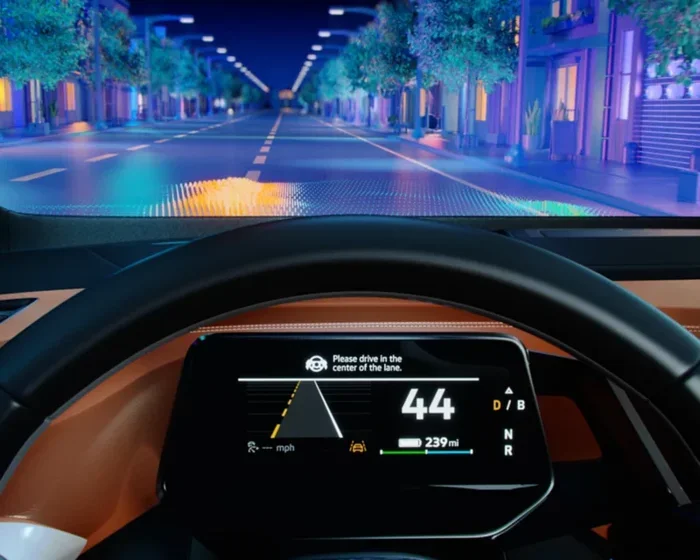
When lane assist is off, the icon on your dashboard will change. It may turn gray or show a line through it. This tells you the system is no longer active.
Method 2: Through the Infotainment Screen
Newer Volkswagen models, especially those with the MIB3 or MIB4 infotainment systems, let you manage lane assist through the touchscreen. This method works well on models like the VW Golf, Jetta, Tiguan, and Passat from recent years.
Follow these steps:
- Press the Settings button on your infotainment screen.
- Navigate to the Driver Assistance or Vehicle Settings menu.
- Look for Lane Assist or Lane Keeping Assist.
- Tap the toggle switch to turn it off.
- The screen will confirm the change, and the dashboard icon will update.
Method 3: Using the Combined Steering and Menu Controls
Some Volkswagen models require you to use both a steering wheel button and the infotainment screen together. This method is common in mid-range VW trims.
Here is the process:
- Press the steering wheel button for driver assistance settings.
- A menu will appear on the instrument cluster or infotainment screen.
- Scroll to find the lane assist option.
- Select it and choose to deactivate or turn off.
- Confirm your choice when prompted.
If you are not sure which method your specific model uses, check your owner’s manual. It will have the exact steps for your Volkswagen model and year. You can also look for a small car icon on the steering wheel that represents driver assistance features.
Quick Reference by Model
Here is a quick look at how lane assist works across popular VW models:
- Volkswagen Golf: Steering wheel button on the left. Newer models also have touchscreen controls.
- Volkswagen Jetta: Steering wheel button. Some newer models use the infotainment menu.
- Volkswagen Tiguan: Infotainment screen method is most common for recent model years.
- Volkswagen Passat: Steering wheel button or infotainment menu, depending on trim level.
- Volkswagen Atlas: Uses the touchscreen for most driver assistance settings.
Remember, these steps can vary slightly based on your model year and trim. Always refer to your owner’s manual for the most accurate instructions.
How to Know When Lane Assist Is Off
Once you have turned off lane assist, you will want to confirm it is really off. Your Volkswagen gives you clear visual cues on the dashboard and instrument cluster.
Here is what to look for:
- The lane assist icon will change color, usually from green or blue to gray.
- A line may appear through the lane icon, showing the system is deactivated.
- You will no longer get steering corrections or warnings when drifting.
- The system will not intervene even if you cross lane lines without signaling.
If you are still unsure, try a gentle, unhurried drift toward the lane line. If the system does not buzz or steer, it is off. If it does respond, go back and check your steps. Sometimes you need to hold the button a little longer.
Can You Turn Off Lane Assist Temporarily?
Yes, you absolutely can. One of the best things about Volkswagen’s lane assist system is that it is not permanent. You can toggle lane assist on and off as often as you need.
Some drivers turn it off for specific stretches of road and then turn it back on. This is especially common when driving through areas with construction or unmarked roads. You simply follow the same steps to re-enable the system when you are ready.
The system remembers your last setting on some models. On others, it resets each time you start the car. Check your owner’s manual to understand how your specific Volkswagen handles this.
Common Issues When Disabling Lane Assist
While turning off lane assist is straightforward, sometimes you may run into issues. Here are the most common problems and how to fix them.
The Button Does Not Respond
If pressing the steering wheel button does nothing, try holding it for a few extra seconds. Sometimes the system requires a longer press. If that does not work, make sure your car is in drive or motion. Some VW models only allow you to change driver assistance settings while the car is moving.
The Dashboard Icon Does Not Change
If you followed the steps but the icon on your dashboard stays the same, try restarting the infotainment system. You can do this by holding the power button on the screen for about 10 seconds. Once it restarts, check the lane assist status again.
Lane Assist Turns Back On Automatically
Some Volkswagen models reset driver assistance features when you restart the engine. If this happens to you, you will need to turn off lane assist each time you start the car. There is no permanent way to disable it on most models, which is actually a safety feature built into the system design.
If you are having trouble and the steps above do not help, it may be a sensor issue. The front-facing camera that runs lane assist can get dirty or blocked. Clean the area near the rearview mirror and try again. If the problem persists, a visit to your VW dealer or a trusted mechanic can help with troubleshooting car issues related to the sensor or module.
Should You Keep Lane Assist On or Off?
This is a great question, and the answer depends on your driving habits and conditions. Let us weigh the pros and cons to help you decide.
When to Keep Lane Assist On
- You are driving on highways with clear lane markings.
- You are tired or driving long distances and need extra support.
- You are in heavy traffic where lane changes happen frequently.
- You want an extra layer of safety during your daily commute.
When to Turn Lane Assist Off
- You are on roads without clear lane lines.
- You are driving on gravel, dirt, or snow-covered roads.
- You are towing a trailer or carrying a heavy load.
- The system is giving you too many false alerts and distracting you.
- You simply prefer full manual control of your steering.
The bottom line is that lane assist is a tool. Like any tool, it works best when you use it in the right situations. Knowing when to turn off lane assist and when to let it run is part of being a smart, informed driver.
Expert Tips for Managing Volkswagen Safety Features
Managing your Volkswagen’s safety features does not have to be complicated. Here are some expert tips to help you get the most out of your car’s driver assistance systems.
Keep Your Camera Clean
The lane assist camera sits near the top of your windshield, behind the rearview mirror. Dirt, snow, or even a hanging air freshener can block it. A quick wipe with a soft cloth during your car wash routine keeps the system working properly.
Update Your Software
Volkswagen occasionally releases software updates that improve the performance of driver assistance features. These updates can be done at your local dealer or, on some models, through a USB drive. Staying up to date ensures your lane assist system works as intended.
Customize Your Alerts
Some Volkswagen models let you adjust how sensitive lane assist is. You may be able to choose between different alert levels. This gives you more control without fully turning off the system. Check your infotainment settings to see if this option is available for your model.
Combine with Other Safety Features
Lane assist works well alongside other VW safety features like adaptive cruise control, blind spot monitoring, and forward collision warning. Understanding how these systems interact helps you use them more effectively together.
Know Your Dashboard Symbols
Spend a few minutes learning what each icon on your dash means. This small investment of time pays off big when you need to quickly understand what your car is telling you. The dashboard is your car’s communication tool, and understanding it makes you a better driver.
Final Thoughts on Turning Off Lane Assist
Knowing how to turn off lane assist on Volkswagen is a simple but valuable skill. It gives you flexibility and control over your driving experience. Whether you are navigating a dusty back road, towing a trailer, or just prefer to steer manually, you now have the steps to do it confidently.
Remember, turning off lane assist is not about disabling safety forever. It is about using the right tool for the right moment. You can always turn it back on when the road conditions improve. Your Volkswagen was designed to adapt to you, and understanding these features is part of being a responsible and informed driver.
Take a few minutes to practice the steps in a safe, low-traffic area. Once you know how it works on your specific model, you will feel more comfortable using and managing this feature. Safe travels, and enjoy the drive!
Frequently Asked Questions
Can I permanently turn off lane assist on my Volkswagen?
Most Volkswagen models do not allow you to permanently disable lane assist. The system typically resets each time you start the car. You can turn it off temporarily each time you drive, but there is no factory setting to keep it off forever.
Will turning off lane assist affect my warranty?
No, turning off lane assist does not affect your Volkswagen warranty. The feature is designed to be toggled on and off by the driver. It is a standard part of the vehicle’s driver assistance system.
What is the difference between lane assist and lane centering on a Volkswagen?
Lane assist warns you when you drift out of your lane. Lane centering actively adjusts your steering to keep the car centered in the lane. Some VW models offer both, while others offer only one. Check your vehicle’s manual to see which features your model includes.
Can I turn off lane assist while driving?
Yes, you can turn off lane assist while driving. It is designed to be adjusted on the go. Simply use the steering wheel button or infotainment menu to deactivate the system whenever you need to.
Why does my lane assist keep turning back on after I turn it off?
This happens on many Volkswagen models. The system often resets to its default state when you restart the engine. Some models also re-enable lane assist after a certain period of time. This is a safety feature built into the system design.
Where is the lane assist button located on a Volkswagen?
On most Volkswagen models, the lane assist button is on the left side of the steering wheel. It usually has an icon showing a car with lane lines. On newer models with touchscreen infotainment systems, you can also access lane assist through the settings menu on the screen.
=== CONCLUSION ===
Learning how to turn off lane assist on Volkswagen is easier than most people think. Whether you use a steering wheel button or the infotainment screen, the process takes just a few seconds. We covered the steps for multiple VW models, explored why drivers choose to disable the feature, and shared practical tips for managing your safety systems.
The key takeaway is that lane assist is a helpful tool, but it is not one-size-fits-all. Different driving situations call for different settings. By understanding how to toggle lane assist on and off, you take full control of your Volkswagen’s driver assistance features. Keep this guide handy, and you will always know exactly what to do the next time you need to make a change.