How to Play Music via Bluetooth in 2014 Maserati GranTurismo
Playing music via Bluetooth in a 2014 Maserati GranTurismo is straightforward once you know the steps. This guide walks you through pairing your phone, adjusting audio settings, and fixing common Bluetooth issues. You will learn how to enjoy wireless streaming, manage multiple devices, and get the best sound quality from your GranTurismo’s infotainment system.
There is nothing quite like cruising in a 2014 Maserati GranTurismo with your favorite playlist flowing through the speakers wirelessly. The ability to play music via Bluetooth in this luxury Italian sports car transforms every drive into a personal concert. Whether you are commuting through the city or heading out on a weekend road trip, wireless audio keeps you connected and entertained.
The 2014 Maserati GranTurismo comes equipped with a capable infotainment system that supports Bluetooth connectivity. This means you can stream music from your phone, take hands-free calls, and control audio right from the dashboard. But like any car technology, getting everything to work smoothly takes a little know-how. That is exactly what this guide is here to help with.
In this article, we will cover everything you need to know about Bluetooth music in the 2014 Maserati GranTurismo. From the initial pairing process to advanced tips for better sound quality, you will find practical steps that work. We will also address common problems and show you how to fix them quickly. By the end, you will feel confident using Bluetooth every time you get behind the wheel.
Key Takeaways
- Paired devices connect easily: The 2014 Maserati GranTurismo supports Bluetooth pairing in just a few simple steps through the infotainment system.
- Multiple devices can be paired: You can store several phones and switch between them without hassle.
- Troubleshooting is simple: Most Bluetooth issues can be fixed by restarting devices, clearing old pairings, or resetting the car’s system.
- Audio quality is impressive: The GranTurismo’s sound system delivers clear, rich Bluetooth audio when configured correctly.
- Hands-free calling works too: Bluetooth in the GranTurismo supports both music streaming and phone calls.
- Keep your software updated: Maintaining the latest firmware helps prevent connectivity problems.
📑 Table of Contents
- Understanding Bluetooth in the 2014 Maserati GranTurismo
- How to Pair Your Phone with the GranTurismo
- Managing Multiple Paired Devices
- Troubleshooting Common Bluetooth Issues
- Tips for the Best Bluetooth Audio Experience
- Comparing Bluetooth Streaming to Other Audio Options
- Maintaining Your Bluetooth System
- Final Thoughts on Playing Music via Bluetooth
Understanding Bluetooth in the 2014 Maserati GranTurismo
The 2014 Maserati GranTurismo features an infotainment system that includes built-in Bluetooth capability. This system allows you to connect your smartphone wirelessly and stream audio directly through the car’s premium sound system. Maserati designed this system to be user-friendly, but it does require a proper setup to work at its best.
Before you dive into pairing, it helps to understand what Bluetooth can do in this vehicle. The system supports both audio streaming and hands-free calling. This means you can listen to music from apps like Spotify, Apple Music, or your local library. At the same time, you can take phone calls without ever touching your device. The car’s built-in microphone picks up your voice clearly, making calls safe and convenient.
Bluetooth Versions and Compatibility
The 2014 GranTurismo uses Bluetooth 2.1 or higher, depending on the specific model and trim. This version supports the Advanced Audio Distribution Profile (A2DP), which is the standard for streaming high-quality audio wirelessly. Most modern smartphones are fully compatible with this profile, so you should not run into issues regardless of whether you use an iPhone or an Android device.
It is worth noting that the Bluetooth system in the GranTurismo also supports the Hands-Free Profile (HFP). This profile handles phone calls and voice dialing. When both profiles are active, your phone seamlessly switches between music streaming and call mode. This dual functionality is one of the reasons Bluetooth in luxury cars has become so popular over the years.
How to Pair Your Phone with the GranTurismo
The pairing process for the 2014 Maserati GranTurismo is simple and takes less than a minute. Follow these steps to get your phone connected and your music streaming.
Step 1: Turn on Bluetooth on Your Phone
First, open the settings menu on your smartphone. Find the Bluetooth option and toggle it on. Your phone will immediately start scanning for nearby devices. Make sure your Bluetooth is set to be visible or discoverable. This allows the car’s infotainment system to detect your phone during the pairing process.
Step 2: Access the Infotainment System
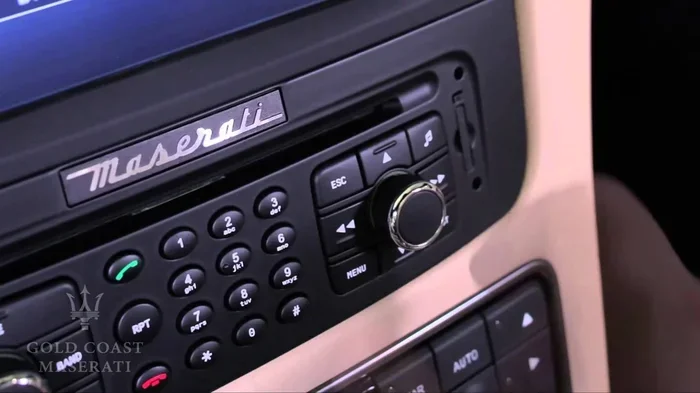
Press the Menu button on the GranTurismo’s infotainment display. Navigate to the Settings or Phone section. Look for the Bluetooth option and select it. The system will begin searching for available devices. You should see your phone’s name appear on the screen within a few seconds.
Step 3: Select Your Phone and Pair
Tap on your phone’s name when it appears in the list of available devices. The car’s system will generate a pairing code. You may need to confirm this code on both your phone and the car’s display. Once both devices show a match, tap Pair or Confirm. The connection should establish within a few seconds.
Step 4: Test the Connection
After pairing, play a song on your phone. The audio should automatically route through the car’s speakers. If you hear music, congratulations, your Bluetooth music setup is complete. If not, check the audio output settings on your phone and make sure Bluetooth is selected as the audio device.
Managing Multiple Paired Devices
The 2014 Maserati GranTurismo allows you to pair multiple devices at once. This is especially useful if you share the car with a partner or family member. Each paired device is stored in the car’s memory, so you can switch between them easily.
To manage paired devices, go to the Bluetooth settings menu in the infotainment system. You will see a list of all previously connected devices. From here, you can delete old pairings, set a default device, or rename entries for easier identification. Keeping this list clean helps prevent connection delays and ensures a smooth experience every time you get in the car.
Setting a Default Device
If you frequently use one phone more than another, you can set it as the default Bluetooth device. This means the car will automatically connect to your phone when you turn the ignition on. To set a default, go to the paired devices list and select your preferred phone. Choose the option to set it as the primary or default device. The next time you start the car, it will connect automatically without any manual steps.
Troubleshooting Common Bluetooth Issues
Even with a great system like the one in the GranTurismo, Bluetooth problems can occasionally pop up. Most issues are easy to fix with a few simple steps. Here are the most common problems and how to solve them.
Bluetooth Will Not Connect
If your phone refuses to pair with the car, start by turning Bluetooth off and back on again. This simple reset often resolves minor connectivity glitches. Next, try restarting your phone. Sometimes a fresh start is all that is needed to establish a clean connection. If the problem persists, delete the old pairing from both devices and start the process fresh.
Another thing to check is whether other Bluetooth devices are interfering. If you have a smartwatch, tablet, or another phone nearby, they might be trying to connect to the car instead. Turn off Bluetooth on all other devices temporarily and try pairing again.
Poor Audio Quality or Intermittent Sound
Bluetooth audio quality can sometimes suffer, especially in older car systems. If you experience static, crackling, or intermittent sound, try moving your phone closer to the car’s infotainment system. Physical distance and obstacles like metal bodies can weaken the Bluetooth signal.
Also, check if other wireless signals are causing interference. Wi-Fi routers, microwaves, and even USB chargers can sometimes disrupt Bluetooth connections. Parking in a different spot or turning off nearby electronics can help improve audio quality. For the best results, keep your phone in a cupholder or center console where it stays close to the car’s antenna.
Phone Connects but No Music Plays
This issue often happens when the audio output is not set correctly. On your phone, go to the Bluetooth settings and make sure media audio is enabled for the GranTurismo connection. Some phones have separate toggles for call audio and media audio. Ensure both are turned on for the best experience.
On the car side, check that the audio source is set to Bluetooth. Use the source or mode button on the dashboard or steering wheel to cycle through audio inputs until you reach the Bluetooth option. Once selected, your phone’s music should begin playing through the speakers.
Tips for the Best Bluetooth Audio Experience
Getting your phone connected is only half the battle. To truly enjoy wireless music streaming in your GranTurismo, follow these tips for the best possible sound quality.
Adjust the Car’s Audio Settings
The 2014 Maserati GranTurismo comes with a premium sound system that includes multiple channels and speakers. Take a few minutes to explore the audio settings in the infotainment system. You can adjust the bass, treble, and balance to suit your preferences. The system also offers different sound modes like Sport, Normal, and Concert. Experiment with these settings to find the perfect sound profile for your music.
Use High-Quality Audio Files
Bluetooth technology compresses audio to some degree when streaming. To get the best sound, use high-quality audio files or streaming services that offer lossless or high-bitrate options. Services like Tidal, Apple Music, and Amazon Music HD provide superior audio quality compared to standard streaming. When paired with the GranTurismo’s sound system, the difference is noticeable and worth the extra effort.
Keep Your Phone Charged
Bluetooth streaming uses more battery power than regular phone use. Long drives can drain your phone if it is not plugged in. Consider using a USB cable to connect your phone to the car’s charging port while streaming music. This keeps your phone powered and ensures uninterrupted playback. Some owners also use a key fob battery as a reference point for keeping all car electronics in good working order.
Update Your Phone and Car Software
Software updates can improve Bluetooth performance and fix known bugs. Check for updates on your phone regularly and install them when available. The 2014 GranTurismo’s infotainment system may also receive updates, though older models may have limited support. Keeping your devices up to date is one of the simplest ways to maintain a strong Bluetooth connection.
Comparing Bluetooth Streaming to Other Audio Options
While Bluetooth is incredibly convenient, it is not the only way to play music in the GranTurismo. Here is a quick comparison of the available options.
- Bluetooth Streaming: Wireless, convenient, supports most phones. Audio quality is good but compressed compared to wired options.
- Auxiliary Cable: A simple 3.5mm cable provides a direct wired connection. Audio quality is excellent, but you need a physical cable and your phone must be within reach.
- USB Connection: Plugging in via USB offers both charging and audio playback. Some phones support higher-quality audio over USB, and you can also browse your music library on the car’s display.
- SD Card or USB Drive: You can load music directly onto a USB drive or SD card and plug it into the car. This option works without a phone and provides solid audio quality.
For most people, Bluetooth strikes the perfect balance between convenience and quality. It eliminates the hassle of cables and lets you access your entire music library instantly. However, if you are an audiophile who demands the absolute best sound, a wired connection through an auxiliary cable or USB might be worth considering on occasion.
Maintaining Your Bluetooth System
Like any car feature, your Bluetooth system benefits from regular maintenance. Taking a few simple steps can keep everything running smoothly for years to come.
- Clear old pairings regularly: Remove devices you no longer use to keep the connection list clean and responsive.
- Restart the infotainment system: A simple restart can resolve minor glitches. Turn the car off, wait a minute, and turn it back on.
- Keep your phone’s Bluetooth cache clean: On Android phones, go to Bluetooth settings and clear the cache periodically. On iPhones, toggle Bluetooth off and on to refresh the connection.
- Protect the car’s electronics: Extreme heat can damage the infotainment system. Use a windshield sunshade when parked in direct sunlight, just as you would protect your car from overheating in the sun.
- Check for firmware updates: Visit a Maserati dealership or check the owner’s manual for information on system updates that may improve Bluetooth performance.
Taking care of your car’s electronics is just as important as maintaining the engine. Regular attention to the infotainment system ensures that your Bluetooth music experience remains seamless and enjoyable. If you ever notice persistent issues, a visit to a qualified technician can help diagnose deeper problems with the car’s Bluetooth module or audio system.
Final Thoughts on Playing Music via Bluetooth
The 2014 Maserati GranTurismo is a stunning machine, and being able to play music via Bluetooth adds a modern convenience that complements its luxury character. The pairing process is quick, the audio quality is impressive, and the system handles multiple devices with ease. Whether you are a tech-savvy user or someone who prefers simple, straightforward setups, the GranTurismo’s Bluetooth system delivers.
Remember that every car and every phone is slightly different, so your experience may vary a bit. The steps in this guide cover the most common scenarios and should work for the vast majority of users. If you run into issues that persist, do not hesitate to consult your owner’s manual or reach out to a Maserati service center for professional assistance.
With the right setup and a little maintenance, your GranTurismo becomes more than just a beautiful car. It becomes a personal audio haven on wheels. So go ahead, pair your phone, hit play, and enjoy the drive. The open road and great music were made for each other.
Frequently Asked Questions
Can I pair more than one phone with the 2014 Maserati GranTurismo’s Bluetooth?
Yes, the 2014 Maserati GranTurismo supports pairing multiple devices at once. You can store several phones in the infotainment system and switch between them easily. This is especially useful if you share the car with a partner or family member. Simply go to the Bluetooth settings menu to manage and switch between paired devices.
Why does my Bluetooth music keep cutting out in my GranTurismo?
Intermittent Bluetooth connections are usually caused by interference or distance. Keep your phone close to the car’s infotainment system, ideally in a cupholder or center console. Other wireless devices, Wi-Fi signals, or even USB chargers nearby can cause interference. Turning off other Bluetooth devices temporarily and restarting both your phone and the car’s system often resolves the issue.
Can I make phone calls through the GranTurismo’s Bluetooth system?
Absolutely. The 2014 Maserati GranTurismo’s Bluetooth system supports both audio streaming and hands-free calling. The car’s built-in microphone picks up your voice clearly, and you can answer or end calls using the steering wheel controls or the infotainment display. This makes it safe and convenient to stay connected while driving.
Do I need any special apps to play music via Bluetooth in the GranTurismo?
No special apps are required. Any music app on your phone that plays audio can stream through Bluetooth to the GranTurismo. Popular options include Spotify, Apple Music, Amazon Music, and even your phone’s default music player. Just make sure media audio is enabled in your phone’s Bluetooth settings for the car connection.
How do I delete a paired device from the GranTurismo’s Bluetooth system?
To delete a paired device, go to the Bluetooth settings menu on the infotainment display. Find the device you want to remove in the list of paired devices. Select it and choose the option to delete or unpair. This removes the device from the car’s memory. You can then pair a new device if needed.
Is Bluetooth audio quality in the 2014 GranTurismo as good as a wired connection?
Bluetooth audio in the 2014 GranTurismo sounds very good, but it is slightly compressed compared to a wired connection. The car’s premium sound system helps deliver rich, clear audio. If you are an audiophile who wants the absolute best quality, using an auxiliary cable or USB connection will provide slightly better sound. However, for most listeners, the Bluetooth quality is more than satisfying.
=== CONCLUSION ===
Playing music via Bluetooth in your 2014 Maserati GranTurismo is a simple and rewarding experience. From the initial pairing process to managing multiple devices and troubleshooting common issues, this guide has covered everything you need. The GranTurismo’s infotainment system makes it easy to enjoy wireless music streaming, hands-free calls, and premium audio quality on every drive.
Remember to keep your devices updated, clear old pairings regularly, and adjust your audio settings for the best experience. A little maintenance goes a long way in keeping your Bluetooth connection strong and reliable. With these tips in hand, you are ready to enjoy every mile in your GranTurismo with your favorite music playing through the speakers.