How to Permanently Disable BMW Auto Start Stop 2022
Disabling the BMW Auto Start Stop system on a 2022 model is straightforward once you know the right steps. Whether you use the iDrive menu, the dashboard button, or a permanent coding tweak, you can stop the engine from shutting off at every stop light. This guide walks you through each method so you can pick the one that fits your driving style and keep your engine running smoothly.
BMW vehicles from 2022 come packed with smart technology designed to boost fuel efficiency and cut emissions. One of those features is the Auto Start Stop system. It shuts off the engine whenever you come to a complete stop, like at a red light or in heavy traffic. Then it restarts the engine the moment you press the gas pedal.
For some drivers, this feature feels like a smart eco-friendly upgrade. For others, it becomes an annoying interruption every single commute. If you have found yourself tapping that Auto Start Stop button every time you get behind the wheel, you are not alone. Many BMW owners want to know how to permanently disable BMW Auto Start Stop 2022 and keep the engine running without interruption.
The good news is that you have options. Whether you want a quick temporary fix or a permanent solution that stays disabled every time you drive, this guide covers it all. We will walk you through each method in simple, clear steps. By the end, you will know exactly which approach works best for your driving habits and your BMW.
Before we dive into the how-to, let us quickly talk about what this system does and why BMW installed it in the first place. Understanding the basics makes the rest of the guide much easier to follow.
Key Takeaways
- Multiple methods exist: You can disable Auto Start Stop temporarily or permanently through iDrive, the steering wheel button, or vehicle coding.
- The dashboard button works short-term: Pressing the Auto Start Stop button turns it off for your current drive but resets each time you start the car.
- Coding via BMW tools offers a permanent fix: Using Bimmercode or similar tools lets you make the change stick across all drives.
- Disabling can improve comfort: Stop-and-go traffic becomes less frustrating when the engine doesn’t keep cutting out.
- Fuel economy may shift slightly: Expect minor changes in fuel usage once the system is off.
- Battery health matters: Understanding how the start stop system interacts with your battery helps you make the best decision.
📑 Table of Contents
What Is the BMW Auto Start Stop System?
The BMW Auto Start Stop system is an automatic feature that turns off the engine when the car comes to a full stop. It then restarts the engine as soon as you release the brake or press the accelerator. This process happens seamlessly in the background. Most drivers barely notice it the first few times.
How It Works in Practice
Here is what happens during a typical drive. You approach a red light and slow down to a complete stop. You press the brake pedal. The engine shuts off automatically. The dashboard display may show a green “A” with an arrow, indicating the system is active. When the light turns green, you release the brake or press the gas. The engine fires right back up. The whole cycle takes just a few seconds.
This system aims to reduce engine idling, which wastes fuel and produces extra emissions. In city driving with frequent stops, the system can deliver small but meaningful fuel savings over time. BMW engineers designed it to work with the vehicle’s electrical system and battery. The system monitors battery charge, engine temperature, and cabin climate demands before deciding whether to shut the engine off.
Why the System Can Be Frustrating
Despite its benefits, the Auto Start Stop system has downsides. Frequent engine restarts in stop-and-go traffic can feel jarring. Some drivers report increased vibration and noise each time the engine cycles on and off. Over long commutes, this can become genuinely annoying. Additionally, the constant starting and stopping adds wear to the starter motor and engine components over time.
If you drive in heavy urban traffic daily, you might notice the system drains your patience faster than it saves fuel. This frustration is exactly why so many owners search for ways to permanently disable BMW Auto Start Stop 2022.
Why Drivers Choose to Disable Auto Start Stop
There are several real reasons why BMW owners decide to turn off the Auto Start Stop system. It is not just about preference. Several practical factors come into play.
Driving Comfort
First and foremost, comfort matters. The engine restart can cause a brief lurch or vibration. In smooth traffic, this might not bother you. But during rush hour, when you stop every few seconds, the constant restarting becomes exhausting. Disabling the system gives you a smoother, more relaxed driving experience.
Battery and Electrical System Concerns
BMW vehicles rely heavily on their electrical systems. The Auto Start Stop system places extra demand on the car battery every time it cycles. If your battery is older or weaker, frequent restarts can accelerate wear. Some owners worry about battery drain over time, especially in cold weather when the battery already works harder. If you have ever dealt with a car not starting but battery is fine what to check, you know how frustrating electrical gremlins can be.
Engine Wear
Every engine start causes wear on internal components. The starter motor, flywheel, and engine bearings all experience stress during ignition. While BMW designs these parts to handle the load, reducing unnecessary cycles can extend component life. Drivers who disable the system may see less wear on the starter motor over thousands of miles.
Fuel Economy Trade-Offs
It might seem counterintuitive, but disabling Auto Start Stop does not always hurt fuel economy. In heavy stop-and-go traffic, the fuel saved by not idling is minimal. The extra fuel used during frequent restarts can sometimes offset the savings. On the highway or in light traffic, the system rarely activates anyway, so disabling it has no real impact.
Methods to Disable BMW Auto Start Stop 2022
BMW offers several ways to turn off the Auto Start Stop system. Some are temporary, and others provide a permanent fix. Let us explore each method in detail.
Method 1: The Dashboard Auto Start Stop Button
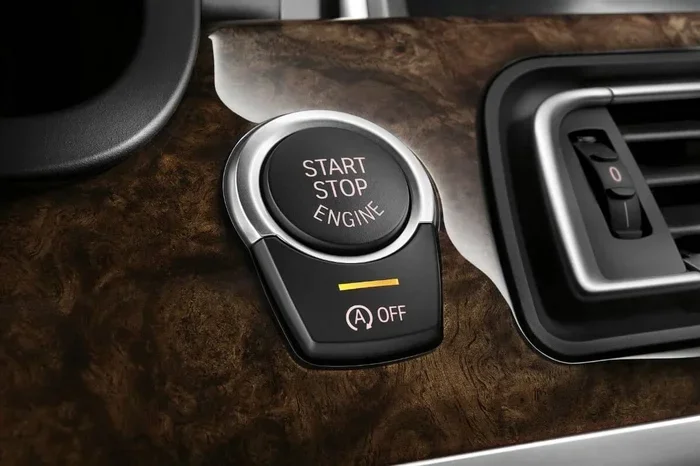
The simplest way to turn off the system is by pressing the Auto Start Stop button on the dashboard. Most 2022 BMW models have this button located near the gear shifter or on the center console. When you press it, a light illuminates on the button, indicating the system is deactivated for your current drive.
Steps to use this method:
- Start the engine and let the car come to a complete stop.
- Locate the Auto Start Stop button on the dashboard or center console.
- Press the button once. The indicator light will turn on.
- The system is now off for this driving session.
- When you restart the engine next time, the system will reactivate automatically.
This method works well if you only want to disable the system occasionally. But if you drive daily and want it off every time, pressing the button every single trip gets old fast. That is where the other methods come in.
Method 2: Persistent Disable Through iDrive Settings
BMW’s iDrive infotainment system offers a way to make the Auto Start Stop setting stick across multiple drives. This method is more convenient than pressing the dashboard button every time.
Steps to disable via iDrive:
- Press the Menu button on the iDrive controller.
- Navigate to Settings.
- Select Vehicle Settings.
- Look for the Driving Assistance or Comfort menu.
- Find the Auto Start Stop option.
- Toggle it off and confirm the selection.
On some 2022 BMW models, the setting may be found under the “Vehicle” or “Comfort” section of iDrive. Once you set it to off, the system should remain disabled until you manually change it back. This is a big improvement over the dashboard button method because it remembers your preference between drives.
Keep in mind that the exact menu path can vary slightly depending on your specific BMW model and trim level. If you do not find the option in the usual location, try searching “Start Stop” within the iDrive settings using the search function.
Method 3: Using Bimmercode or Similar Coding Tools
For owners who want a truly permanent solution, coding the vehicle offers the most reliable approach. BMW vehicles use a standardized diagnostic protocol called OBD-II (On-Board Diagnostics). You can connect a coding tool like Bimmercode to the OBD-II port and modify the Auto Start Stop setting at the software level.
Steps to code the disable:
- Purchase or borrow a compatible OBD-II coding tool such as Bimmercode.
- Locate the OBD-II port under the dashboard on the driver’s side.
- Connect the coding tool to the port.
- Turn the ignition to the “on” position (do not start the engine).
- Open the Bimmercode app on your phone or tablet.
- Allow the tool to read the vehicle’s modules.
- Navigate to the Comfort or Driving module.
- Find the Auto Start Stop setting and change it to “deactivated.”
- Code the change and confirm.
This method permanently disables the system across all drives. Even if you use the dashboard button or iDrive settings, the coding override will keep it off. It is the most reliable way to ensure the system stays disabled.
One thing to note: some BMW dealerships may flag a modified coding during service visits. If you regularly visit the dealer for warranty work, be aware that coding changes could potentially complicate things. However, for most independent shops and DIY enthusiasts, this is a non-issue.
Method 4: Using an OBD-II Diagnostic Tool
Similar to the Bimmercode method, you can use a professional-grade OBD-II scanner to disable the Auto Start Stop feature. Tools like the BMW ISTA (Intelligent System Troubleshooting Application) offer deeper access to vehicle modules and settings.
ISTA is primarily a dealer-level tool, but some third-party versions are available for independent use. If you have access to ISTA through a shop or a friend who works on BMWs, this provides a professional-grade solution. The process is similar to the Bimmercode method, but with more detailed module access and diagnostic capabilities.
If you ever need to troubleshoot electrical issues after making changes, remember that a tool like ISTA can also help diagnose problems related to car lights on auto drain the battery or other electrical concerns that might arise.
Comparison of Disable Methods
Not sure which method fits your needs best? Here is a quick comparison to help you decide.
| Method | Type | Permanent? | Difficulty | Cost |
|---|---|---|---|---|
| Dashboard Button | Temporary | No | Very Easy | Free |
| iDrive Settings | Semi-Permanent | Until changed | Easy | Free |
| Bimmercode | Permanent | Yes | Moderate | $50-$100 for tool |
| ISTA / Dealer Tool | Permanent | Yes | Advanced | Varies |
For most BMW owners, the iDrive method or Bimmercode method strikes the best balance between convenience and permanence. The dashboard button works fine for occasional use, but it does not solve the daily annoyance.
Important Considerations Before Disabling
Before you make the change, there are a few important things to keep in mind. These considerations help you make an informed decision and avoid potential issues.
Impact on Fuel Economy
Disabling the Auto Start Stop system will likely reduce your fuel economy slightly, especially in city driving. The system was designed to save fuel during stops, so turning it off means the engine continues to idle. In practice, the difference is usually small. Most drivers notice less than a half-mile-per-gallon change in mixed driving conditions.
Warranty Implications
If your 2022 BMW is still under warranty, check with your dealer before making coding changes. BMW warranty terms cover manufacturing defects, but modifications made through third-party tools could potentially complicate warranty claims. If you are unsure, the iDrive or dashboard button methods are safe and do not alter the vehicle’s factory coding.
Resale Value
A coded or modified vehicle may raise questions during resale. Some buyers prefer stock settings, while others actively seek out disabled Auto Start Stop systems. If you plan to sell your BMW soon, keeping the system in its original state may be the safer choice.
Battery Health
The Auto Start Stop system relies on a healthy battery to operate. If you disable the system, your battery will not experience the extra cycling stress. This can actually extend battery life, especially if you drive short trips frequently. If you have ever wondered how long car parts can be on backorder, you know that replacing a BMW battery can sometimes involve waiting for the right part. Keeping your battery healthier by reducing unnecessary cycles is a smart move.
Environmental Impact
The Auto Start Stop system reduces emissions by minimizing idle time. Disabling it means slightly more fuel consumption and emissions per drive. For environmentally conscious drivers, this is worth considering. However, the difference is minimal for most driving patterns and should not be a major concern for occasional city driving.
Expert Tips for BMW Owners
Here are some practical tips from experienced BMW owners and technicians who have worked with the Auto Start Stop system extensively.
- Check your battery regularly: A weak battery can cause the Auto Start Stop system to malfunction or reactivate unexpectedly. Have your battery tested at least twice a year.
- Keep your iDrive updated: BMW occasionally releases software updates that improve the Auto Start Stop system. Keeping your iDrive current ensures optimal performance.
- Use quality fuel: BMW engines perform best with premium fuel. Using lower-grade fuel can affect engine performance, including how smoothly the Auto Start Stop system operates.
- Monitor engine health: If you notice rough idling or hesitation after disabling the system, it may indicate an underlying issue unrelated to the Auto Start Stop feature. Have a technician check things out.
- Consider your commute: If your daily drive involves heavy stop-and-go traffic, disabling the system will noticeably improve comfort. If you mostly drive highway miles, the system rarely activates anyway, so disabling it has little practical benefit.
Some owners also ask about how the system interacts with other vehicle features. For instance, if you are considering adding accessories like a tow hitch, it is important to understand how the electrical system handles additional loads. Always consult your owner’s manual or a qualified technician before making modifications.
Common Mistakes When Disabling Auto Start Stop
Avoid these common pitfalls that BMW owners frequently encounter when trying to disable the Auto Start Stop system.
- Forgetting to re-enable it for emissions testing: Some states require the Auto Start Stop system to be active during emissions inspections. If you have permanently disabled it, you may need to temporarily re-enable it before testing.
- Using an incompatible coding tool: Not all OBD-II tools work with BMW vehicles. Make sure your coding tool specifically supports BMW models before attempting any changes.
- Ignoring warning lights: If you disable the system and see a warning light on the dashboard, do not ignore it. It could indicate a separate issue that needs attention.
- Assuming all BMW models are the same: The Auto Start Stop system varies across BMW models and years. Always consult your specific model’s owner manual for the most accurate instructions.
- Making coding changes without a backup: Always document your original settings before making any coding changes. If something goes wrong, you can easily revert to the factory configuration.
One more thing to keep in mind: if you are dealing with any electrical issues on your BMW, problems like car lights on auto draining the battery can sometimes be confused with Auto Start Stop behavior. Make sure you have correctly identified the issue before making changes to the system.
Conclusion
Permanently disabling BMW Auto Start Stop 2022 is entirely achievable with the right approach and the right tools. Whether you choose the simple iDrive settings method for a semi-permanent fix or go all in with a Bimmercode tool for a permanent software-level change, the process is well within the capabilities of most BMW owners. The dashboard button works for quick, temporary needs, but if daily comfort is your priority, the iDrive or coding methods deliver the best results.
Consider your driving habits, your warranty status, and your long-term plans before making the change. Each method has its pros and cons, and the best choice depends on your individual needs. With the guidance in this article, you now have everything you need to take control of your BMW’s Auto Start Stop system and enjoy a smoother, more comfortable driving experience.
The road ahead is yours. Make the choice that fits your drive, and enjoy every mile in your 2022 BMW without the constant engine cycling getting in the way.
Frequently Asked Questions
Can I disable Auto Start Stop on a BMW 2022 without any tools?
Yes, you can. The dashboard Auto Start Stop button and the iDrive settings menu both allow you to turn the system off without any additional tools. The iDrive method is the most convenient because it remembers your preference between drives. Simply navigate through the settings menu and toggle the option off.
Will disabling Auto Start Stop void my BMW warranty?
Using the dashboard button or iDrive settings to disable Auto Start Stop does not void your warranty. These are factory-supported methods. However, if you use coding tools like Bimmercode to make permanent changes at the software level, some dealers may consider that a modification. Check with your dealer if your vehicle is still under warranty.
How much fuel does BMW Auto Start Stop actually save?
The fuel savings vary depending on driving conditions. In heavy city traffic with frequent stops, the system can save approximately 3 to 5 percent on fuel. On highways or in light traffic, the system rarely activates, so there is no measurable benefit. The savings are real but modest for most drivers.
Can I re-enable Auto Start Stop after disabling it?
Absolutely. All the methods described in this guide are reversible. If you used the dashboard button or iDrive settings, simply reverse the steps to turn it back on. If you used a coding tool like Bimmercode, you can recode the setting to reactivate the system at any time.
Does disabling Auto Start Stop affect the battery?
Disabling Auto Start Stop actually reduces stress on the battery because the engine no longer cycles on and off as frequently. This can contribute to longer battery life over time. However, the system itself does not damage the battery when active, as BMW designs it to work within safe electrical parameters.
Is it legal to disable Auto Start Stop in all states?
In most states, disabling the Auto Start Stop system is perfectly legal. However, some states with strict emissions testing requirements may flag a vehicle if the system is not functioning as designed. If you live in a state with emissions inspections, check local regulations or temporarily re-enable the system before testing.
=== INTERNAL LINKS ===
If you are dealing with electrical issues related to your vehicle’s auto features, you might also find it helpful to learn about do car lights on auto drain the battery, which covers common causes of battery drain from automated systems.
For those who have experienced starting problems after making electrical changes, check out our guide on car not starting but battery is fine what to check to troubleshoot further.
Additionally, if you are curious about how hybrid systems handle start stop technology, our article on can you jump start a hybrid battery provides useful insights into hybrid battery behavior.