How to Change Time on a Volkswagen Passat Made Easy
Changing the time on your Volkswagen Passat is simple and takes just a few minutes. Whether you drive a newer Passat with a digital display or an older model with a manual clock, our guide walks you through every method. You will learn how to adjust the clock through the instrument panel, the infotainment system, and even troubleshoot common clock problems.
Have you ever glanced at your dashboard and realized your Volkswagen Passat clock is showing the wrong time? It happens to everyone, especially after a battery change or a long road trip across time zones. The good news is that changing the time on a Volkswagen Passat is one of the easiest car maintenance tasks you can handle yourself. You do not need a mechanic, you do not need expensive tools, and you definitely do not need to visit a dealership. In this guide, we will walk you through every method step by step. Whether you own a newer Passat with a fancy infotainment screen or an older model with a simple analog clock, we have you covered. By the end of this article, you will know exactly how to adjust your Passat clock in under five minutes.
Many Passat owners put off adjusting their car clock because they think it is complicated. Some assume they need a Volkswagen Passat manual or a special diagnostic tool. That is simply not true. The clock adjustment process is designed to be user-friendly. Car manufacturers want you to be able to handle basic settings on your own. Once you learn the steps for your specific Passat model, you will never need to ask anyone for help again. Let us dive into the details and get your clock showing the right time.
Key Takeaways
- Multiple Methods: You can change the time on a Volkswagen Passat using the steering wheel controls, the instrument panel buttons, or the infotainment screen depending on your model year.
- No Tools Needed: Adjusting the clock does not require any special tools or mechanical knowledge.
- Common Issues: The clock may reset after a battery disconnect or show incorrect time due to a faulty fuse or sensor.
- DIY Friendly: This is a simple maintenance task you can do at home without visiting a dealership or mechanic.
- Model Variations: Different Passat model years may have slightly different procedures, so knowing your specific setup helps.
📑 Table of Contents
- Understanding the Volkswagen Passat Clock System
- How to Change Time on a Volkswagen Passat Step by Step
- Common Problems When Changing the Clock on a Volkswagen Passat
- Tips to Keep Your Volkswagen Passat Clock Accurate
- When to Seek Professional Help for Clock Issues
- Quick Comparison: Clock Adjustment Methods by Passat Model Year
- Frequently Asked Questions
- Conclusion
Understanding the Volkswagen Passat Clock System
Before you start adjusting the time, it helps to understand how the clock works in your Passat. Different model years use different systems. Some Passats have a simple digital display on the instrument cluster. Others rely on the infotainment center. And some older models still use a traditional analog clock face. Knowing which system your car uses is the first step.
Digital Clock on the Instrument Panel
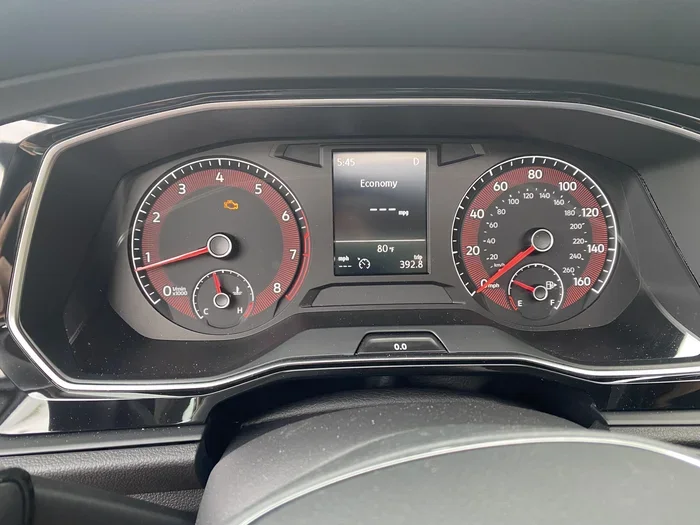
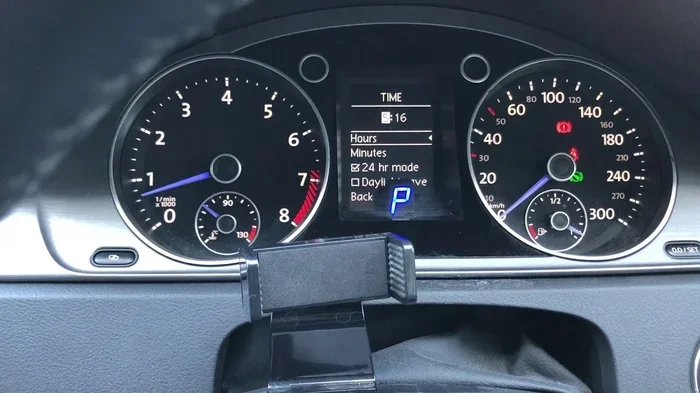
Most Volkswagen Passats from the mid-2000s onward feature a digital clock on the instrument panel. This small display sits behind the steering wheel and shows the time in a simple digital format. The clock is connected to the car’s main computer system. When you adjust the time through the controls, you are sending a signal to this computer. The change takes effect immediately. This type of clock is very reliable and rarely loses time unless the battery dies or there is a power interruption.
Infotainment System Clock
Newer Volkswagen Passat models, especially those from 2015 and later, often display the time on the infotainment screen. This is the large center console display that controls navigation, audio, and vehicle settings. The clock on the infotainment system can usually be adjusted through the settings menu. Some Passats even sync the clock automatically with GPS signals. This means the time updates itself when you cross time zones. If your Passat has this feature, you may not need to adjust the clock manually very often.
Analog Clock in Older Models
If you drive an older Volkswagen Passat, you might have a traditional analog clock. These clocks have hands that move around a clock face, similar to a wall clock in your home. Analog clocks in older Passats sometimes need the clock mechanism itself to be adjusted. This involves pressing a small button or turning a knob on the back of the clock unit. While less common today, these analog clocks still work well and give a classic look to the dashboard.
How to Change Time on a Volkswagen Passat Step by Step
Now let us get into the actual process. The steps vary slightly depending on your Passat model year and the type of clock display you have. We will cover the most common methods below. Follow the one that matches your vehicle.
Method 1: Using the Steering Wheel Controls
Many Volkswagen Passats allow you to adjust the clock using buttons on the steering wheel. This is the quickest method and works on most models. Here is how to do it:
- Turn on the ignition. You do not need to start the engine. Just turn the key to the on position or press the start button without pressing the brake.
- Locate the menu button. On the left side of the steering wheel, you will usually find a button labeled “Menu” or a small icon that looks like a gear.
- Navigate to the clock settings. Use the arrow buttons on the steering wheel to scroll through the menu options. Look for an option called “Settings,” “Clock,” or “Time.”
- Select the time option. Press the “OK” or “Enter” button in the center of the arrow controls.
- Adjust the hours and minutes. Use the up and down arrows to change the hour first, then the minutes. Some models let you toggle between AM and PM as well.
- Save and exit. Press the “Menu” button again or wait a few seconds for the system to automatically save your changes.
This method works on most Passat models from 2005 onward. If you cannot find the clock option in the steering wheel menu, try Method 2 below.
Method 2: Using the Instrument Panel Buttons
Some Volkswagen Passats have dedicated buttons near the instrument cluster. These buttons are usually located on the left side of the dashboard, just below the steering column. Here is what to do:
- Press and hold the “Trip” button. This button is usually labeled “Trip” or “TRIP.” Hold it for about three seconds until the display changes.
- Scroll to the clock display. Use the trip reset button or the arrow button to cycle through the display options until you see the time.
- Press and hold the “Set” button. This button is often labeled “Set” or has a small clock icon. Hold it for two seconds.
- Adjust the time. Use the up and down buttons to change the hour and minute values.
- Confirm the setting. Press the “Set” button again to save. The clock should now display the correct time.
If your Passat does not have a dedicated “Set” button, look for a small button with a wrench or gear icon. This is the settings button and it serves the same purpose. Can I Change My Car Air Filter Myself? Yes, and adjusting the clock is just as easy. Both are simple maintenance tasks that anyone can do at home.
Method 3: Using the Infotainment Screen
For Passat models with a touchscreen infotainment system, adjusting the clock is done through the on-screen menu. Here is the process:
- Tap the Settings icon. This is usually a gear icon on the home screen of the infotainment system.
- Look for “Vehicle Settings” or “System Settings.” Tap on this option to expand the menu.
- Select “Clock” or “Time & Date.” The exact wording depends on your Passat model and software version.
- Turn off automatic time if needed. Some Passats sync the clock automatically. If you want to set it manually, toggle off the automatic setting first.
- Adjust the hours and minutes. Use the on-screen keypad or the +/- buttons to set the correct time.
- Choose your time format. You can select between 12-hour and 24-hour format depending on your preference.
- Tap “Save” or “Apply.” The new time will display on your screen immediately.
This method is the most straightforward for newer Passat owners. The infotainment system makes it easy to see the time and make changes on the fly. If you are having trouble finding the settings, Can You Check Tire Pressure On The Dashboard? Yes, and the clock is usually located in a similar area of the vehicle settings menu.
Common Problems When Changing the Clock on a Volkswagen Passat
Sometimes the clock does not behave as expected. This is more common than you might think, and it usually has a simple fix. Let us look at the most common issues Passat owners face.
Clock Resets After Battery Disconnect
If you recently disconnected your car battery or had a jump start, the clock will likely reset to a default time, usually 12:00. This is normal behavior. The car’s computer loses its stored settings when the power is cut. To fix this, simply follow the steps in Method 1 or 2 above to reset the time. Once you set it again, the clock should hold the correct time going forward.
Clock Display Is Blank or Not Working
A blank clock display can be alarming, but it is often a minor issue. First, check if the display is simply dimmed. Many Passats have a brightness control for the instrument panel. If the display is completely dark, the issue might be a blown fuse. The fuse box in a Passat is usually located under the dashboard on the driver’s side. Check the fuse labeled “Instrument Cluster” or “Clock.” Replacing a fuse is inexpensive and takes just a few minutes. If the fuse is fine, the problem could be a wiring issue that requires professional diagnosis.
Time Zone Does Not Update Automatically
Some newer Passat models have GPS-based time zone detection. If your clock does not update when you cross into a new time zone, the GPS feature may be turned off. Go to your infotainment settings and look for “GPS” or “Location Services.” Make sure the feature is enabled. If it is already on and the clock still does not update, try restarting the infotainment system by holding the power button for ten seconds.
Clock Shows the Wrong Time After Daylight Saving
Daylight saving time changes catch many Passat owners off guard. If your clock does not adjust automatically, you will need to manually change it. The automatic adjustment depends on your Passat model year and whether the infotainment system has the correct date and location settings. Double-check that your time zone is set correctly in the vehicle settings menu. If it is, the clock should adjust automatically when daylight saving time begins or ends.
Tips to Keep Your Volkswagen Passat Clock Accurate
Keeping your Passat clock accurate is easy with a few simple habits. Here are some tips that every Passat owner should follow:
- Check the time once a month. A quick glance at your dashboard clock once a month helps you catch any drift early. Most digital clocks in Passats lose or gain only a few seconds per month, so a monthly check keeps you on track.
- Replace the car battery every 3 to 5 years. A weak battery can cause the clock to reset or behave erratically. Regular battery replacement prevents this issue and keeps all your electronic systems running smoothly.
- Keep the infotainment system updated. Volkswagen releases software updates that improve clock accuracy and add features. Check with your dealership or visit a trusted service center to see if an update is available for your Passat model.
- Note your time zone settings. If you move to a new area or travel frequently, update your time zone in the vehicle settings. This ensures your clock stays accurate no matter where you are.
- Avoid draining the battery. Leaving your car lights on or using electronics with the engine off can drain the battery and reset the clock. Always turn off all accessories before exiting your Passat.
Does Low Engine Oil Show On The Dashboard? Yes, and just like an oil warning, your clock can tell you a lot about your car’s electrical health. If the clock behaves strangely along with other electrical glitches, it may be worth checking your battery and fuses.
When to Seek Professional Help for Clock Issues
Most clock problems on a Volkswagen Passat are easy to fix at home. But there are times when professional help is the right call. If you have tried all the methods above and the clock still does not work, it is time to visit a service center. A blank display that does not respond to any controls could indicate a problem with the instrument cluster itself. Similarly, if the clock resets every time you turn off the engine, there may be a deeper electrical issue that needs professional diagnosis.
Another reason to seek help is if your Passat is still under warranty. Can I Take My Toyota To Any Dealership For Warranty Work? The same principle applies to Volkswagen. If your Passat is under warranty, the clock repair or replacement may be covered at no cost to you. Contact your local Volkswagen dealership and schedule a service appointment. They can run diagnostics and determine if the issue is covered under your warranty plan.
Also consider professional help if you are not comfortable working with your car’s electrical system. While changing the clock time is safe and simple, opening up the dashboard or checking fuses can feel intimidating. A qualified technician can handle these tasks quickly and safely. There is no shame in asking for help when it comes to your vehicle.
Quick Comparison: Clock Adjustment Methods by Passat Model Year
Here is a quick reference table to help you find the right method for your Passat:
- 2000-2005 Passat: Use the instrument panel buttons. These models typically do not have infotainment screens for clock adjustment.
- 2006-2010 Passat: Steering wheel controls or instrument panel buttons work best. Some models also support infotainment adjustments.
- 2011-2014 Passat: The infotainment screen method is the most reliable. Steering wheel controls also work on most models.
- 2015 and newer Passat: Use the infotainment system. These models often have GPS-synced clocks that update automatically.
Can You Do An Oil And Filter Change Yourself? Absolutely, and adjusting the clock is just as simple. Both tasks are basic maintenance that keeps your Passat running smoothly and looking great. The key is knowing which method matches your specific model year.
Frequently Asked Questions
How do I change the time format from 12-hour to 24-hour on my Volkswagen Passat?
Go to the infotainment settings menu and look for “Clock” or “Time & Date.” There should be an option to toggle between 12-hour and 24-hour format. If your Passat uses the instrument panel display, the format may be fixed depending on your model year. Check your Volkswagen Passat manual for specific instructions on changing the time format.
Why does my Volkswagen Passat clock keep resetting to 12:00?
A clock that keeps resetting to 12:00 usually indicates a power issue. This commonly happens after a battery disconnect, a dead battery, or a blown fuse. Check your battery first and replace it if it is more than three years old. If the battery is fine, inspect the fuse box for a blown fuse related to the instrument cluster or clock circuit.
Can I adjust the Passat clock while driving?
Yes, you can adjust the clock while driving on most Passat models. However, it is always safer to pull over or have a passenger make the adjustment. Taking your eyes off the road, even for a few seconds, can be dangerous. If you are driving alone, wait for a safe moment at a red light or parking lot to make the change.
Does the Volkswagen Passat clock sync with my phone automatically?
Some newer Passat models with Bluetooth connectivity can sync the clock with your phone’s time settings. This feature depends on your infotainment system version and your phone’s operating system. To enable this, go to the Bluetooth settings in your infotainment menu and look for a “Sync Time” or “Auto-Update Time” option.
What should I do if the clock buttons on my Passat are not responding?
Non-responsive buttons are often caused by a temporary software glitch. Try restarting the infotainment system by holding the power button for ten seconds. If that does not work, check if the buttons are physically stuck or dirty. A soft cloth dampened with a little water can clean around the buttons. If none of these steps work, the issue may be a wiring problem or a faulty control module that needs professional repair.
Is it possible to add a clock display to an older Passat that does not have one?
Yes, it is possible to add an aftermarket clock display to an older Volkswagen Passat. Aftermarket clock kits are available online and at automotive stores. These kits are designed to be plug-and-play, meaning you do not need to wire anything directly into your car’s electrical system. Installation usually takes about 30 minutes and requires basic tools like a screwdriver and a trim removal tool.
Conclusion
Changing the time on a Volkswagen Passat is a straightforward task that anyone can do. Whether you use the steering wheel controls, the instrument panel buttons, or the infotainment screen, the process is quick and requires no special skills. We have covered every method, every common problem, and every tip you need to keep your Passat clock accurate year-round.
Remember to check your clock regularly, especially after a battery change or when traveling across time zones. Keep your infotainment system updated and your time zone settings correct. And if you ever run into a problem you cannot solve, do not hesitate to reach out to a professional. Your Volkswagen Passat is a well-engineered vehicle, and its clock system is designed to be reliable and easy to use.
Take a few minutes today to check your Passat clock. If it is off by even a few minutes, follow the steps in this guide to set it right. A correctly set clock is a small thing, but it makes a big difference in your daily driving experience. You will feel more confident, more organized, and more in control every time you get behind the wheel. Happy driving, and enjoy your accurately set Volkswagen Passat clock!