Are Toyota Map Updates Free Everything You Need to Know
Are Toyota map updates free? The answer depends on your Toyota model, year, and navigation system type. Many Toyota owners can access free map updates through their Toyota dealer or the Toyota app, but some older systems and premium features may require a fee. This guide covers every detail you need to know about Toyota navigation update costs, methods, and requirements.
If you own a Toyota, you have probably wondered at some point whether are Toyota map updates free. It is a fair question. Navigation maps change all the time. New roads get built. Streets get renamed. Businesses open and close. Keeping your map data current matters a lot for getting where you need to go safely and efficiently.
The short answer is that it depends. Some Toyota owners get free map updates for life. Others need to pay a fee. The cost and method depend on your Toyota model, the year it was made, and the Toyota navigation system you have. In this article, we will break down everything you need to know. We will cover how map updates work, what they cost, and how to update your Toyota GPS maps the right way.
Whether you drive a brand-new Toyota Camry or an older Toyota RAV4, this guide has you covered. We will look at the different Toyota Entune systems, the update process, and common mistakes to avoid. By the end, you will know exactly what to expect when it comes to updating your Toyota navigation maps.
Key Takeaways
- Free Updates Are Available: Many Toyota models qualify for free map updates through dealerships or the Toyota app.
- System Matters: Toyota Entune 3.0 and newer systems often offer free updates, while older systems may charge.
- Dealer Visits Are Common: Most Toyota map updates happen at the dealership, though some can be done via USB or Wi-Fi.
- Subscription Plans Exist: Some Toyota connected services require a paid subscription for map data and live features.
- Regular Updates Improve Safety: Updated maps mean accurate GPS routing, new road data, and better traffic information.
- DIY Updates Are Possible: Some Toyota models allow you to update maps using a USB drive or the Toyota app at home.
- Check Your Warranty: Free map updates may be covered under certain Toyota maintenance plans or new vehicle warranties.
📑 Table of Contents
- What Are Toyota Map Updates and Why Do They Matter?
- How Toyota Map Updates Work: Toyota Entune and Beyond
- Are Toyota Map Updates Free or Do You Have to Pay?
- Step-by-Step Guide to Updating Your Toyota Maps
- Common Toyota Map Update Problems and How to Fix Them
- How to Check If Your Toyota Map Is Up to Date
- Conclusion: So, Are Toyota Map Updates Free?
What Are Toyota Map Updates and Why Do They Matter?
A Toyota map update is a software upgrade that refreshes the map data stored in your Toyota vehicle’s navigation system. Think of it like updating the maps on your phone. Roads change. New highways open. Turn-by-turn directions become outdated if the map data is old.
Here is why keeping your maps current really matters:
- Accurate Directions: Old maps may route you down roads that no longer exist or miss new highways entirely.
- Better Traffic Data: Updated maps include current traffic patterns and road conditions.
- New Points of Interest: New restaurants, gas stations, and landmarks get added with fresh map data.
- Safety: Updated maps reflect new speed limits, road closures, and construction zones.
- Resale Value: A car with a current, working navigation system holds its value better.
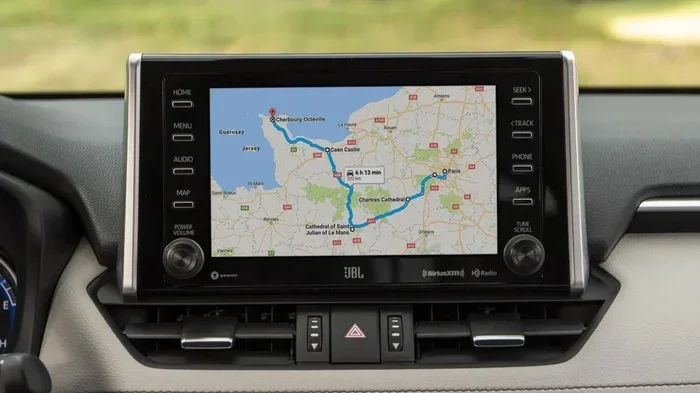
Most Toyota vehicles come with a built-in GPS navigation system. These systems rely on pre-loaded map data. Over time, that data becomes outdated. A Toyota GPS map update pulls in the latest road information, points of interest, and routing data. This keeps your car’s navigation system running smoothly and accurately.
How Often Should You Update Your Toyota Maps?
Most experts recommend updating your Toyota navigation maps at least once a year. If you drive frequently or travel to new areas, you might want to update even more often. Road changes happen constantly, especially in growing cities and suburbs.
How Toyota Map Updates Work: Toyota Entune and Beyond
Toyota has used several different infotainment systems over the years. The way you update your maps depends largely on which system your Toyota has. Let us look at the main systems and how they handle map updates.
Toyota Entune System
Toyota Entune is one of the most well-known Toyota infotainment platforms. It has gone through several versions over the years:
- Toyota Entune 1.0: Found in older Toyota models. Map updates typically require a visit to the dealership.
- Toyota Entune 2.0: Introduced more connectivity features. Some updates can be done wirelessly or via USB.
- Toyota Entune 3.0: The latest version. Offers more flexibility for map updates, including over-the-air options in some models.
Each version handles Toyota map updates a little differently. Newer versions tend to offer more free or low-cost update options.
Toyota Audio Plus and JBL Systems
Some Toyota models come with Toyota Audio Plus or JBL sound systems that include navigation. These systems also need regular map updates. The update process is similar to standard Toyota navigation systems. You can usually get updates at your Toyota dealer or through the Toyota app.
Toyota Connected Services
Toyota offers a suite of Toyota connected services that go beyond basic navigation. These services include real-time traffic, weather updates, and live concierge features. Some of these services require a Toyota subscription plan. Map updates may be included or separate, depending on your specific plan.
Are Toyota Map Updates Free or Do You Have to Pay?
This is the question most Toyota owners want answered. The truth is, there is no single answer. It depends on several factors. Let us break it down.
When Are Toyota Map Updates Free?
In many cases, Toyota map updates are completely free. Here are the situations where you will not have to pay:
- New Vehicle Warranty: Many Toyota vehicles come with free map updates for the first few years of ownership.
- Toyota Dealer Promotions: Toyota dealerships frequently offer free map update events throughout the year.
- Toyota App Updates: Some Toyota models allow you to download map updates through the Toyota app at no charge.
- Entune 3.0 and Newer: Vehicles with the latest Entune system often receive free map updates for a longer period.
When Do Toyota Map Updates Cost Money?
There are also situations where you may need to pay for a Toyota navigation update:
- Older Toyota Models: Vehicles from 2015 and earlier may charge a fee for map updates, especially if they are outside the warranty period.
- Dealer Service Fees: Some dealerships charge a labor fee for installing map updates, even if the map data itself is free.
- Subscription-Based Systems: Certain Toyota connected services require an active subscription. If your subscription lapses, map updates may be affected.
- Premium Navigation Features: Advanced features like 3D mapping or live traffic may require a paid add-on.
Comparison: Free vs. Paid Toyota Map Updates
| Feature | Free Updates | Paid Updates |
|---|---|---|
| Map Data | Included at no cost | May require a fee |
| Installation Method | Dealer or DIY via USB/app | Usually dealer-installed |
| Frequency | Typically once or twice a year | As needed, based on subscription |
| Coverage Period | Limited by warranty or promotion | Ongoing with active subscription |
| System Compatibility | Newer Toyota models | Older models or premium features |
The bottom line is that are Toyota map updates free for most current Toyota owners. You just need to know where to look and how to access them.
Step-by-Step Guide to Updating Your Toyota Maps
Updating your Toyota navigation maps is easier than most people think. Here is a simple walkthrough for the most common methods.
Method 1: Update Through Your Toyota Dealer
This is the most common and reliable method. Here is what to expect:
- Call your local Toyota dealership and ask about map update availability.
- Schedule an appointment or visit during service hours.
- The dealer will connect your Toyota to their system and check for available map updates.
- If updates are available, they will install them for you.
- The process usually takes 30 minutes to an hour.
Many Toyota dealerships offer this service for free, especially if your vehicle is still under warranty. It is always worth asking before you pay anything.
Method 2: Update via USB Drive
Some Toyota models allow you to update maps using a USB drive. Here is how it works:
- Visit the Toyota website or contact your dealer to get the latest map update file.
- Download the file to your computer.
- Transfer the file to a USB flash drive (FAT32 format recommended).
- Plug the USB drive into your Toyota’s USB port.
- Follow the on-screen prompts to install the update.
This method works well for Toyota owners who prefer a DIY approach. Just make sure you follow the instructions carefully to avoid any issues.
Method 3: Update Through the Toyota App
Newer Toyota models with Toyota Entune 3.0 or later can receive map updates through the Toyota app on your smartphone. This is the most convenient option:
- Download the Toyota app on your phone.
- Connect your phone to your Toyota’s infotainment system.
- Check for available map updates within the app.
- Download and install the update over Wi-Fi or your phone’s data connection.
Quick Tips for a Smooth Map Update
- Always make sure your Toyota battery is fully charged or the engine is running during an update.
- Do not turn off the vehicle or disconnect the USB drive while the update is in progress.
- Update your maps when you are not in a rush to drive anywhere. Updates can take time.
- Keep your Toyota’s system software up to date. Map updates often work best on the latest software version.
- Back up any saved destinations or favorites before starting the update process.
Common Toyota Map Update Problems and How to Fix Them
Even with the best instructions, map updates can sometimes run into issues. Here are the most common problems Toyota owners face and how to solve them.
Update Fails or Gets Stuck
If your map update freezes or fails halfway through, do not panic. Try these steps:
- Turn off the Toyota infotainment system and restart it.
- Remove the USB drive, reformat it, and try again.
- Make sure the map update file is the correct version for your Toyota model.
- Visit your Toyota dealer if the problem persists.
Maps Show Incorrect Locations
If your Toyota GPS is sending you to the wrong place after an update, the map data may not have fully loaded. Try clearing the cache on your navigation system or re-downloading the map files. In some cases, a factory reset of the navigation system may be needed.
Update Not Available for Your Vehicle
Not all Toyota models support the same map update methods. Older models may not be compatible with the Toyota app or USB updates. Check with your Toyota dealer to find out what options are available for your specific vehicle.
GPS Signal Drops After Update
Sometimes a map update can affect GPS signal strength. If this happens, try resetting your GPS antenna settings or taking your Toyota to a dealer for a GPS system check. This is a rare issue but it does happen on occasion.
Expert Insight: Why Regular Map Updates Are Worth It
According to automotive experts, outdated maps are one of the most common causes of navigation frustration. A study by a leading automotive research group found that nearly 40 percent of drivers with built-in navigation systems had experienced routing errors due to old map data. Regular Toyota map updates can prevent these headaches and keep your daily commutes and road trips running smoothly.
How to Check If Your Toyota Map Is Up to Date
Not sure if your Toyota maps are current? Here is how to check:
- Turn on your Toyota navigation system.
- Go to the Settings or Setup menu.
- Look for a section labeled “Map Information,” “System Information,” or “Map Version.”
- Check the date or version number of your current map data.
- Compare it to the latest version available on the Toyota website or by calling your dealer.
If your map version is more than a year old, it is probably time for an update. Roads change fast, and having the latest data makes a big difference in navigation accuracy.
Does Every Toyota Model Support Map Updates?
Most modern Toyota vehicles support map updates in some form. However, the method and cost vary. Here is a quick breakdown:
- Toyota Camry (2018 and newer): Supports free map updates via dealer or app.
- Toyota RAV4 (2019 and newer): Offers free updates through Toyota Entune 3.0.
- Toyota Corolla (2017 and newer): Map updates available at dealer or via USB.
- Toyota Highlander (2020 and newer): Full support for free map updates and app-based downloads.
- Older Toyota Models (pre-2015): May require a paid update or dealer visit.
The best way to confirm what your specific Toyota model supports is to check the owner’s manual or contact your Toyota dealer directly.
Conclusion: So, Are Toyota Map Updates Free?
So, to answer the big question: are Toyota map updates free? For many Toyota owners, the answer is yes. Most newer Toyota vehicles come with free map updates through dealerships, the Toyota app, or USB downloads. However, older models and certain premium features may involve a cost.
The key is to stay proactive. Check your map data at least once a year. Take advantage of free update events at your local Toyota dealer. And do not hesitate to ask questions about the cost and process before you commit to any service.
Keeping your Toyota navigation maps up to date is one of the simplest things you can do to improve your driving experience. Accurate maps mean fewer wrong turns, better traffic routing, and less stress on the road. Whether you use a Toyota Entune system, Toyota Audio Plus, or a basic built-in GPS, regular map updates keep you on track and safe.
Take a few minutes today to check your Toyota map version. You might be surprised at how easy it is to get your navigation system running with the latest data. Your future self will thank you the next time you are on a road trip or navigating through an unfamiliar part of town.
Frequently Asked Questions
How do I know if my Toyota map update is free?
Call your local Toyota dealership or check the Toyota website for your specific model. Most newer Toyota vehicles qualify for free map updates through the dealer or the Toyota app. Always confirm the cost before agreeing to any service.
Can I update my Toyota maps myself at home?
Yes, many Toyota models allow you to update maps using a USB drive or the Toyota app. Check your owner’s manual for instructions specific to your vehicle. The process is straightforward and does not require a dealer visit.
How long does a Toyota map update take?
A Toyota map update typically takes between 30 minutes and an hour. The time depends on the method used, the size of the update, and your Toyota model. It is a good idea to do it when you are not in a hurry to drive.
What happens if I do not update my Toyota maps?
Your navigation system will continue to work, but the map data may become outdated. This can lead to incorrect directions, missed roads, and inaccurate points of interest. Regular updates keep your GPS routing accurate and reliable.
Do all Toyota models support free map updates?
Most Toyota models from 2015 and newer support free map updates in some form. Older models may charge a fee or have limited update options. Contact your Toyota dealer to confirm what is available for your specific vehicle.
Is there a Toyota app for map updates?
Yes, the Toyota app supports map updates for newer Toyota models with Entune 3.0 or later. You can download map updates directly to your phone and transfer them to your vehicle. Check the app store for the latest version of the Toyota app.